
Mechanical Gaming Keyboard Buyer's Guide
The search for the right mechanical gaming keyboard can quickly become overwhelming. The market is filled with countless models vying for your attention with aggressive designs and vibrant colours. However, not every keyboard marketed as "gaming" offers the performance and durability required for demanding games and intensive use. As your Joybuy Product Recommendation Officer, I'll help you avoid common purchasing pitfalls and make an informed decision.
Many buyers invest in models that later prove to be impractical or prone to failure. Here are three common pitfalls:
- The "Gaming" Premium: Eye-catching designs and intense RGB keyboard lighting often drive up the price without offering any real performance benefit. Meanwhile, core components like the switches and build quality are sometimes neglected.
- Choosing the Wrong Switches: Selecting the wrong switch type is one of the most common causes of dissatisfaction. A loud, clicky switch might feel great in the store, but it can quickly become disruptive in a quiet environment or during online meetings. Conversely, a switch that's too soft can feel imprecise for heavy typists.
- Lack of Durability: Budget keyboards often use thin ABS keycaps that wear down and develop a shine after a short time. A non-standard key layout can also make replacing keycaps difficult or impossible, artificially shortening the product's lifespan.
What Really Matters: The Key Factors
To avoid these mistakes, you should focus on the core technical features that directly impact performance and user experience.
1. Switch Type: The Heart of Every Mechanical Keyboard
The switch under each key determines the typing feel, volume, and response time. The most common types are:
- Linear Switches: These switches, like the popular red switch keyboard, offer a smooth, resistance-free keystroke from top to bottom. They allow for very rapid and repeated key presses, making them an excellent choice for a fast gaming keyboard, especially in genres that demand quick reactions.
- Tactile Switches: They provide noticeable but quiet feedback (a small "bump") upon actuation. This confirms the keypress without the loud clicking sound, making them a good all-rounder for typing and gaming.
- Clicky Switches: These switches produce both tactile feedback and an audible clicking sound. They are popular with heavy typists who appreciate clear feedback but can be perceived as loud in shared spaces.
Newer technologies like optical or magnetic switches offer even faster response times, as they register the keypress not mechanically, but via a light beam or a magnetic field.
2. Form Factor: The Right Size for Your Desk
The size of the keyboard has a direct impact on ergonomics and the available space for your mouse.
- Full-Size (100%): The standard format with a number pad. Ideal for users who use the keyboard for both gaming and productivity tasks with heavy number entry.
- TKL Keyboard (Tenkeyless, 80–87%): This design omits the number pad, creating more space for the mouse. A compact gaming keyboard in the TKL format is a popular compromise between functionality and space-saving.
- 60% / 65% Keyboard: These ultra-compact form factors also remove the function keys (F-row) and often the arrow keys, which are then accessible via a secondary layer (FN key). A 60% keyboard maximises mouse space and is highly portable.
3. Key Additional Features: Layout, Hot-Swap, and Lighting
Pay attention to other features that can be crucial for your user experience:
- Layout: For users in English-speaking regions, a standard QWERTY gaming keyboard is essential to avoid having to readjust and to find all characters in their usual places.
- Hot-Swap Capability: A hot-swap keyboard allows you to change the mechanical switches without soldering. This offers maximum flexibility to try out different switch types or to easily replace a faulty switch.
- Lighting: A keyboard with backlighting is more than just an aesthetic feature. It improves the visibility of the keys in low-light conditions and, on some models, can be used to highlight important keys with colour.
Product Recommendations By User
Here are some recommendations tailored to specific user profiles that take the above criteria into account.
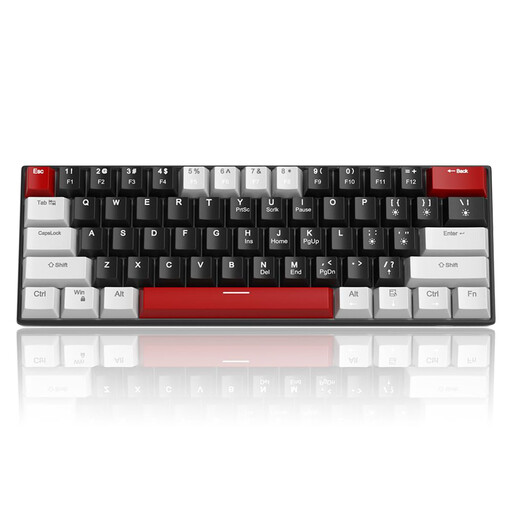
MageGee STAR 61 60% Wired Gaming Keyboard, Red Switch
Why This Fits Their Persona: Ideal for gamers looking to enter the world of mechanical keyboards without a large investment. The compact 60% format is perfect for setups with limited space and for users who want to try out the form factor.
This model avoids the "gaming premium" by focusing on the essentials: mechanical linear switches and a functional, compact design. It offers a clear performance proposition without expensive, unnecessary extras.
The highly compact 60% keyboard layout maximises mouse space. The linear red switches are well-suited for fast-paced gaming. The detachable USB-C cable enhances portability.
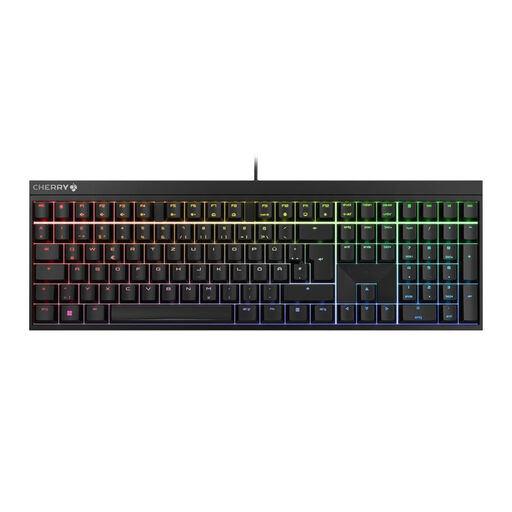
CHERRY MX 2.0S Wired Mechanical Gaming Keyboard, QWERTZ
Why This Fits Their Persona: Perfect for users who value durability, precision, and a standard key layout. Thanks to its high-quality components and full-size format, this keyboard is equally suited for intensive gaming and productive work.
This model avoids the durability trap by using proven CHERRY MX2A Red switches, rated by the manufacturer for over 100 million actuations. The focus is on quality and function, not on short-lived trends.
Original CHERRY MX2A Red switches for a smooth, linear typing feel. Full-size QWERTY gaming keyboard layout. Robust and wear-resistant ABS keycaps.
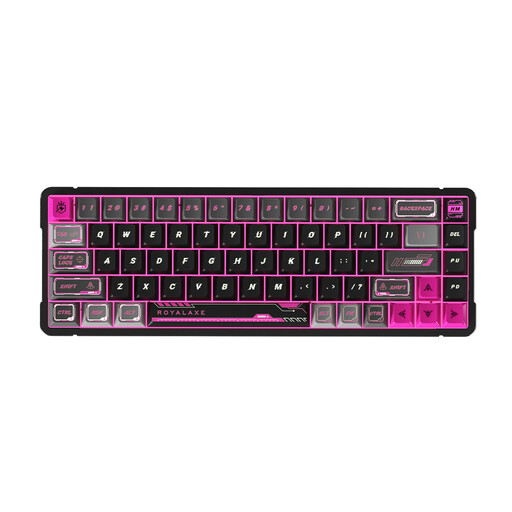
Royalaxe X68 Bright Red Magnetic Switch Keyboard
Why This Fits Their Persona: Designed for competitive players who need maximum speed and customisation. The magnetic switches with an adjustable actuation point (Rapid Trigger) offer a measurable advantage in fast-paced games like FPS shooters.
This keyboard avoids the "wrong switch" trap by offering highly customisable technology. The user can set the actuation point precisely to their needs, rather than being locked into a fixed value. The price is justified by the technology and materials.
Magnetic switches with adjustable actuation precision (RT) for extremely fast responses. The aluminium alloy frame ensures high stability and a premium feel. Compact 68-key layout.
Looking for More Options?
We have compiled a complete, up-to-date list of products that fully meet these strict selection criteria and safety standards.
Frequently Asked Questions (FAQ)
What is the main advantage of linear Red switches for gaming?
Linear switches, especially red variants, have no noticeable "bump" or click during the keystroke. This allows for very fast, fluid, and repeated actuation of the keys with minimal force. In games where milliseconds count, this feature can make a difference, as actions like "double-tapping" or rapid "strafing" can be performed more smoothly.
Is a compact TKL or 60% keyboard right for me?
This largely depends on your usage habits and your desk setup. If you primarily play games, especially FPS titles, and use low mouse sensitivity, you will benefit enormously from the extra mouse space that a TKL keyboard or a 60% keyboard provides. However, if you frequently enter data into spreadsheets or need the number pad for other applications, a full-size keyboard may be the more practical choice.
What does "hot-swap" mean, and is it suitable for beginners?
A hot-swap keyboard allows the mechanical switches to be replaced without soldering. The switches are mounted in sockets on the circuit board and can be easily pulled out with a special tool and replaced with new ones. This is also suitable for beginners and offers two main advantages: First, you can try out different switch types to find your perfect typing feel. Second, you can replace a faulty switch yourself cheaply and easily, which significantly extends the life of the keyboard.