
LTE Routers with a SIM Slot: Top Picks and Buying Guide
By Your Joybuy Product Recommendation Officer, 15 July 2026
A stable internet connection isn't a given everywhere. Especially in rural areas, holiday homes, or for small businesses, a missing or unreliable fixed-line connection can complicate daily life and work. An LTE router with a SIM slot offers a flexible and powerful solution for internet without a landline. This device uses the mobile network to create a stable Wi-Fi network for your home or office.
This article serves as a practical guide. We'll explain the key technical features you should look for when making your choice and present a selection of devices suited for various use cases.
What to Look for in a Router for Mobile Internet
Choosing the right device depends on your individual needs. Three key criteria will help you make an informed decision.
1. LTE Category and Speed
The LTE category (often abbreviated as "Cat") indicates the maximum possible download and upload speed over the mobile network. A router with LTE Cat 6, like the ASUS 4G-AX56, supports Carrier Aggregation, a technique that bundles multiple frequency bands. According to its specifications, this allows for download speeds of up to 300 Mbps. For standard applications like HD streaming, video conferencing, and web browsing, this is typically more than enough. Before you buy, check the network coverage and available speeds from your mobile provider at your location.
2. Wi-Fi Standard: WiFi 6 for Modern Networks
While LTE establishes the connection to the internet, the Wi-Fi standard is responsible for distributing the signal to your end devices (smartphone, laptop, smart TV). A WiFi 6 LTE router (802.11ax standard) offers significant advantages over older standards like WiFi 5 (802.11ac):
- Higher Efficiency: Multiple devices can be active on the network simultaneously without major performance degradation.
- Greater Capacity: Ideal for households or offices with many connected devices.
- Improved Speed: Faster data transfer within your local network.
Devices that support WiFi 6 are a future-proof investment for a stable home network.
3. Ports and Connectivity
A good Wi-Fi router for a SIM card should offer more than just a mobile connection. Look for the following connectivity options:
- Gigabit LAN Ports: For a stable, wired connection for devices like desktop PCs, gaming consoles, or network-attached storage (NAS).
- WAN Port: Allows the router to also operate with a conventional fixed-line connection (DSL, fibre). This is useful for a failover function, where the router automatically switches to the mobile connection if the fixed-line service fails.
- USB Port: Provides additional flexibility, for example, for connecting an external storage device or using a 4G/5G USB dongle (tethering).
Recommended LTE Routers and Alternatives
Here, we present three models that stand out for their technical features and areas of application.
ASUS 4G-AX56: The All-in-One Solution for Your Home
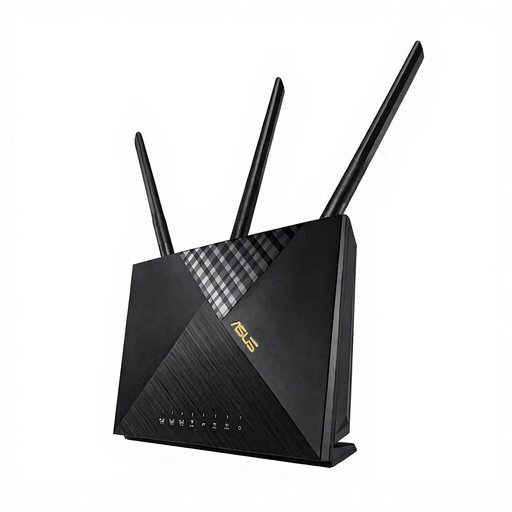
The ASUS 4G-AX56 is a classic 4G router with a SIM card designed for stationary use. It combines modern network technology with a straightforward setup.
- Why it stands out: The combination of an integrated Nano-SIM slot, LTE Cat 6, and WiFi 6 makes it a powerful and easy-to-use hub for your home internet. The setup is incredibly simple: insert the SIM card, turn on the device, and connect to the Wi-Fi.
- Advantages:
- Integrated LTE modem (Cat 6) for up to 300 Mbps download.
- Dual-band WiFi 6 (AX1800) for an efficient home network.
- Four Gigabit LAN ports for wired devices.
- AiProtection Classic for basic network security.
- Who is it for? For families and individuals in areas without a fast fixed-line connection who are looking for a reliable and uncomplicated primary internet source. It's also a great choice for small offices as a primary or backup solution.
ASUS RT-BE58U: For Demanding Users with a Focus on Flexibility
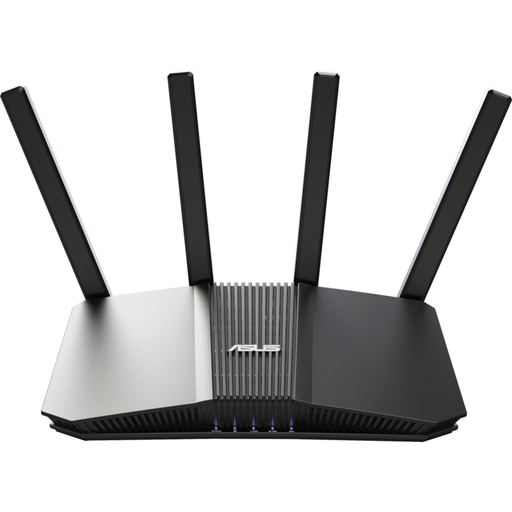
The ASUS RT-BE58U does not have an integrated SIM slot, but its USB 3.2 port allows you to use a 4G or 5G dongle for mobile internet. Its strength lies in its future-proof home network technology.
- Why it stands out: This model is equipped with the latest WiFi 7 standard and a 2.5G WAN/LAN port. It is aimed at users who need maximum performance on their local network and appreciate the flexibility of using a mobile connection via a USB dongle as a primary or backup solution.
- Advantages:
- Support for the future-proof WiFi 7 standard.
- Flexible internet access via WAN or 4G/5G USB tethering.
- Powerful quad-core processor and 1 GB of RAM for demanding tasks.
- AiProtection Pro offers advanced security features.
- AiMesh compatible for creating a seamless mesh network.
- Who is it for? For tech-savvy users who want to build an extremely powerful and expandable home network and either already own a USB dongle or plan to purchase one.
ASUS RT-AX57 Go: The Compact Companion for On the Go
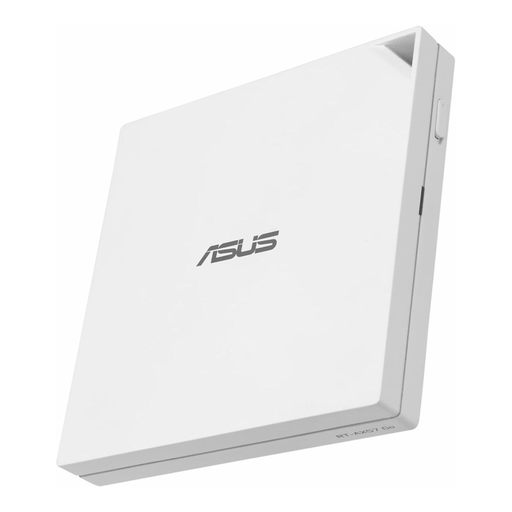
The ASUS RT-AX57 Go is a compact travel router that also relies on a USB tethering connection with a smartphone or a 4G/5G dongle. Its versatility makes it an interesting option for mobile use cases.
- Why it stands out: Its compact design and tri-mode connectivity (Router Mode, Hotspot Mode, 4G/5G Tethering) make it an extremely flexible device. It can turn a public Wi-Fi into a private, secure network or provide an internet connection for multiple devices via a tethered smartphone.
- Advantages:
- Compact and lightweight design, ideal for travel.
- Powerful WiFi 6 (AX3000) for on the go.
- Comprehensive VPN features for secure connections.
- Can be powered via USB-C.
- Who is it for? For people with a mobile lifestyle who need a reliable and secure internet connection for multiple devices in a holiday home, camper van, or hotel. It's a great addition when a smartphone hotspot isn't enough.
Looking for More Options?
The models presented cover common scenarios. However, if you need a different solution or are looking for accessories like a compatible USB dongle to upgrade an existing router, you can find more products in our wireless USB category.
Frequently Asked Questions (FAQ)
1. Can an LTE router completely replace a fixed-line connection? Yes, this is possible for many households. The performance of an LTE router depends heavily on network coverage and the chosen data plan. With good reception, you can achieve speeds sufficient for streaming, working from home, and online gaming. However, for very data-intensive applications or in areas with a weak signal, a fixed-line connection may be more stable.
2. What data plan do I need for an LTE router? This depends on your usage habits. For occasional browsing and emails, plans with 20-50 GB per month are often sufficient. If you regularly stream videos, download large files, or work from home, plans with 100 GB, 200 GB, or even unlimited data are recommended. Many mobile providers offer special data plans for home use.
3. How do I set up a 4G router with a SIM card? The setup is usually very simple:
- Insert an activated SIM card (usually Nano or Micro-SIM) into the designated slot on the powered-off router.
- Connect the router to the power supply and turn it on.
- Connect your computer or smartphone to the router's Wi-Fi network (the network name and password are often on the bottom of the device).
- The router should automatically connect to the mobile network. In some cases, you may need to access the router's user interface via a browser to complete the setup or enter the SIM card's PIN.