
Logitech Wireless Mouse: Buyer's Guide and Recommendations for 2026
Choosing the right computer mouse is crucial for a productive and comfortable workspace. A Logitech wireless mouse offers a cable-free solution that creates a clutter-free desk and provides flexibility in the office, at home, or on the go. However, the range of options is vast, from compact models for mobile use to highly advanced ergonomic mice for power users.
This guide is designed to help you navigate the options. It introduces various models and explains the key criteria to help you make an informed decision tailored to your specific needs.
What to Look for When Choosing a Logitech Wireless Mouse
Before you decide on a model, several technical features and design aspects should be considered. These factors determine how well the mouse fits your workflow and ergonomic needs.
Ergonomics and Form Factor
The shape of the mouse directly impacts comfort during extended use. Logitech offers several different approaches:
- Standard Design: Symmetrical or slightly contoured mice like the Pebble M350s are suitable for both left- and right-handed users and are distinguished by their compactness.
- Ergonomic Shape: Models like the MX Master series are contoured for right-handed users, offering a natural hand rest to reduce muscle strain.
- Vertical Mouse: An ergonomic mouse like the MX Vertical positions the hand at a 57-degree angle, similar to a natural handshake position. According to Logitech, this posture can reduce muscle activity compared to a traditional mouse.
Connectivity and Multi-Device Capability
A modern Bluetooth mouse allows for a direct connection without needing an extra receiver. However, many Logitech models also offer a connection via the Logi Bolt USB receiver, which ensures a stable and secure wireless link for demanding office environments.
A key feature for productivity is the ability to use one mouse for multiple devices. With Easy-Switch technology, you can seamlessly switch between up to three devices (e.g., laptop, tablet, and PC) at the touch of a button.
Specific Features for Daily Work
Depending on your use case, other features are also relevant:
- Sensor Technology: DPI (Dots Per Inch) determines the mouse's sensitivity. Higher DPI values allow for more precise and faster cursor movements. Darkfield sensors, found in the MX series, even work on glass surfaces.
- Battery Life: Many models are designed as a rechargeable mouse with a USB-C port, offering weeks or even months of use on a single charge. Others use standard batteries for maximum flexibility.
- Noise Level: A quiet mouse with Silent Touch technology significantly reduces click noise, which is a benefit in open-plan offices or quiet environments.
Our Selection of Logitech Wireless Mice for 2026
Here is a selection of Logitech wireless mice designed for different user profiles and applications.
Logitech Pebble Mouse M350s
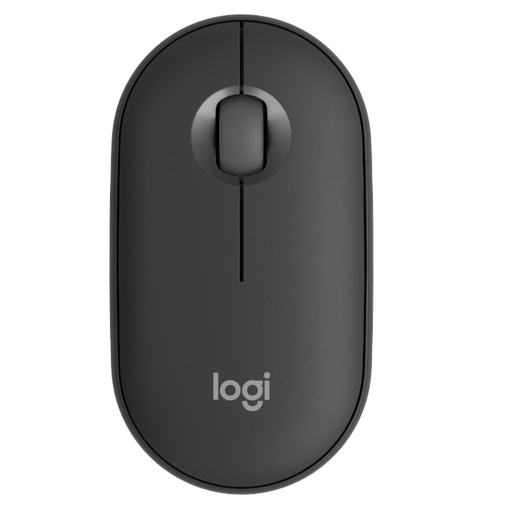
Logitech Mouse Pebble M350s Wireless Tonal Graphite
- Why it stands out: The Pebble M350s combines a minimalist, slim design with quiet clicks and multi-device connectivity. Its light weight and compact shape make it an ideal companion for on the go.
- Pros:
- Silent Touch technology for reduced click noise.
- Connect with up to three devices via Bluetooth or the Logi Bolt receiver.
- Slim, ambidextrous design for easy transport.
- Long battery life with a single AA battery.
- Who is it for? Mobile users, students, and professionals who need a lightweight, quiet, and stylish mouse for use in various locations and with multiple devices like a laptop and tablet.
Logitech MX Vertical
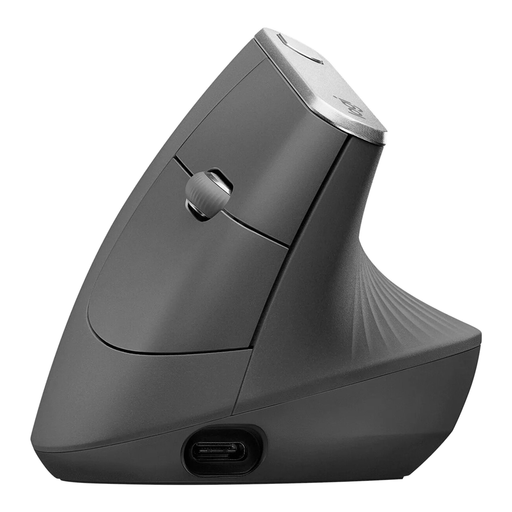
Logitech MX Vertical Ergonomic Mouse, Wireless Bluetooth & USB Receiver
- Why it stands out: The MX Vertical is a specialised ergonomic mouse with a vertical 57-degree design that promotes a natural handshake posture. This is aimed at reducing wrist strain and muscle activity.
- Pros:
- Unique vertical design for an improved hand posture.
- High-precision 4000 DPI sensor for accurate control.
- Rechargeable mouse with USB-C fast charging.
- Easy-Switch for use with up to three devices.
- Who is it for? Users who spend long hours at the computer and prioritise ergonomics to prevent wrist and forearm discomfort. Ideal for the office or home office.
Logitech MX Master 4
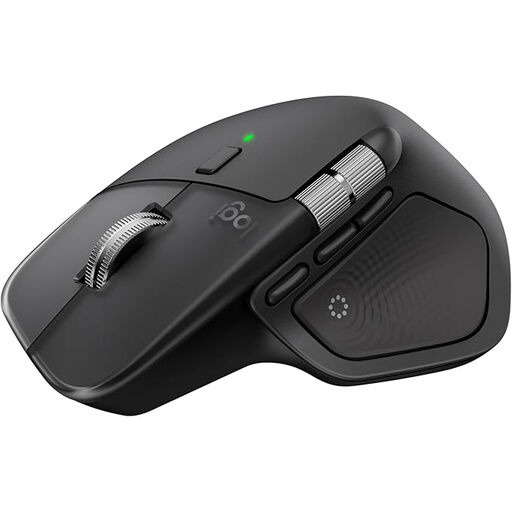
Logitech MX Master 4 Ergonomic Wireless Mouse with Advanced Powerful Haptic Feedback
- Why it stands out: The Logitech MX Master 4 is a tool for maximum productivity. It features an electromagnetic MagSpeed scroll wheel, a high-resolution 8K DPI sensor that tracks on glass, and extensive customisation options via the Logi Options+ software.
- Pros:
- MagSpeed scroll wheel for fast and precise scrolling.
- 8K DPI sensor for ultimate precision on virtually any surface.
- Ergonomic shape with a thumb wheel for horizontal navigation.
- Quiet clicks and haptic feedback for an enhanced interaction.
- Who is it for? Power users, creative professionals, and developers who require the highest level of control, speed, and customisability. A great choice as a mouse for Mac and Windows systems.
Logitech MX Anywhere 3S for Business
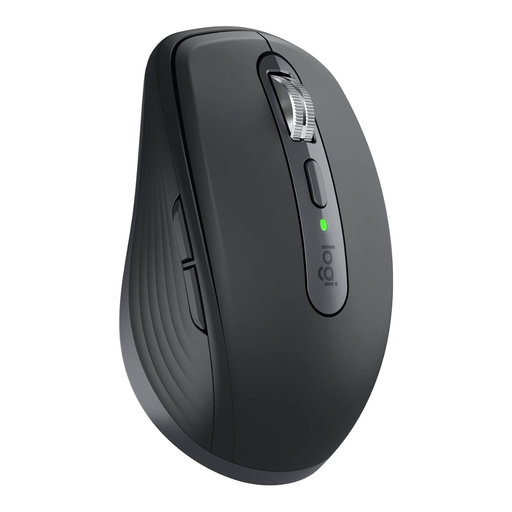
Logitech MX Anywhere 3S for Business, Wireless Mouse, 8000 DPI Darkfield Sensor
- Why it stands out: The MX Anywhere 3S packs the premium features of the MX series into a compact form factor. It's designed for mobile professionals who don't want to compromise on performance. The Darkfield sensor and MagSpeed wheel make it extremely versatile.
- Pros:
- Compact design, ideal for travel and changing workspaces.
- 8000 DPI Darkfield sensor that tracks on glass and other challenging surfaces.
- MagSpeed scroll wheel and quiet click technology.
- Secure connection via Logi Bolt and multi-device compatibility.
- Who is it for? Business travellers and hybrid workers who need a powerful yet portable mouse that works reliably in any environment.
Didn't Find the Right Model?
Logitech offers a wide range of wireless mice that vary in shape, function, and colour. If the models presented here don't exactly match what you're looking for, there are other alternatives to discover.
Explore more options in our Graphite Mouse category.
Frequently Asked Questions (FAQ)
How do I connect a Logitech wireless mouse to my computer?
Most Logitech wireless mice offer two connection options. You can pair the mouse via your computer's Bluetooth settings. Alternatively, plug the included Logi Bolt USB receiver into an available USB port, and the connection will typically be established automatically.
Which Logitech mouse is suitable for use with multiple devices?
Many models, especially from the MX series (MX Master, MX Anywhere, MX Vertical) and also the Pebble Mouse, are equipped with Easy-Switch technology. This feature allows you to switch between up to three paired devices at the touch of a button.
Are Logitech wireless mice compatible with Mac?
Yes, the majority of current Logitech wireless mice are fully compatible with macOS. They can be connected via either Bluetooth or the Logi Bolt receiver. For advanced features and button customisation, Logitech also provides the Logi Options+ software for Mac users, making them a great mouse for Mac.