
Logitech C920 HD Pro Webcam Buyer's Guide: What to Look for in 2026
Choosing a webcam can be complicated, given the countless technical specs and marketing promises. Whether for the home office, meetings, or streaming, a clear and reliable video and audio feed is crucial. This guide focuses on the Logitech C920 HD Pro Webcam and comparable models, helping you understand the essential features and avoid common purchasing traps.
Common Pitfalls When Buying a Webcam
Before you make a decision, it's important to be aware of common marketing traps that often lead to unsatisfying purchases.
- The "Higher Resolution is Always Better" Trap: Many manufacturers advertise 4K resolution as a key selling point. In practice, most applications like video conferences (Zoom, Microsoft Teams) do not require 4K quality. A 1080p Full HD webcam offers more than enough sharpness, consumes less bandwidth, and places lower demands on your computer's processing power. High resolution alone does not guarantee a good picture if the sensor and lens are of poor quality.
- Poor Low-Light Performance: A high resolution is useless if the image is noisy or too dark in normal room lighting. A webcam's ability to automatically adjust exposure (light correction) is often more important than the sheer pixel count. Models without effective light correction often deliver disappointing results in typical office environments or in the evening.
- Inadequate Microphone Quality: An integrated USB webcam with a microphone is convenient, but the quality varies greatly. Many budget models have basic microphones that prominently pick up ambient noise like keyboard clicks or background conversations. A good webcam should have at least one microphone with noise reduction to ensure clear voice transmission.
Key Parameters for Your Selection
To make an informed decision, you should focus on three core technical parameters that determine a webcam's actual performance.
Resolution and Frame Rate (FPS)
Resolution determines image sharpness, while the frame rate (Frames Per Second, FPS) is responsible for the smooth rendering of motion.
- 1080p at 30 FPS: This is the de facto standard for professional video conferencing and most streaming applications. It provides a sharp image and smooth motion for standard use. The Logitech C920 HD Pro Webcam is a classic example of a device that reliably meets this standard.
- 720p at 60 FPS: A lower resolution but a higher frame rate. This setting is particularly interesting for webcams for streaming video games, as movements appear significantly smoother and more natural.
- 4K at 30 FPS: Offers the highest level of detail but is only practical for professional content creators or special use cases. Keep in mind the higher demand for bandwidth and system performance.
Autofocus and Light Correction
A reliable autofocus ensures that your face remains sharp even when you move. Cheaper models with a fixed focus can become blurry if you move too close to or too far from the camera. An automatic light correction (like Logitech's RightLight technology) dynamically adjusts brightness and contrast to match the lighting conditions. This is a crucial feature for a professional PC camera for meetings, as lighting in a home office is often not ideal.
Microphone and Compatibility
A good integrated microphone saves you from buying an external device. Look for specifications like "stereo microphone" or "microphone with noise reduction." Furthermore, compatibility is key. Most modern webcams are plug-and-play and work seamlessly with Windows and macOS. If you're looking for a webcam for Mac, check the manufacturer's specifications for compatibility with current macOS versions.
Our Picks for Different User Profiles
Here are some recommendations tailored to different user profiles that take the above criteria into account.
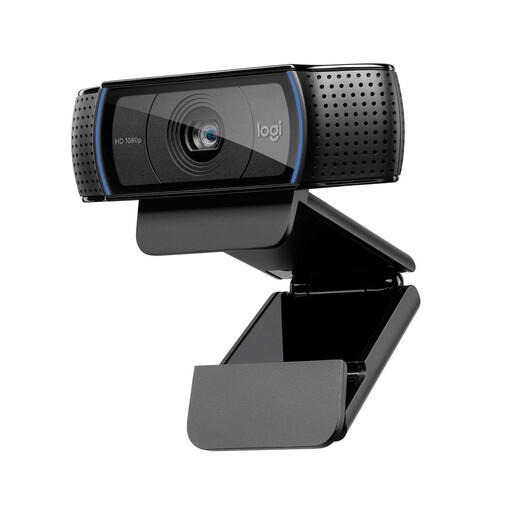
Logitech C920 HD Pro Webcam
Why This Fits Their Persona: Ideal for professionals seeking a reliable and straightforward solution for daily video conferences. It delivers proven performance without unnecessary and costly extra features.
The C920 focuses on solid 1080p performance with effective light correction, rather than advertising a high resolution that offers little practical value. The two integrated microphones deliver clear stereo sound.
Balanced image and sound quality; broad compatibility with PC, Mac, and popular meeting platforms; reliable autofocus.
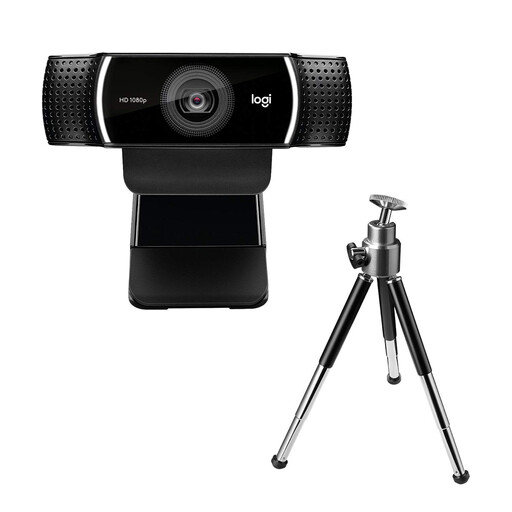
Logitech C922 Pro Stream Webcam
Why This Fits Their Persona: For content creators and streamers who need smooth motion rendering. The option for 60 FPS at 720p is a decisive advantage for live broadcasts.
Instead of just focusing on resolution, the C922 offers a higher frame rate, which provides a visible advantage for fluid streams. The light correction also works well in typical, imperfectly lit streaming setups.
Option for 720p at 60 FPS for very smooth video; includes a tabletop tripod for flexible positioning.
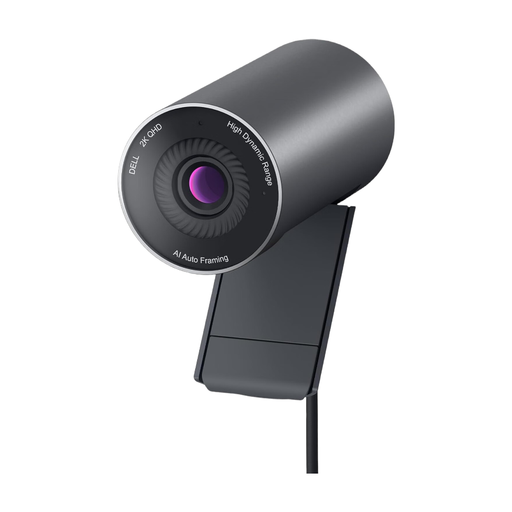
DELL Pro WB5023 2K Webcam
Why This Fits Their Persona: For users who need above-average image quality for important client meetings or high-quality content creation. The 2K resolution and advanced sensor deliver a visibly sharper image.
The higher 2K resolution is combined with a high-quality Sony STARVIS sensor and HDR technology. This ensures excellent image quality even in difficult lighting conditions, avoiding the empty-pixel-promise trap.
Sharp 2K QHD resolution; Sony sensor for high image quality; AI-powered auto-framing keeps you centered in the shot; magnetic privacy shutter.
Looking for more options?
We have compiled a complete, up-to-date list of products that fully meet these strict selection criteria and German safety regulations.
Frequently Asked Questions (FAQ)
1. Do I need special software for the Logitech C920? No, the Logitech C920 HD Pro Webcam is plug-and-play with most operating systems (Windows, macOS, ChromeOS). It is detected automatically. For advanced settings like zoom, pan, or color correction, you can download the optional "Logi Tune" software from the Logitech website.
2. What is the best way to mount a webcam like the C920? The C920 features a universal mounting clip that attaches securely to most laptop screens and external monitors. The inside of the clip is rubberized to prevent scratches. Additionally, there is a standard tripod thread (1/4-inch) on the bottom of the clip, so you can also mount the webcam on a separate tripod for more flexibility.
3. Is a 1080p webcam still sufficient in 2026? Yes, for the vast majority of use cases, 1080p resolution is absolutely sufficient and will remain so for the foreseeable future. Video conferencing platforms compress the signal anyway, so the difference from 4K is often barely noticeable. For professional meetings, standard streaming, and personal video calls, 1080p offers an optimal balance of image quality, required internet bandwidth, and system performance.