
LED Light Bar Buyer's Guide 2026: Technical Criteria for Your Selection
An LED light bar is a compact, elongated fixture designed to produce indirect, colored, or white light. It is primarily used to visually extend on-screen content, serving as TV backlighting or as an immersive gaming light. The technology aims to increase the screen's perceived contrast, reduce eye strain in dark settings, and create an atmospheric ambiance. Selecting the right model depends on specific technical requirements and the desired level of integration.
Buyer's Guide: What to Look for in an LED Light Bar
The decision for a particular model should be based on an analysis of its technical specifications. The following criteria are crucial for functionality and the intended application.
1. Light Technology and Color Spectrum
The type of LEDs used determines the quality and variety of lighting effects.
- RGB: Standard LEDs that can produce a wide range of colors by mixing red, green, and blue. This is often sufficient for basic colored ambient lighting.
- RGBW: These LEDs have an additional white chip. This allows for the creation of a purer, higher-quality white light in various color temperatures (from warm to cool white), which often has a slight color cast in RGB-mixed whites.
- RGBIC: "Independent Control" LEDs allow for the control of individual segments of the bar. This enables multiple colors to be displayed simultaneously, creating dynamic effects like color gradients or "rainbow" animations. This technology is particularly relevant for a dynamic gaming light setup.
Brightness, measured in lumens, and the adjustable color temperature (in Kelvin) are further indicators of the light's performance.
2. Connectivity and Control Methods
The control method defines the ease of use and integration capabilities.
- Remote Control (IR/RF): A simple and direct control method that doesn't require a network connection or an app. The range of functions is usually limited to color selection, brightness adjustment, and predefined modes. An LED light bar with a remote is a straightforward, entry-level solution.
- App Control (Bluetooth/Wi-Fi): Connecting to a smartphone app via Bluetooth or Wi-Fi unlocks advanced features. These include precise color selection using a color wheel, creating custom light scenes, setting schedules, and often music synchronisation via the smartphone's microphone.
- Smart Home Integration: Models with Wi-Fi connectivity can often be integrated into existing ecosystems like Amazon Alexa, Google Assistant, or Apple HomeKit. This enables voice control and automation in conjunction with other smart devices. This is a key feature for comprehensive smart home lighting.
3. Synchronisation Features
For an immersive experience, the light bar's ability to synchronise with on-screen content or audio is crucial.
- Screen Synchronisation: This feature adjusts the light bar's color and brightness in real time to match the content displayed on the screen. This is typically achieved via a desktop application (for PC/Mac) or an external HDMI sync box that analyses the video signal.
- Music Synchronisation: An integrated or external microphone captures ambient sounds or music and translates the rhythm and frequency into dynamic light effects. The quality of this feature varies greatly depending on the microphone's sensitivity and the complexity of the algorithms.
4. Design and Materials
The physical characteristics affect placement and durability. Most housings are made of plastic (e.g., ABS) or, less commonly, aluminium. The included stands or mounts are important, as they allow for flexible positioning (horizontally next to the monitor, vertically behind the TV) or wall mounting. Practical considerations also include the cable length and the type of power supply (e.g., the ability to run multiple bars from a single power adapter).
Our Top Picks for 2026
Based on the technical criteria mentioned, we present two models that cater to different user profiles.
Philips Hue White & Color Ambiance Play Lightbar
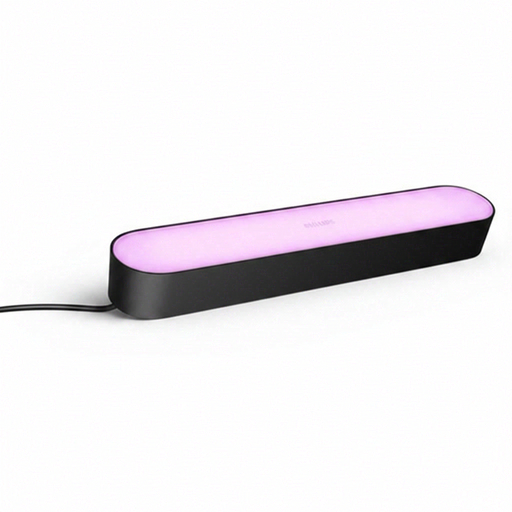
Why We Recommend This Product The Philips Hue Play Lightbar is known for its seamless integration into the established Hue ecosystem. Its strength lies in its mature software, particularly the Hue Sync app for PC and Mac, which enables precise, low-latency screen synchronisation for gaming and movies. The light quality, for both colors and shades of white, meets the high standards of the Hue product family.
-
Pros:
- Excellent software synchronisation (Hue Sync) for PC/Mac.
- Comprehensive smart home integration (requires Hue Bridge).
- High light quality with 16 million colors and a broad spectrum of white light.
- Expandable system: Up to three Play Lightbars on a single power adapter.
- Flexible positioning with included mounts.
-
Who It's For:
- Users who already have or want to build a Philips Hue system.
- PC gamers and home cinema enthusiasts who value high-performance, software-based screen synchronisation.
View Product: Philips Hue Play Lightbar
Atmosphera Pack of 2 Paol multicoloured light bars
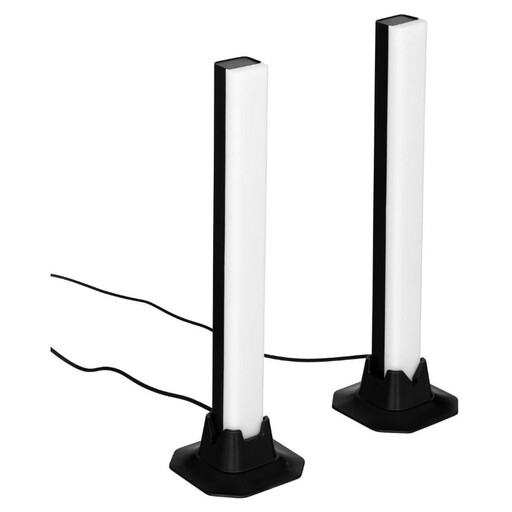
Why We Recommend This Product The set from Atmosphera is a straightforward and accessible solution. It comes as a two-pack and is controlled via an included remote. This makes app installation or integration into a smart home network unnecessary. The product focuses on its core function: creating colored mood lighting.
-
Pros:
- Simple plug-and-play installation.
- Direct control via the included remote; no app required.
- Comes in a convenient 2-pack for symmetrical lighting.
- No additional devices like a bridge or hub required.
-
Who It's For:
- Beginners looking for a simple and cost-effective solution for ambient lighting.
- Users who prefer a standalone solution without complex smart home features.
View Product: Atmosphera Paol Light Bars (2-Pack)
More Options for Ambient Lighting
The models featured cover specific use cases. However, the market offers a much wider variety of shapes, sizes, and functionalities. For a broader overview of decorative lighting solutions, from flexible LED strips to smart light panels, you can find more models in our Lighting Decorations category.
Frequently Asked Questions (FAQ)
1. What is the benefit of an LED light bar behind the TV? TV backlighting, also known as bias lighting, reduces the harsh contrast between the bright screen and the dark wall behind it. This can lessen eye strain during long viewing sessions. Additionally, it enhances the subjectively perceived contrast of the on-screen image, leading to a more immersive viewing experience.
2. How does screen content synchronisation work with LED light bars? There are two primary methods. The first is software-based: An application on a PC or Mac analyses the screen content in real time and sends the corresponding color information to the light bar. The second method is hardware-based: An HDMI sync box is placed between the signal source (e.g., a game console or streaming player) and the TV. The box analyses the video signal passing through it and controls the lights accordingly, which also works with external source devices.
3. Do I always need an app for an RGB light bar? No. Many models, especially in the entry-level segment, come with an infrared (IR) or radio frequency (RF) remote control. This allows for basic functions like color selection, brightness adjustment, and switching between preset modes. App control is typical for "smart" models with Wi-Fi or Bluetooth connectivity and usually offers an expanded feature set, such as custom scenes or schedules.