
Laser Engraver Buying Guide: Avoid Costly Mistakes
A personal laser engraver opens up a world of creativity—from personalized gifts to precise components for model making. However, the market is crowded and filled with technical jargon that makes an informed decision difficult. Many buyers invest in a device that fails to meet their needs or breaks the budget with hidden follow-up costs.
As your Joybuy Product Recommendation Officer, I'll help you identify the common pitfalls and understand the crucial criteria for your selection. This guide focuses on objective facts to help you make an informed and sustainable purchasing decision.
The 3 Most Common Pitfalls When Buying an Engraving Machine
Before we dive into the technical details, let's debunk the marketing claims that often lead to disappointment.
- The "Total Power" vs. "Optical Power" Trap: Many manufacturers advertise high wattage figures (e.g., 40W), but this often refers to the machine's total electrical power consumption. For engraving and cutting performance, only the optical output power of the laser module (e.g., 7W, 10W, 12W) is what matters. A machine with 40W total power and 5W optical power is significantly weaker than a machine with 30W total power and 10W optical power.
- Unrealistic Material Claims: A hobby-grade diode laser can work with many materials, but it has its limits. The claim that a 5W laser can "engrave metal" is often misleading. Typically, this only means removing a layer of paint or anodization, not engraving bare metal. Furthermore, diode lasers are fundamentally unsuitable for cutting transparent or blue acrylic.
- Hidden Costs and Missing Safety Features: A low initial price can be deceptive. Essential components like an enclosure for smoke extraction, a honeycomb workbed, or a license for professional software like LightBurn are often not included. Safety, in particular, should not be overlooked: certified safety glasses and an emergency stop button are indispensable.
Core Parameters That Should Drive Your Decision
To find the right laser cutter, focus on three verifiable technical specifications.
Optical Power (in Watts)
This is the most important indicator of your machine's capability. The optical power determines how fast you can engrave and the maximum thickness of the material you can cut.
- 3–7W: Sufficient for beginners who primarily want to engrave and cut thin materials like cardboard, leather, or plywood up to 3mm. Ideal as a wood engraving machine for small projects.
- 10–12W: A great choice for ambitious hobbyists. This power class allows for faster engraving and reliably cutting wood or dark acrylic up to 10mm thick in a single pass.
- 20W and above: Suitable for small business owners or advanced users who need to cut thicker materials regularly and require high productivity.
Work Area (in mm x mm)
The size of the work area defines the maximum dimensions of your projects.
- Small (approx. 150 x 150 mm): Perfect for small, personalized items like keychains, coasters, or jewelry. These machines often have a very compact design.
- Medium (approx. 300 x 300 mm to 400 x 400 mm): The standard for most hobbyist applications. This size offers enough flexibility for signs, boxes, or decorating larger wooden panels.
- Large (over 400 x 400 mm): Necessary for processing large workpieces or for batch production of smaller parts.
Safety Features and Construction
A laser cutter is not a toy. Pay close attention to integrated safety features.
- Protective Enclosure: A closed enclosure (as found on Laser Class 1 devices) protects against laser radiation, contains smoke and fumes, and reduces fire risk. Open-frame machines (often Laser Class 4) absolutely require safety glasses and a well-ventilated environment.
- Emergency Stop and Sensors: An easily accessible emergency stop button is essential. Some models also feature gyroscope sensors that immediately stop the machine if it is lifted or tilted, as well as flame sensors.
- Software Compatibility: Check if the device is compatible with common software like LightBurn (cross-platform) or LaserGRBL (free for Windows). This ensures long-term flexibility.
Picks for Different User Profiles
Here are some recommendations tailored to specific user needs that avoid the pitfalls mentioned above.
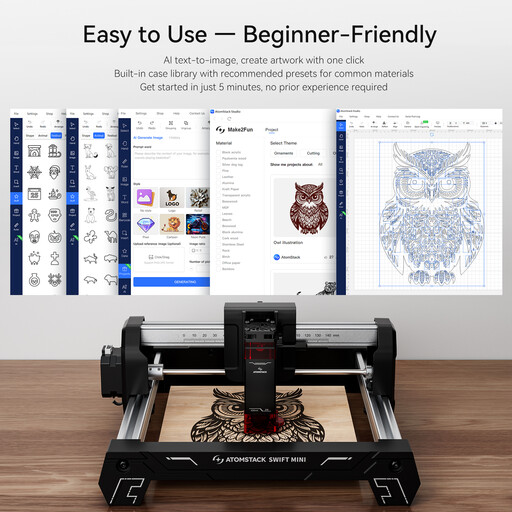
ATOMSTACK Swift Mini 3W Laser Engraving Machine
Why This Fits Their Persona: This model is ideal for anyone looking to enter the world of laser engraving without a large investment or technical hassle. The compact work area is perfect for personalizing gifts, cards, and small craft projects.
The device comes fully pre-assembled and is ready to use out of the box, which eliminates the hurdle of complicated setup. The 3W power rating is realistic for the target audience and avoids false expectations.
No assembly required: Unpack and start engraving. Compact and portable: Easy to store and transport.
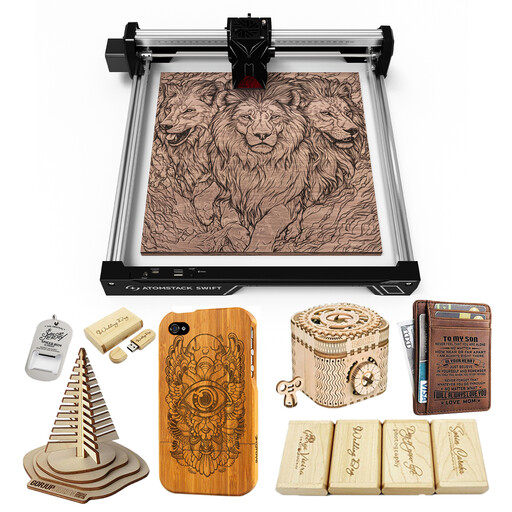
ATOMSTACK 12W Laser Engraving Machine
Why This Fits Their Persona: For DIY enthusiasts who want to do more than just simple engraving. The 12W optical power enables cutting of thicker wood and acrylic, while the 300x300 mm work area provides ample space for diverse projects.
The product description clearly distinguishes between 12W optical power and 40W peak power. This allows for an honest assessment of its capabilities and avoids the trap of misleading power ratings.
High optical power: 12W for fast engraving and cutting. Fixed-focus laser: No manual focusing required, which simplifies operation.
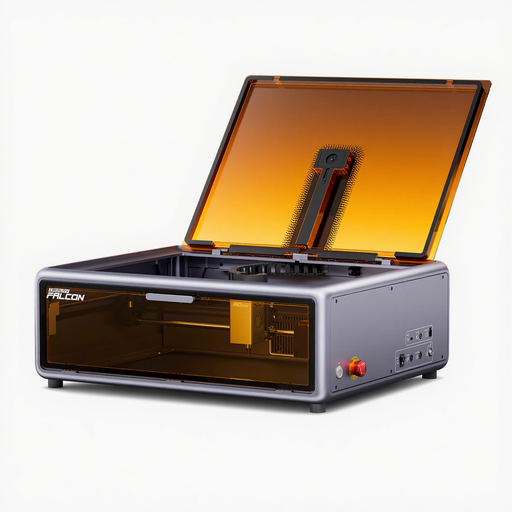
Creality Falcon A1 10W Enclosed Diode Laser Engraver
Why This Fits Their Persona: Ideal for use in living spaces, workshops with public access, or educational institutions. The enclosed design offers the highest level of safety by shielding laser radiation and containing fumes.
This model directly addresses the hidden costs and effort of sourcing separate safety solutions. As a certified Laser Class 1 device, it offers an integrated safety concept right out of the box.
Integrated safety enclosure: Maximum safety for the user and bystanders. Solid performance: The 10W power is a solid standard for a wide range of engraving and cutting tasks.
Looking for More Options?
We have compiled a complete, up-to-date list of products that fully meet these strict selection criteria and relevant safety standards.
Frequently Asked Questions (FAQ)
What software do I need for a laser engraver?
Most laser engravers are compatible with two main programs: LaserGRBL is a free option for Windows that is well-suited for beginners. LightBurn is a paid but very powerful software that runs on Windows, macOS, and Linux and is considered the industry standard. Some manufacturers, like ATOMSTACK, also offer their own apps or software. Before you buy a laser cutter, check for compatibility with your operating system.
How thick can a diode laser cut wood?
The maximum cutting depth depends directly on the laser's optical power and the type of wood. As a rule of thumb:
- A 5W laser can cut softwoods up to approx. 4mm in multiple passes.
- A 10W laser can manage approx. 8–10mm of softwood or 5mm of plywood in a single pass.
- A 20W laser can cut up to 15mm of softwood and 10mm of hardwood or acrylic. Dark and soft woods are easier to cut than light and hard ones.
Are laser engravers safe for home use?
Yes, provided that safety regulations are strictly followed. Always wear the included safety glasses or a pair certified for the specific wavelength (e.g., 455 nm). Never leave the machine running unattended and ensure the room is well-ventilated to exhaust smoke and fumes. A machine with a closed enclosure offers the highest level of safety.