
Laptop Accessories Buyers Guide
A productive workspace, whether in the office or at home, depends heavily on the right equipment. The right laptop accessories can not only boost efficiency but also contribute to better posture. However, the market is flooded with products whose practical utility often falls short of their marketing promises. This guide will help you avoid common purchasing traps and make an informed decision.
We focus on objective criteria to help you identify products that will genuinely enhance your daily workflow, rather than ending up unused in a drawer after a short time.
Typical Pitfalls When Buying Laptop Accessories
Before investing in new gear, it's helpful to understand the most common problems users face. A forward-thinking selection saves you from disappointment and unnecessary expenses.
- Unstable Construction: Many low-cost laptop mounts and stands are made from thin plastic or poorly finished metal. The result is a wobbly setup that flexes with every touch and, in the worst-case scenario, jeopardises the safety of your expensive device.
- Misleading Portability Claims: A monitor advertised as "portable" isn't always practical for on-the-go use. Models that require multiple cables, a separate power adapter, and a cumbersome setup contradict the very concept of a mobile workspace.
- Lack of Adjustability: A rigid, non-adjustable stand can actually worsen ergonomic issues. If the height and tilt angle cannot be adapted to your body and sitting position, the purpose of an ergonomic upgrade is defeated.
Key Criteria: What to Look for Before You Buy
To avoid these pitfalls, you should focus on a few crucial technical specifications. These form the basis for a durable and functional home office setup.
Material and Stability: The Foundation for Your Laptop
The material of a laptop stand for your desk is critical for its durability and stability.
- Aluminium alloys offer an excellent balance of low weight and high strength. They are often the foundation for a robust yet portable laptop stand.
- Steel is used for exceptionally stable but also heavier designs, intended primarily for stationary use.
- Wood or bamboo can be an aesthetically pleasing and stable option for a monitor riser that also serves as a desk organiser.
Regardless of the material, look for a wide, stable base and non-slip silicone or rubber pads on the support surfaces and bottom. These prevent the laptop from sliding and protect surfaces from scratches.
Ergonomics and Adjustability: Your Key to a Healthy Workspace
An ergonomic workspace is not a luxury but a necessity for preventing strain. A height-adjustable laptop stand or a tablet holder should allow you to position the screen at eye level. The ideal angle relieves pressure on your neck and spine. Check whether the adjustment mechanisms (e.g., hinges or telescopic arms) are robust enough to hold the weight of your device permanently and without sagging.
Connectivity and Image Quality: The Performance of Your Second Screen
When choosing a portable monitor, connectivity options are crucial.
- USB-C with DisplayPort Alt Mode: This is the most modern solution. A single cable can transmit video, audio, and sometimes even power, which minimises cable clutter. Check if your laptop's USB-C port supports this feature.
- HDMI/Mini-HDMI: A widely used standard that ensures reliable video transmission but typically requires a separate cable for power.
For image quality, resolution and refresh rate are key. Full HD (1920x1080) is sufficient for most office applications. Those using a second screen for their laptop for graphic design or video editing will benefit from a 2K or 4K resolution. A portable gaming monitor should also offer a high refresh rate (e.g., 144 Hz) for smooth visuals.
Our Picks for Different User Profiles
Based on the criteria mentioned, we have put together a few products for different user groups.
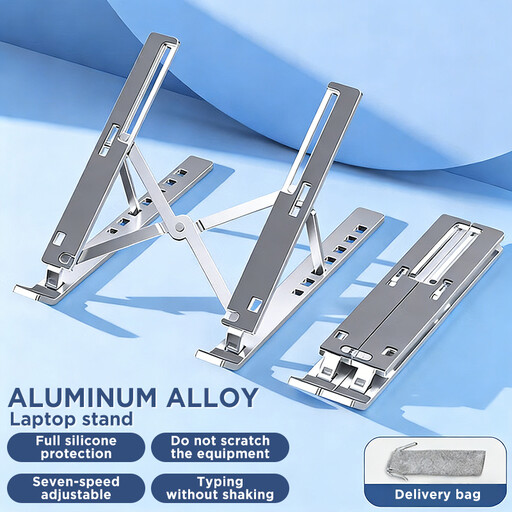
Laptop Stand for Desk, Ergonomic Design Adjustable Aluminum Foldable Portable Computer Stand
Why This Fits Their Persona: Ideal for users who frequently switch between their home office, university, and cafés. Its foldable design and lightweight aluminum construction make it an effortless companion in any laptop bag.
This model avoids the trap of bulky, pseudo-portable stands. It is explicitly designed for transport and folds down compactly without sacrificing stability.
The aluminum alloy construction ensures stability while keeping it lightweight. The adjustable height and angle allow for an ergonomic setup anywhere.
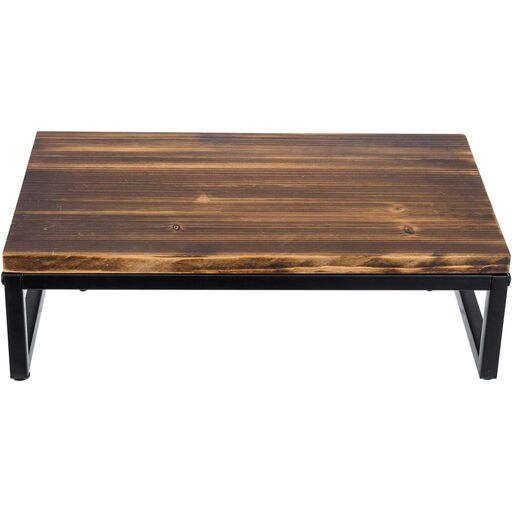
My Gift Rustic Brown Solid Wood Desk Computer Monitor Stand
Why This Fits Their Persona: Perfect for users with a dedicated workspace who value organisation and aesthetics. This monitor riser elevates the screen to an ergonomic height while creating storage space for a keyboard, notebooks, and other essentials.
Unlike wobbly plastic stands, this model uses a combination of solid wood and a powder-coated metal frame. This ensures high stability, even for heavy monitors or all-in-one PCs.
The combination of ergonomic elevation and extra storage space optimises your desk area. The open design also simplifies cable management.
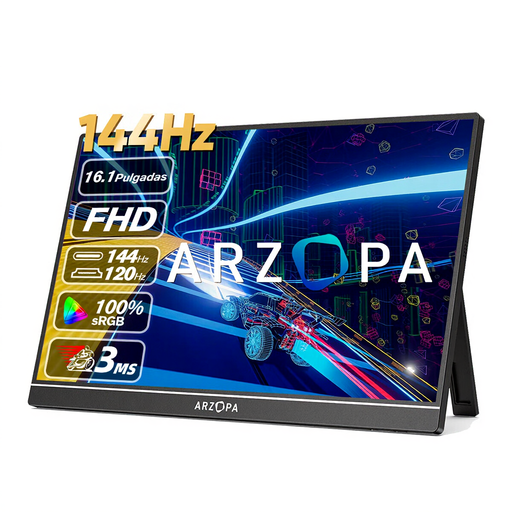
ARZOPA Z1FC 16.1'' 144Hz Portable Gaming Monitor
Why This Fits Their Persona: Designed for users who refuse to compromise on performance, even on the go. The high refresh rate is ideal for fluid gaming, while the excellent colour gamut coverage (106% sRGB according to the manufacturer) is also beneficial for mobile photo and video editing.
This model avoids the trap of generic monitors with low refresh rates that cause motion blur in fast-paced scenes. It is specifically tailored for use cases that demand high performance.
The 144 Hz refresh rate ensures an extremely smooth display. Thanks to its USB-C and HDMI ports, the monitor is compatible with a wide range of devices, including laptops, PCs, and gaming consoles.
Looking for more options?
We have compiled a complete, up-to-date list of products that fully meet these strict selection criteria and applicable regulations.
Frequently Asked Questions (FAQ)
How high should a laptop stand be set for good ergonomics?
For an ergonomic posture, the top edge of the screen should be at or just below your eye level. Your gaze should be directed slightly downward without you having to bend your neck. This typically requires the use of an external keyboard and mouse.
Does a portable monitor always need an external power source?
That depends on the model and your laptop. Many modern portable monitors can receive both the video signal and power from the laptop via a single USB-C cable. The prerequisite is that your laptop's USB-C port supports "DisplayPort Alternate Mode" and "Power Delivery". When connecting via HDMI or with laptops that lack a high-power USB-C port, a separate power adapter or power bank is usually required.
What should I check for compatibility when choosing a second screen for my laptop?
Check the available video outputs on your laptop. Common ones include HDMI, DisplayPort, and USB-C (with DisplayPort Alt Mode). Ensure that the portable monitor has at least one matching input. Most monitors come with the necessary cables (e.g., USB-C to USB-C, Mini-HDMI to HDMI), but cross-referencing the specifications before purchase is always advisable.