
4K Projector Selection Guide: Avoiding Common Pitfalls
A big-screen experience in your own home, whether for movie nights, gaming sessions, or backyard viewing parties, is easier to achieve than ever with a modern projector. But the market is confusing and full of technical jargon that often obscures more than it clarifies. Many buyers invest in a device that looks impressive on paper but disappoints in practice.
As your Joybuy Product Recommendation Officer, I'm here to help you separate the crucial features from the empty marketing promises. This guide focuses on the most common traps and shows you what to look for to make an informed decision.
The 3 Most Common Traps When Buying a Projector
Before we dive into the important specifications, let's highlight the three biggest pitfalls that lead to costly mistakes.
- The Lumen Trap: Many manufacturers advertise with inflated numbers like "9000 lumens." This figure is often misleading as it doesn't refer to the standardised measurement. The only reliable measure of brightness is ANSI lumens. A device with 700 ANSI lumens is typically brighter than one advertised with 9000 non-standardised lumens. A projector that is too dim is practically unusable in daylight or in rooms that are not completely darkened.
- The "4K-Supported" Trick: Searching for a "4K projector" often leads to products that can only receive a 4K signal and downscale it to a lower native resolution (usually 1920x1080 pixels, i.e., Full HD). The result is not a true 4K image. Always pay attention to the native resolution, as this is the only spec that describes the projector's actual physical pixel count.
- The "Smart" Illusion: A smart projector with Wi-Fi and Bluetooth sounds convenient. However, many budget models use slow, outdated Android versions or lack official licenses for streaming apps. The result: apps like Netflix or Prime Video either don't work at all or only stream in poor quality. Such a "smart" projector then ends up needing an external TV stick anyway.
What Really Matters: The Core Specs for Your Home Cinema
To avoid these traps, you should focus on three objective core parameters. These are the key determinants of your future projector's image quality and user experience.
1. Resolution: Native vs. Supported
As mentioned, native resolution is crucial.
- Full HD Projector (1920 x 1080 pixels): Delivers a sharp and detailed image that is perfectly adequate for most users and screen sizes up to about 120 inches. Many models can process 4K content (4K-supported) and downscale it to 1080p, which often results in better image quality than pure 1080p material.
- Native 4K Projector (3840 x 2160 pixels): Provides four times the pixel count of Full HD, delivering an extremely sharp and detailed picture, especially on large screens over 120 inches. These devices are in a higher price range.
2. Brightness: ANSI Lumens as the Only Standard
Brightness, measured in ANSI lumens, determines the environment in which the projector can produce a clear and vibrant image.
- Up to 500 ANSI lumens: Suitable for heavily darkened rooms. Often found in very compact mini projectors.
- 500 - 1500 ANSI lumens: A great choice for living rooms with some ambient light or for evening use. Many modern LED projectors fall into this category, offering a good balance of brightness and longevity.
- Over 1500 ANSI lumens: Necessary for use in brighter environments, larger rooms, or for an outdoor projector at dusk.
3. Smart Features and Connectivity
Modern projectors are more than just playback devices. Look for features that make everyday use easier.
- Automatic Image Adjustment: A projector with autofocus and automatic keystone correction adjusts the image to be sharp and straight within seconds, even when the projector is placed at an angle to the wall.
- Operating System: An integrated system like Android TV or Google TV with official Play Store access ensures you can use a projector with Netflix and other apps without restrictions.
- Connectivity: The latest Wi-Fi (WiFi 6) ensures stable streaming and is important for a gaming projector to keep latency low. Bluetooth allows for easy connection to external speakers or headphones.
Selecting Your Energy Monitor
Here are some models that represent a considered choice for different user profiles, based on objective criteria.
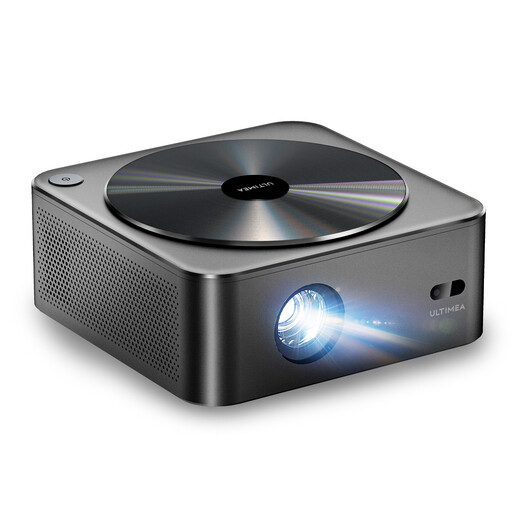
Ultimea Apollo P40 Projector HDR10 1080p 700 ANSI Lumen
Why This Fits Their Persona: Ideal for users seeking a hassle-free home cinema experience. With a native 1080p resolution and 700 ANSI lumens, it delivers solid image quality for movie nights in the living room. The automatic correction features make setup incredibly easy, even for tech novices.
The product clearly states 700 ANSI lumens and a native 1080p resolution with 4K decoding. This prevents confusion with misleading lumen specs and the "fake" 4K trap.
The fully automatic image adjustment (autofocus and 6D keystone correction) ensures a perfect picture in seconds without any manual fiddling. The dust-proof optical engine promises a longer lifespan.
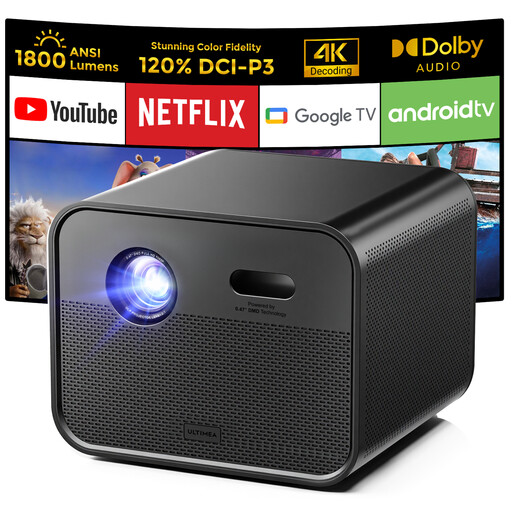
Ultimea Poseidon E100 DLP Projector 1800 ANSI Lumens
Why This Fits Their Persona: For users who prioritise maximum image quality and brightness. With 1800 ANSI lumens and DLP technology, this projector delivers a brilliant, high-contrast image even in rooms that aren't completely dark. Integrated Google TV turns it into a complete entertainment hub.
It avoids the "smart" illusion by integrating Google TV, a fully-featured and licensed operating system. The brightness is clearly stated in ANSI lumens and is high enough for flexible use cases.
The high brightness of 1800 ANSI lumens combined with DLP technology provides above-average image dynamics. MEMC technology smooths out fast motion, which is particularly beneficial for sports broadcasts and action films.
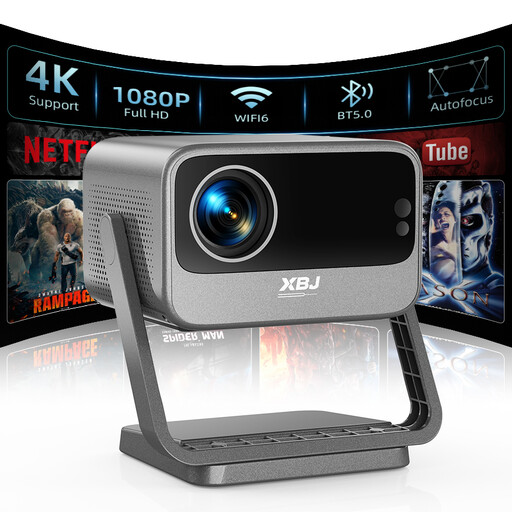
XBJ Portable 4K-Supported Projector with Rotatable Stand
Why This Fits Their Persona: Perfect for anyone who values flexibility. The integrated, rotatable stand allows for projection onto walls, ceilings, or in unusual places without needing a tripod. As a portable projector, it's ideal for use in different rooms or even in the garden.
This model features an integrated Linux system with direct access to Netflix, YouTube, and Prime Video, thus avoiding the trap of a "smart" projector with non-functional apps.
The 180° freely rotatable stand is its standout feature, offering maximum placement flexibility. The AI-powered automatic image correction quickly adjusts the picture even with angled projection.
Looking for more options?
We have compiled a complete, up-to-date list of products that fully meet these strict selection criteria and safety standards.
Frequently Asked Questions (FAQ)
How many ANSI lumens are necessary for my home cinema?
It heavily depends on the environment. For a dedicated, well-darkened cinema room, 500 ANSI lumens can be sufficient. For a typical living room where you might watch at dusk or with some ambient light, 700 to 1500 ANSI lumens is a good guideline. If you plan to use the projector during the day or outdoors, you should consider models with over 1500 ANSI lumens.
Does Netflix work on every smart projector?
No. For Netflix to work in HD or 4K quality, the projector needs official certification from Netflix. Many cheap "smart projectors" lack this license, which results in the app not starting at all or only playing videos in low standard definition (SD). Look for explicit statements like "Netflix-certified" or for operating systems like Google TV or Android TV, which typically have the necessary licenses.
What does "4K-supported" mean compared to native 4K resolution?
A projector with native 4K resolution has an imaging chip with 3840 x 2160 physical pixels and can display a true 4K image. A 4K-supported projector has a lower native resolution (e.g., 1920 x 1080 pixels) but can receive and process a 4K video signal. It downscales the high-resolution signal to its native resolution. The resulting image is often sharper than pure 1080p content but does not achieve the level of detail of a native 4K projector.