
Gaming PC Cases Buyer's Guide and Selection Tips
Choosing the right gaming PC case is more crucial than many realize. It's not just a shell for your valuable components; it's the foundation for cooling performance, longevity, and future upgradeability. However, the market is flooded with alluring designs that often hide serious functional flaws. This guide will help you navigate the common pitfalls and make an informed decision.
The 3 Most Common Traps When Buying a PC Case
Before we dive into the important specifications, let's look at the most costly mistakes made when selecting a case.
- The "Aquarium" Trap: Aesthetics Over Airflow: Cases with large glass fronts and sides look impressive but can quickly become a heat trap. If the air intakes are too small or poorly placed, the fresh air supply can't keep up with the heat generated by modern CPUs and graphics cards. The result is "thermal throttling," where components reduce their performance to avoid overheating. You pay for high-end hardware but don't get its full power.
- The Compatibility Nightmare: You've found the perfect case, but during assembly, you discover the new graphics card is 10mm too long, the water cooling radiator collides with the RAM, or the power supply doesn't fit into its designated bay. Vague or inaccurate manufacturer specifications for maximum dimensions often lead to frustration and additional costs.
- The RGB Gimmick: Many cases advertise four or more pre-installed RGB fans at an attractive price. However, these are often low-performance models with proprietary connectors. The result is not only inadequate cooling and high noise levels but also a massive restriction on controlling and expanding the lighting system.
Core Parameters to Check Before You Buy
To avoid the traps mentioned above, focus on these three objective criteria. They form the technical basis for a high-performance and future-proof system.
1. Form Factor and Compatibility: The Foundation of Your Build
The form factor determines which components will fit in your case. The most common standards are:
- ATX: The standard for most gaming PCs. An ATX Case offers a good compromise between space for components and expansion cards.
- Micro-ATX (mATX): A more compact variant that offers fewer expansion slots but allows for smaller, more space-saving systems.
- E-ATX (Extended ATX): For enthusiast motherboards with additional features. These require significantly wider cases.
A new trend is Back-Connect Cases. These are designed for special motherboards (e.g., MSI Project Zero, ASUS BTF) where the connectors are located on the back. The result is extremely clean cable management in the visible main chamber. Always check the exact motherboard compatibility and the maximum dimensions for the graphics card (length), CPU cooler (height), and power supply (length) before purchasing.
2. Cooling Concept: Airflow and Water Cooling
An effective cooling concept is essential. There are two main approaches here:
- Airflow Cases: These models are focused on maximum airflow. A key feature is a perforated front panel (mesh front), which allows the front fans to draw in cool air without obstruction. Pay attention to the number and size of possible fan mounts (front, top, rear, bottom).
- Water-Cooling Ready: This term means the case offers dedicated mounting points for radiators. Important specifications are the maximum supported radiator size (e.g., 240mm, 280mm, 360mm) and the possible installation locations (front, top). A case that can accommodate a 360mm radiator in the top often offers more flexibility than one where it only fits in the front.
3. Design, Materials, and Practical Features
Beyond pure performance, it's often the thoughtful details that make the difference:
- PC Case with Glass Window: Look for tempered glass. It is more scratch-resistant and clearer than cheaper acrylic. Panoramic designs that wrap around a corner offer a particularly good view of the components.
- Dust Filters: Easily removable and cleanable dust filters on all air intakes (front, bottom, top) are essential for long-term operation and easy maintenance. Magnetic filters are especially convenient here.
- Aesthetics and Colour: Whether a clean white PC case or a classic black model—colour is a matter of taste. However, a good RGB PC case not only offers illuminated fans but also an integrated controller or hub that is compatible with common motherboard software (e.g., MSI Mystic Light).
A Product For Every Need
Here are some recommendations tailored to specific user needs that take the above criteria into account.
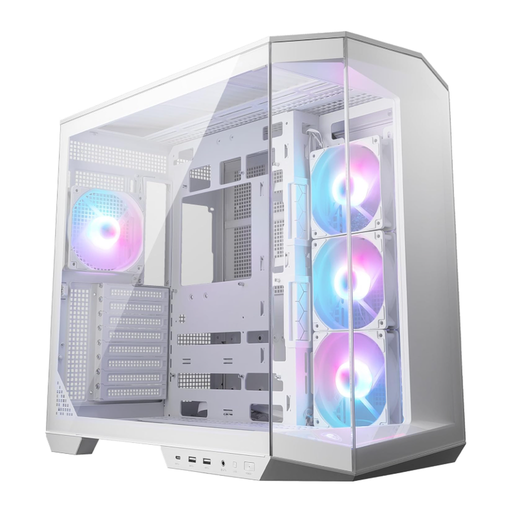
MSI MAG PANO 100R PZ White ATX PC Case
Why This Fits Their Persona: Ideal for users who want to showcase their hardware in a pristine, clutter-free interior. The combination of panoramic glass, a white design, and support for back-connect motherboards allows for an extremely clean look with no visible cables in the main chamber.
The dual-chamber design separates the power supply and drives from the main components, which improves airflow and avoids the "aquarium" trap. The explicit back-connect support is a clear feature, not a vague claim, preventing compatibility issues.
Dual-chamber architecture for clean cable management and optimized cooling. Four pre-installed ARGB fans and a vertical GPU bracket are included.
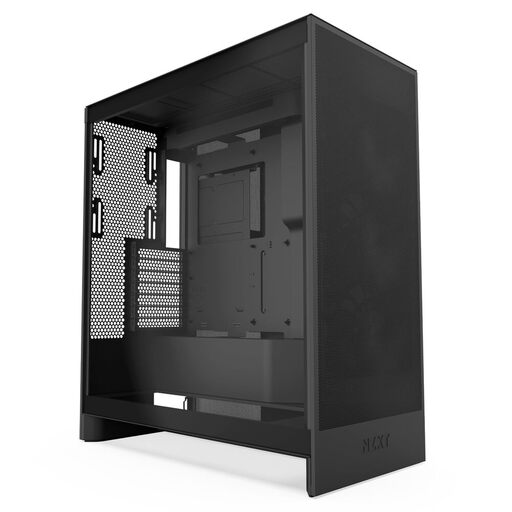
NZXT H7 Flow Mid-Tower ATX Airflow PC Gaming Case
Why This Fits Their Persona: Perfect for gamers and power users running overclocked CPUs and power-hungry graphics cards. The focus here is clearly on maximum cooling performance to ensure stable temperatures and full performance even during long gaming sessions.
This case is the antithesis of the "aquarium" trap. The perforated front and top panels are consistently designed for high airflow. The generous dimensions and clear documentation for radiator support (up to 420mm) prevent compatibility issues.
Optimized for airflow with high-performance mesh. It offers dedicated mounting spots for three 120mm fans on the bottom for direct GPU cooling—an often overlooked but critical feature.
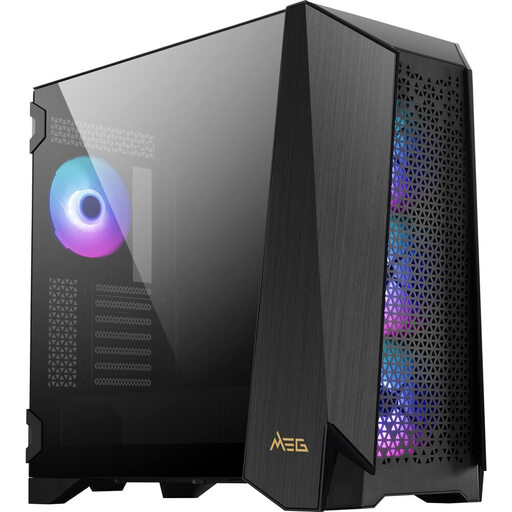
MSI MEG PROSPECT 700R Mid-Tower ATX PC Gaming Case
Why This Fits Their Persona: For system builders who make no compromises and demand full control and the latest features. The combination of a touchscreen control, modularity, and E-ATX support makes it the foundation for extremely powerful and customizable builds.
The modular side panel allows for adaptation to cooling needs (airflow or water cooling), preventing heat buildup. The clear specifications for E-ATX boards and 400mm GPUs provide planning security. The high-quality 140mm ARGB fans bypass the trap of cheap RGB solutions.
Exclusive 4.3-inch IPS touchscreen for software-independent control of fans, lighting, and system monitoring. The innovative modular system offers high flexibility for future modifications.
Looking for More Options?
We've compiled a complete, up-to-date list of products that fully meet these strict selection criteria and rigorous safety standards.
Frequently Asked Questions (FAQ)
1. How many fans does a good gaming PC case need? The required number depends heavily on the installed components. A solid baseline for most systems is two to three intake fans (typically at the front) and at least one exhaust fan (rear or top) to create directed airflow. For high-end CPUs and graphics cards, additional fans or an AIO water cooler are recommended. More important than the sheer number, however, is strategic placement to ensure efficient airflow from front/bottom to rear/top.
2. What is the difference between a Mid Tower and an ATX case? These terms describe different things. ATX case refers to compatibility with the ATX motherboard form factor, the most common standard for gaming PCs. Mid Tower case is a size classification. Most Mid Towers are designed for ATX motherboards, which is why the terms are often used interchangeably. A Mid Tower typically offers a balanced compromise between interior space for powerful components and a moderate footprint.
3. How important are dust filters in a PC case? Dust filters are critically important for the longevity and consistent performance of your PC. Accumulated dust acts as an insulating layer on heatsinks and in fans, which increases temperatures and puts more strain on the components. Cases with easily accessible and removable dust filters (e.g., magnetic or slide-out) on all major air intakes (front, bottom, top) significantly simplify regular maintenance and protect your investment.