
Gaming PC Cases: A Guide to Choosing the Right Model
Choosing a gaming PC case is a foundational decision when building a new system. It's far more than just a shell for your components; it influences cooling performance, noise levels, and the overall aesthetics of your setup. With a vast array of options, from minimalist designs to elaborately lit showcases, the choice can quickly become overwhelming.
This guide is designed to provide clarity. We'll outline objective criteria to help you find a case that not only looks impressive but also meets the technical demands of your hardware. We will also present a selection of standout models for 2026, notable for their thoughtful features and modern designs.
What to Look for When Choosing a Gaming PC Case
Before you decide on a model, there are several technical aspects to consider. These ensure that your components will not only fit but also function optimally.
1. Form Factor and Compatibility
The size of the case must match your motherboard. The most common format is the mid-tower case, which offers a good compromise between internal space and a moderate footprint. It typically supports ATX, Micro-ATX, and Mini-ITX motherboards. For larger motherboards found in high-end systems, an E-ATX case is necessary, providing more room for expansion cards and drives. Also, check the maximum supported graphics card length and CPU cooler height to avoid compatibility issues.
2. Cooling and Airflow
High-performance processors and graphics cards generate significant heat. A well-thought-out cooling concept is therefore essential to maintain stable performance. Pay attention to the number of pre-installed and maximum possible fans, as well as compatibility with radiators for liquid cooling. Cases with mesh front panels often provide better airflow than those with solid glass fronts. Modern designs like the panoramic PC case, also known as an aquarium-style PC case, often compensate for this with side or bottom air intakes. An ARGB PC case with controllable lighting also allows for individual visual customisation of the cooling setup.
3. Design and Practical Features
Aesthetics are subjective, but functional design features offer objective advantages. A PC case with a glass window allows you to see your hardware. For an exceptionally clean look, choose a case designed for clean cable management. Dedicated channels, cable tie-down points, and a power supply shroud help you route cables out of sight, which not only looks better but also improves airflow. Other practical details include tool-free removable side panels, dust filters on the air intakes, and an easily accessible front I/O panel. A white PC case is a popular choice for bright and modern setups.
Top Gaming PC Case Picks
Here is a selection of cases that, with their specific features, are suited for different user profiles.
MSI MEG PROSPECT 700R
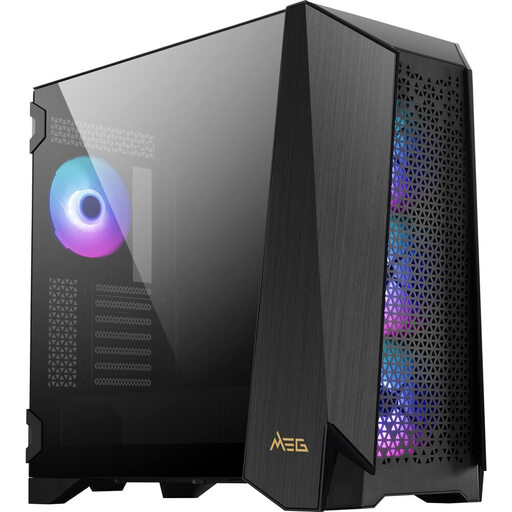
What sets it apart: The MSI MEG PROSPECT 700R is a mid-tower case designed for maximum control and modularity. Its key feature is a 4.3-inch IPS touchscreen on the front, allowing you to control system stats, fan speeds, and ARGB effects directly without additional software. The modular side panel allows for the installation of an E-ATX motherboard, an additional fan bracket, or a distribution plate for custom water cooling loops.
Advantages:
- Integrated 4.3-inch IPS touch panel for hardware monitoring and control.
- Innovative modular side panel for flexible configurations.
- Support for E-ATX motherboards and graphics cards up to 400 mm in length.
- Four pre-installed 140 mm ARGB fans for high cooling performance out of the box.
- Tool-free hinged side panels and well-designed channels for clean cable management.
Who is it for? For PC enthusiasts and system builders who want to create a high-end system with maximum flexibility and direct control over hardware functions.
Corsair 3500X ARGB
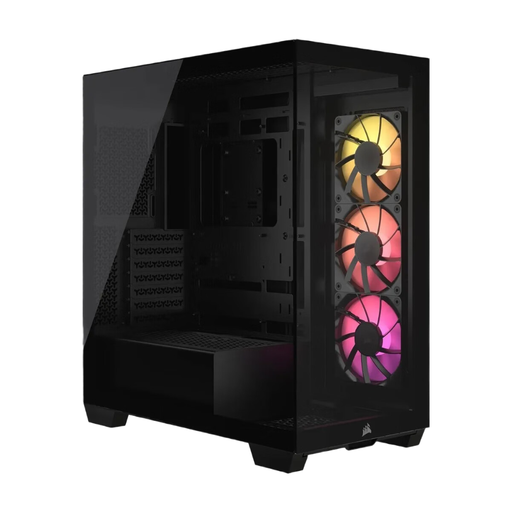
What sets it apart: The Corsair 3500X ARGB features a bezel-less aesthetic with a panoramic PC case design, using tempered glass on the front and side panels. It offers an uninterrupted view of the components. A special feature is its compatibility with rear-connector motherboards (e.g., ASUS BTF, MSI Project Zero), which enables an extremely clean look in the main chamber as cables are hidden behind the motherboard tray.
Advantages:
- Panoramic glass on the front and side for a modern, pillarless design.
- Compatibility with rear-connector motherboards for outstanding cable management.
- Three pre-installed CORSAIR RS120 ARGB fans.
- High cooling capacity with space for up to ten 120 mm fans.
- Supports motherboards from Mini-ITX to E-ATX.
Who is it for? For users who want a visually flawless build with maximum component visibility and value innovative solutions for a tidy interior.
MSI MAG PANO 110R PZ White
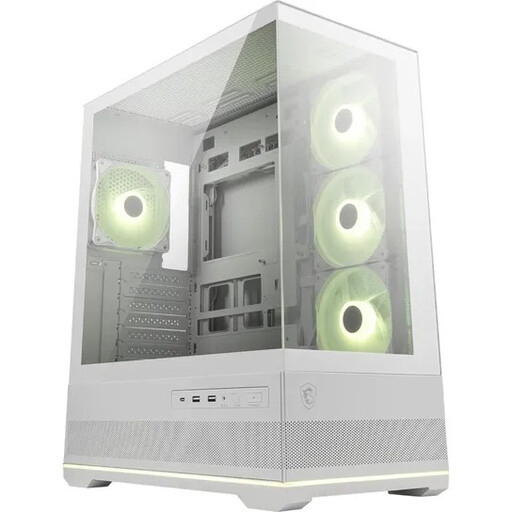
What sets it apart: This white PC case offers a seamless showcase look with its 270° panoramic glass. A unique feature is the three pre-installed side reverse-blade fans, which display their illuminated side without an obstructive frame and direct air straight onto the components. An integrated 1-to-5 ARGB hub simplifies lighting control via a button on the case or through software.
Advantages:
- Seamless 270° PC case with a glass window for maximum hardware presentation.
- Four pre-installed ARGB fans, including three with a reverse-blade design for an optimised look.
- Integrated ARGB hub for easy lighting synchronisation.
- Dual-chamber layout separates the power supply and drives from the main heat-generating components.
- Supports radiators up to 360 mm on the top panel.
Who is it for? Ideal for users who want to build an aesthetically pleasing showcase PC with a bright design, and who value a well-thought-out, ready-to-use ARGB solution.
Discover More Options
The models presented here cover specific user profiles. If you haven't found the right model for your needs or budget, you can explore a wider selection of cases in our Tower Desktop PC category. There, you can filter by other criteria such as size, colour, and price.
Frequently Asked Questions (FAQ)
1. What is a mid-tower case? A mid-tower case is the most common form factor for desktop PCs. It offers a balanced compromise between internal space for standard components (typically ATX motherboards, long graphics cards, and multiple drives) and a moderate size that fits on or under most desks.
2. How important is cable management in a PC case? A good case designed for clean cable management is important for two reasons. First, it improves airflow inside the case, as fewer cables obstruct the path of air from the fans to the components. This can lead to lower temperatures. Second, it creates a clean and professional look, which is especially important in a PC case with a glass window.
3. Are PC cases with glass windows worse for cooling? Not necessarily. While a solid glass front panel can block direct air intake from the front, many modern cases compensate for this with generous air intakes on the sides, bottom, or top. A well-designed case with a glass panel can achieve cooling performance just as effective as a mesh-front model, as long as the overall airflow path is well-engineered.