
How to Choose the Right Gaming Mouse
The search for the right gaming mouse can quickly become overwhelming. Manufacturers advertise ever-higher DPI numbers, futuristic designs, and a multitude of features. But not every innovation is a real advantage. Many users invest in expensive models whose features they never fully use or which prove to be impractical after a short time. To help you make an informed decision, we'll highlight the most common pitfalls and the criteria that truly matter.
Common Pitfalls When Buying a Gaming Mouse
- The Trap of Extremely High DPI: Marketing departments often highlight DPI values over 20,000 as a key selling point. In practice, such extreme sensitivities are practically unusable for most users, even professional gamers. A mouse movement of just a few millimetres would send the cursor flying across multiple screens. Such a high value is often an indicator of a powerful sensor, but it is not the sole indicator of quality.
- The Myth of Universal Ergonomics: A mouse advertised as "ergonomic" is not automatically suitable for every hand and grip style. An ill-fitting shape can lead to faster fatigue or even wrist discomfort. The fit is a subjective factor that depends on hand size and preferred grip (Palm, Claw, or Fingertip Grip).
- Misjudging Wireless Technology: The old prejudice that a wireless gaming mouse inherently has higher latency than a wired model is outdated. Modern 2.4 GHz wireless technologies offer response times that are indistinguishable from wired connections. However, cheaper models that rely solely on Bluetooth mouse technology may have latency that is too high for competitive gaming.
What Really Matters in a Gaming Mouse
To avoid making the wrong purchase, you should focus on the technical parameters that have a direct impact on precision, comfort, and durability.
Sensor, DPI, and Polling Rate
The sensor is the heart of every PC mouse. It determines how precisely and quickly your movements are translated to the screen.
- DPI (Dots Per Inch): This value indicates how sensitive the mouse is. A high-DPI mouse is not necessarily better. Most gamers use settings between 400 and 3,200 DPI. More important is a high-quality sensor that remains precise even during fast movements (measured in IPS – Inches Per Second) and does not produce unwanted mouse acceleration.
- Polling Rate: Measured in Hertz (Hz), this value indicates how often the mouse reports its position to the computer. A standard of 1,000 Hz (1-millisecond response time) is well-established for gaming. Higher rates of 4,000 Hz or 8,000 Hz can further reduce latency, but the perceptible difference is marginal and requires a powerful system.
Weight, Shape, and Ergonomics
The weight and shape directly influence handling and comfort during long gaming sessions.
- Weight: A lightweight gaming mouse (typically under 80 grams) reduces inertia and allows for faster, less fatiguing movements. This is particularly advantageous in fast-paced FPS games. Heavier mice, on the other hand, can provide a feeling of more control and stability.
- Ergonomics: An ergonomic mouse should fit your hand size and grip style. Right-handed models with a thumb rest often offer high comfort, while symmetrical mice are equally suitable for left- and right-handed users.
Connectivity and Functionality
The type of connection and additional features determine the mouse's versatility.
- Connectivity: Wired mice offer an interference-free connection with no battery life to worry about. A wireless gaming mouse with a 2.4 GHz dongle provides comparable performance with maximum freedom of movement. A multi-device mouse that also supports Bluetooth can switch seamlessly between multiple devices like a PC, laptop, and tablet.
- Programmable Buttons: A programmable mouse allows you to assign macros or specific functions to its buttons. This is a significant advantage not only for gamers but also for professionals in creative or development fields.
Product recommendations for varied needs
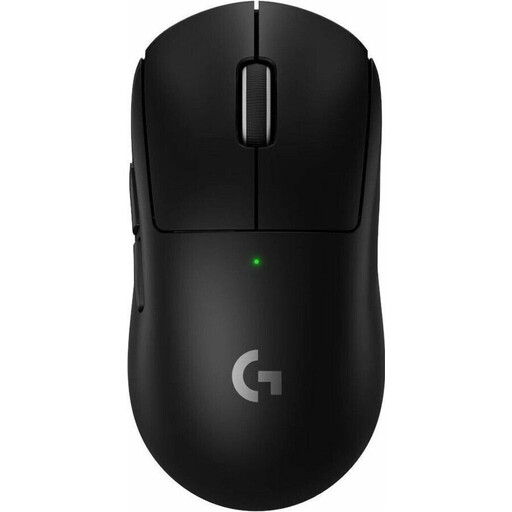
Logitech G PRO X SUPERLIGHT 2 LIGHTSPEED Wireless Gaming Mouse
Why This Fits Their Persona: Engineered for professional demands with an extremely low weight and high-precision, lag-free LIGHTSPEED wireless technology used at the tournament level.
The design is the result of collaboration with esports pros, not just a marketing label. Its wireless technology is battle-tested, debunking the myth of latency disadvantages.
The low weight of just 60 grams allows for fast, fatigue-free movements. The HERO 2 sensor and LIGHTFORCE hybrid switches offer maximum precision and reliability.
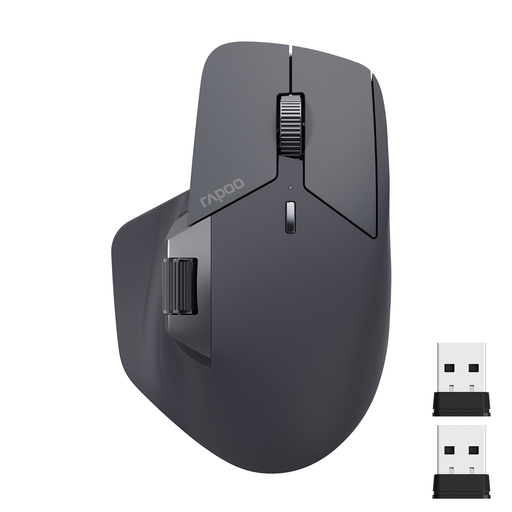
RAPOO MT760L Multi-Device Wireless Bluetooth Mouse
Why This Fits Their Persona: Perfect for users who need to switch seamlessly between a work PC, laptop, and smartphone without sacrificing gaming-grade features like programmable buttons.
Offers a pragmatic balance of connectivity (2.4G for low latency, Bluetooth for compatibility) and ergonomics. The M+ Cross-Computer technology is a genuine productivity booster, not a gimmick.
Can be connected to up to 4 devices simultaneously, allowing you to switch with the press of a button. The 11 programmable buttons and side scroll wheel significantly streamline workflows.
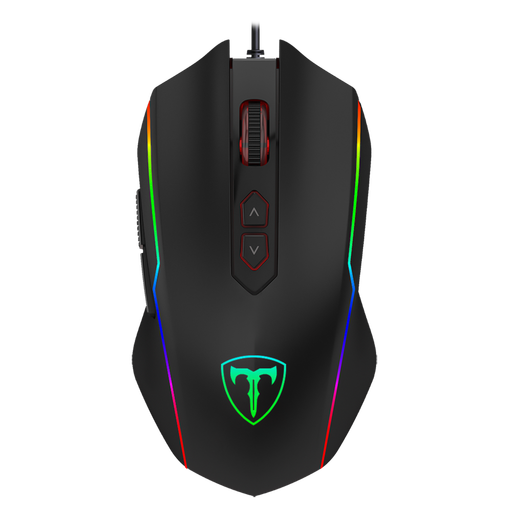
ET High Performance USB Wired Gaming Mouse
Why This Fits Their Persona: Delivers essential gaming features like adjustable DPI, RGB mouse lighting, and programmable buttons at an accessible price point, ideal for getting started without a major investment.
Focuses on usable DPI levels (up to 7200) instead of exaggerated marketing numbers and provides a solid wired connection that eliminates latency issues from the start.
8 programmable buttons and a dedicated rapid-fire button provide a functional advantage in FPS games that is uncommon in this price range.
Looking for More Options?
We have compiled a complete, up-to-date list of products that fully meet these strict selection criteria.
Frequently Asked Questions (FAQ)
1. How important is the polling rate, really? For most gamers, a polling rate of 1,000 Hz is perfectly sufficient, offering an imperceptible latency of 1 ms. Higher rates like 4,000 or 8,000 Hz can theoretically improve response time further, but the difference is barely noticeable to the human eye and can increase CPU load. A stable 1,000 Hz connection is more important than an unstable 8,000 Hz one.
2. How long does the battery of a wireless gaming mouse last? Battery life varies greatly depending on the model, usage, and lighting. Models designed for energy efficiency can last several hundred hours on a single charge, especially if the RGB mouse lighting is disabled. High-performance models with high polling rates and constant lighting may need to be charged every few days or weekly. Pay attention to manufacturer specifications for battery life, which are often measured with the lighting turned off.
3. Are programmable buttons useful for every gamer? Not necessarily. For players of MOBAs (e.g., League of Legends) or MMOs (e.g., World of Warcraft), additional programmable buttons are extremely useful for quickly activating abilities and items. For players of pure FPS titles (e.g., Counter-Strike), two side buttons are often sufficient for standard functions like throwing grenades or melee attacks. However, for productivity tasks, they can significantly speed up workflows by assigning shortcuts.