
Gaming Mouse Buyer’s Guide: How to Avoid Costly Mistakes
Choosing the right gaming mouse can be the difference between victory and defeat. Yet, the market is flooded with marketing buzzwords and technical specs that often confuse more than they help. Many gamers invest in features they never use or get frustrated with models that become uncomfortable after a short time. Before you make a decision, it's crucial to understand the most common pitfalls to make an informed choice that actually enhances your gaming experience.
This guide will help you separate the essential features from the superfluous ones and find a PC mouse for gamers that is precisely tailored to your needs.
The 3 Most Common Traps When Buying a Gaming Mouse
Manufacturers often advertise with impressive numbers and designs. But not all that glitters is gold. Here are three typical marketing traps that can lead to a poor purchase:
- The DPI Myth: Extremely high DPI values (e.g., over 16,000) are presented as a main selling point. In practice, however, even professional gamers rarely use settings above 3,200 DPI. An unnecessarily high DPI is no guarantee of precision; the quality of the built-in optical sensor is far more critical.
- Misunderstood Ergonomics: A mouse advertised as "ergonomic" is not automatically suitable for every hand. The shape must match your hand size and grip style (Palm, Claw, or Fingertip Grip). An ill-fitting ergonomic gaming mouse can lead to more fatigue and discomfort in the long run than a simpler but better-fitting model.
- RGB Lighting Over Core Features: A flashy RGB mouse can visually enhance a setup. However, some models use spectacular lighting effects to distract from weaknesses in the sensor, switch quality, or build stability. Performance should always take priority over aesthetics.
What Really Matters: The Decisive Parameters
To make an informed decision, focus on the technical features that directly impact your in-game performance.
Sensor, DPI, and Polling Rate: The Heart of Precision
The sensor is the most important component of a gaming mouse. It determines how accurately and reliably your movements are translated to the screen.
- DPI (Dots Per Inch): This value indicates the mouse's sensitivity. A higher DPI number means the cursor travels a greater distance on the screen with the same hand movement. Instead of focusing on a maximum DPI value, it's more important that the mouse has a reliable sensor that operates precisely over a practical range (e.g., 400 to 6,400 DPI).
- Polling Rate: Measured in Hertz (Hz), the polling rate indicates how often the mouse reports its position to the computer. A rate of 1000 Hz is standard for gaming mice and results in a fast response time of just 1 millisecond. A wired gaming mouse typically offers the most stable and reliable connection without any lag.
Buttons and Customisation: Custom-Tailored Control
The number and arrangement of buttons should suit the games you primarily play.
- Standard vs. Programmable Buttons: For fast-paced shooters (FPS), the two main buttons, a mouse wheel, and two thumb buttons are often sufficient. For MMO or MOBA games, however, a mouse with programmable buttons can offer a significant advantage, as complex commands or macros can be assigned to extra buttons.
- Switch Quality: The mechanical switches located under the buttons determine the click feel and lifespan. Manufacturers often state the durability in millions of clicks (e.g., 10 or 20 million). Durable switches ensure consistent performance for years.
Our Selection: Suitable Gaming Mice for Different User Profiles
Instead of making a one-size-fits-all recommendation, we have identified models that meet specific requirements and avoid the pitfalls mentioned.
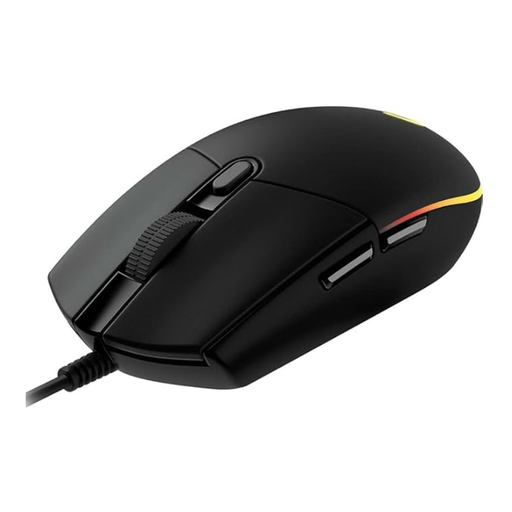
Logitech G102 LIGHTSYNC Gaming Mouse
Why this model is a great fit: Ideal for gamers looking to upgrade from a standard office mouse. It offers all the essential gaming features, such as a precise sensor, programmable buttons, and customisable RGB lighting, at a very accessible price point.
It resists the DPI myth by offering a practical sensor with up to 8000 DPI, which is more than sufficient for most games and users, without driving up the cost for unnecessarily high specs.
Delivers a well-rounded package of performance and customisation through the Logitech G HUB software, which is not a given in this price range.
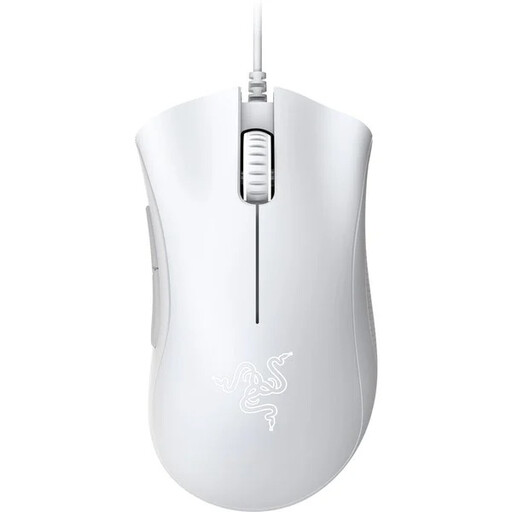
Razer DeathAdder Essential (2021)
Why this model is a great fit: Focuses on the essentials for competitive gaming: a proven, comfortable shape for long sessions and a precise optical sensor for reliable tracking. A choice for players who value pure performance.
It avoids the "over-designed" ergonomics trap by relying on an iconic shape, optimised over years, that is found comfortable by a large number of gamers with different hand sizes and grip styles.
The combination of its proven ergonomic shape and durable mechanical switches, rated for up to 10 million clicks according to the manufacturer, ensures lasting comfort and reliability.
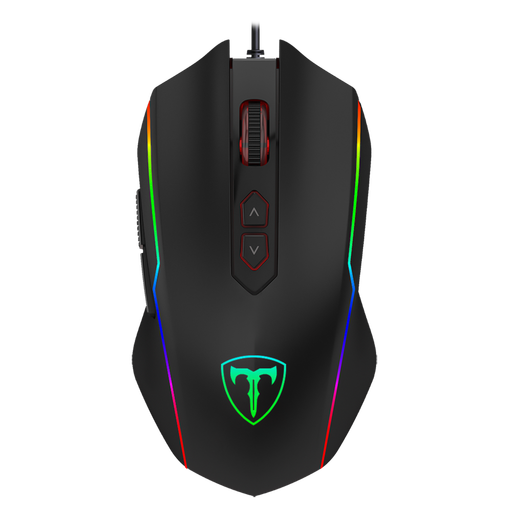
ET High Performance USB Wired Gaming Mouse
Why this model is a great fit: For gamers who play various genres and enjoy customising their gear. With 8 programmable buttons, adjustable DPI and polling rate, and RGB modes, it offers maximum flexibility for MMOs, RTS, and FPS.
This model escapes the "RGB over performance" trap by combining its customisable lighting with tangible performance features like an adjustable polling rate and a high number of programmable buttons.
The high degree of customisation, with 8 programmable buttons and an adjustable polling rate of up to 1000 Hz, allows for detailed fine-tuning to individual preferences and different game genres.
Looking for more options?
We've compiled a complete, up-to-date list of products that fully meet these strict selection criteria and UK safety regulations.
Frequently Asked Questions (FAQ)
1. Is a gaming mouse with a high DPI always better? No. The quality and reliability of the optical sensor are more important than an extremely high maximum DPI value. Most gamers find their ideal setting range between 400 and 3,200 DPI. Stable performance in this range is more crucial than a theoretical upper limit of 20,000 DPI or more.
2. How long does a typical gaming mouse last? The lifespan heavily depends on the quality of the built-in components, especially the mechanical switches under the main buttons. Many manufacturers specify a durability rating in clicks (e.g., 10, 20, or 50 million clicks). With regular use, a well-built model can function reliably for several years.
3. Do I need a mouse with programmable buttons? That depends on your preferred games. For strategy games (RTS) or online role-playing games (MMOs), programmable buttons are extremely useful for quickly accessing skills and commands. For most first-person shooters (FPS), the standard side buttons are sufficient. However, they also offer practical added value in everyday use, such as browsing the internet.