
Gaming Mouse Buyer's Guide: Choose Your Perfect Fit
Choosing the right gaming mouse can be a challenge given the vast array of models and technical specifications. Parameters like sensor precision, weight, and ergonomics are crucial for in-game performance and comfort during long sessions. An unsuitable mouse can lead to inaccurate movements, fatigue, or even a critical competitive disadvantage.
This guide is designed to demystify the technical specs and provide you with a solid basis for making an informed decision. We'll introduce a selection of models for different needs and budgets, helping you buy the gaming mouse that's perfect for you.
What to Look for When Buying a Gaming Mouse
Before you decide on a model, it's helpful to understand the most important technical features and what they mean in practice.
Sensor, DPI, and Polling Rate: The Heart of Precision
The sensor is the most critical component of a gaming mouse, responsible for accurately tracking your movements. Two metrics are particularly important here:
- DPI (Dots Per Inch): This value indicates how sensitive the mouse is to movement. A high DPI value means a small hand movement results in a large cursor movement on the screen. While manufacturers often advertise very high numbers, many competitive players actually use settings between 400 and 1600 DPI for more controlled aiming, especially in FPS games.
- Polling Rate: Measured in Hertz (Hz), this value indicates how often the mouse reports its position to the computer. A standard mouse often has a rate of 125 Hz, whereas a professional gaming mouse typically offers 1000 Hz or more. A higher rate results in smoother, more responsive cursor movement.
Weight and Ergonomics: Comfort for Long Sessions
The weight and shape of the mouse directly impact handling and comfort.
- Weight: The clear trend is toward the lightweight gaming mouse. Models under 70 grams allow for faster reactions and changes in direction, and can reduce arm fatigue during long gaming sessions.
- Ergonomics: An ergonomic gaming mouse is shaped to fit the natural posture of your hand, offering superior comfort. The shape should match your grip style (Palm, Claw, or Fingertip Grip). Symmetrical mice are suitable for both right- and left-handed users, while asymmetrical, ergonomic shapes are usually optimised for right-handers only.
Wired or Wireless? A Question of Latency and Freedom
Today, the choice between a wired and a wireless gaming mouse is primarily a matter of personal preference. Modern wireless technologies like Razer HyperSpeed or Logitech LIGHTSPEED offer signal transmission with latency that is practically indistinguishable from a wired connection. A wireless mouse provides maximum freedom of movement and a clean setup, but it does need to be charged regularly.
Top Gaming Mouse Picks
Based on the criteria mentioned, we've compiled a selection of models that appeal to different types of gamers.
Razer DeathAdder V3 Pro
Why It Stands Out
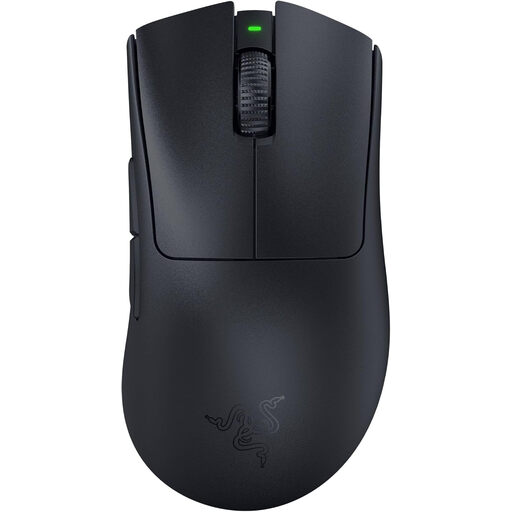
The Razer DeathAdder V3 Pro is an evolution of one of the most iconic ergonomic mouse shapes. Weighing just 63 grams, it's extremely lightweight and designed for fast, precise manoeuvres. According to Razer, the shape was optimised in collaboration with esports pros to ensure superior handling and comfort.
Pros
- Ultralight Design: At just 63g, it's built for maximum speed and control.
- Precise Sensor: The Razer Focus Pro 30K Optical Sensor ensures flawless tracking on various surfaces.
- Wireless Technology:Razer HyperSpeed Wireless provides a fast and stable connection.
- Long Battery Life: Up to 90 hours of use on a single charge via USB-C.
- Durable Switches: 3rd-gen optical mouse switches rated for 90 million clicks.
Who It's For
This Razer gaming mouse is ideal for competitive players, especially in the FPS genre, who are looking for an ultralight, wireless, and ergonomic mouse for right-handers.
Logitech G PRO X SUPERLIGHT 2
Why It Stands Out
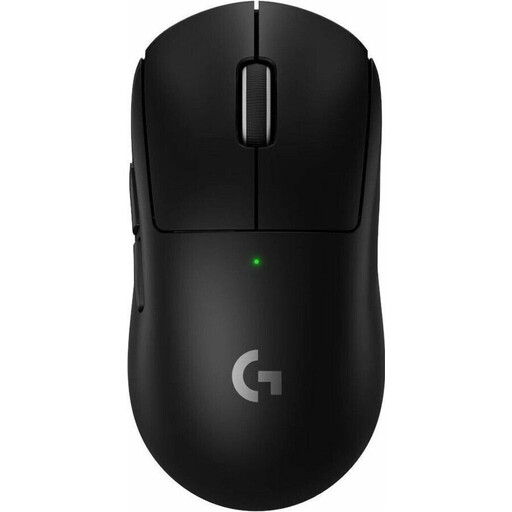
The Logitech G PRO X SUPERLIGHT 2 is relentlessly focused on low weight and maximum performance. At just 60 grams, it's one of the lightest wireless mice on the market. Its symmetrical design and advanced HERO 2 sensor make it a tool for the highest demands in esports.
Pros
- Extremely Low Weight: Only 60g for effortless and rapid movements.
- Advanced Sensor: The HERO 2 Sensor offers tracking up to 44,000 DPI with no smoothing or acceleration.
- High Polling Rate: A polling rate of up to 8,000 Hz ensures an extremely responsive transmission.
- Long Battery Life: Up to 95 hours of gameplay per charge.
- Hybrid Switches:LIGHTFORCE Hybrid Switches combine the speed of optical switches with the tactile feel of mechanical ones.
Who It's For
This Logitech gaming mouse is aimed at esports pros and ambitious gamers who need an extremely lightweight, symmetrical mouse with state-of-the-art sensor technology and minimal latency.
Logitech G102 LIGHTSYNC
Why It Stands Out
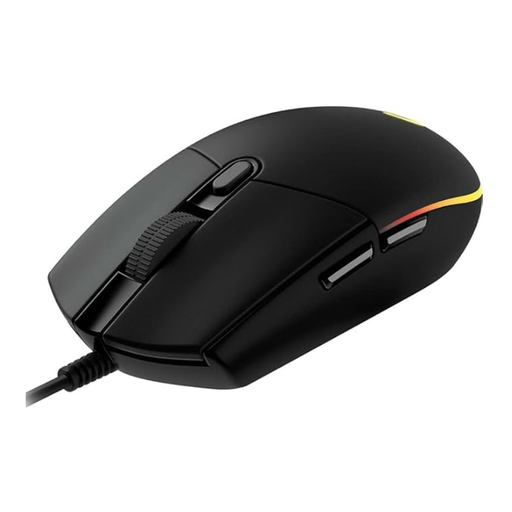
The Logitech G102 LIGHTSYNC offers solid gaming performance at a very accessible price point. With a proven design, a reliable sensor, and customisable RGB lighting, it's an excellent choice for entering the world of gaming mice.
Pros
- Reliable Sensor: An optical sensor with up to 8,000 DPI delivers precise tracking for various game genres.
- Programmable Buttons:6 programmable buttons allow for control customisation via the Logitech G HUB software.
- Customisable Lighting:LIGHTSYNC RGB lighting with 16.8 million colours.
- Classic Design: A proven and comfortable shape for long gaming sessions.
Who It's For
This model is ideal for beginners, casual gamers, and users on a budget who are looking for a reliable, wired gaming mouse with all the essential performance features.
Looking for More Options?
The models presented here cover common user profiles. However, if you're looking for different designs, specific features, or more colour options, you might find the perfect model for your setup in our broader selection.
Discover our entire collection of black gaming mice.
Frequently Asked Questions (FAQ)
What is a good DPI value for a gaming mouse?
There is no one-size-fits-all "best" DPI value. The choice heavily depends on personal preference, screen resolution, and the game genre. Many competitive FPS players prefer lower settings (e.g., 400 to 1600 DPI) as they allow for more precise and controlled movements. It's advisable to experiment with different values to find the setting that works best for you.
Is a wireless gaming mouse as good as a wired one?
Yes, modern wireless gaming mice from leading manufacturers offer performance that is virtually indistinguishable from wired models in terms of latency and stability. Technologies like Logitech LIGHTSPEED or Razer HyperSpeed are specifically designed to ensure lag-free transmission. The decision ultimately comes down to whether you prefer the freedom of movement of a wireless mouse or the peace of mind that comes with a constant power supply from a cable.
How important is the weight of a gaming mouse?
Weight is a key factor for handling. A lightweight gaming mouse (typically under 80 grams) can reduce fatigue during long gaming sessions and enable faster, more agile movements. This is particularly advantageous in fast-paced games like FPS shooters. However, some players prefer the feel of a heavier mouse for more stable and controlled movements. The choice is ultimately a matter of personal comfort and playstyle.