
Gaming Lighting 2026: A Technical Guide for Your Setup
The integration of dynamic lighting in gaming and entertainment environments has evolved from a niche aesthetic to a functional component of modern setups. Strategically used gaming lighting can enhance visual immersion, reduce eye strain during long sessions, and highlight the user's personal style. The technological foundation for this is typically RGB (Red, Green, Blue) LEDs, which enable a virtually limitless color palette and dynamic effects through smart control systems.
This guide analyzes the technical criteria relevant to selecting smart ambient lighting and presents specific product configurations.
Buyer's Guide: What to Consider When Choosing Gaming Lighting
The decision for a lighting system should be based on an analysis of technical specifications and compatibility with your existing setup.
1. Form Factor and Placement
The form factor of the light source determines its primary application.
- Lightbars: Compact, elongated lights like the RGB LED Lightbar are ideal for placement next to or behind a monitor or television. They create indirect TV backlighting or PC lighting that illuminates the wall behind the screen, creating a halo effect. This can enhance the perceived contrast.
- LED Strips: Flexible strips that are attached to the back of monitors, desks, or along the edges of a room. They provide wide-area, diffuse lighting.
- Panels and Modular Systems: Square or triangular panels mounted on the wall allow for creative, large-scale light installations. Modular cube systems offer high flexibility for desk lighting.
- Spotlights: Smaller, directional lights that accentuate specific objects or areas of the setup.
2. Connectivity and Control System
The type of control defines the feature set and the depth of integration.
- App Control: Most systems for smart ambient lighting are configured via a smartphone app (iOS/Android). This allows for color selection, brightness adjustment, and the activation of predefined or custom scenes.
- Desktop Software: For deeper synchronization with PC applications, dedicated desktop software is required. This software analyzes screen content or audio signals in real-time to dynamically adjust the light colors.
- Bridge-Based vs. Standalone Systems: Some ecosystems, like Philips Hue Play, require a central control unit (bridge) that acts as an intermediary between the lights and the network. Other systems, like many from Yeelight, connect directly to the router via Wi-Fi and do not require additional hardware.
3. Synchronization Technology
The ability to synchronize with media content is a core feature of modern gaming lighting.
- Screen Synchronization (Screen Mirroring): Software analyzes the colors at the edges of the screen and projects them onto the wall behind it via the lights. This creates an immersive extension of the on-screen content.
- Game Integration: Direct interfaces (APIs) with games allow the lighting to react to in-game events—for example, by flashing red when damage is taken or displaying cooldowns. Platforms like Razer Chroma or Overwolf are common standards for this.
- Audio Visualization: An integrated microphone or software analysis of the audio output allows the lights to pulse in time with music or sound effects.
4. Light Quality and Color Spectrum
The quality of the LEDs significantly influences the visual impact. Parameters such as the number of displayable colors (typically 16 million) and the ability to display different shades of white (from warm to cool white) are relevant here. A high Color Rendering Index (CRI) ensures a more natural and accurate color representation.
Our Picks for 2026
Based on the technical criteria mentioned above, we present two different concepts for LED mood light systems.
Yeelight Cube 4 Matrix LED Light
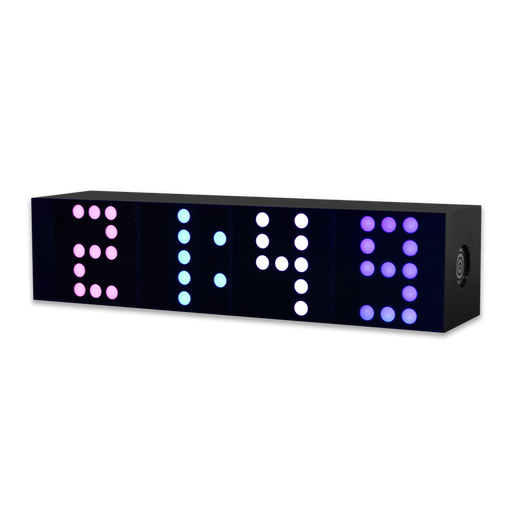
The Yeelight Cube system takes a modular approach to desk and ambient lighting. The Matrix version is distinguished by a 5x5 pixel matrix on each cube face, which allows for the display of dynamic patterns, symbols, and pixel art.
-
Why we're featuring this product: The system stands out for its high modularity and the creative possibilities of its pixel matrix. The magnetic connections between the cubes allow for a flexible and tool-free arrangement. Direct compatibility with gaming platforms like Razer Chroma and Overwolf enables native integration without complex configuration.
-
Pros:
- Modular Design: Cubes can be magnetically combined into any shape.
- Pixel Art Display: The matrix surface allows for the display of customizable animations and symbols.
- Standalone Operation: No separate bridge is required; connection is made directly via Wi-Fi.
- Game Integration: Supports Razer Chroma RGB and Overwolf for synchronization with games.
-
Who it's for: Users looking for highly customizable desk lighting who value a visually distinct element. Ideal for content creators and gamers who want to display their own animations or status indicators directly on their desk.
Philips Hue White & Color Ambiance Play Lightbar
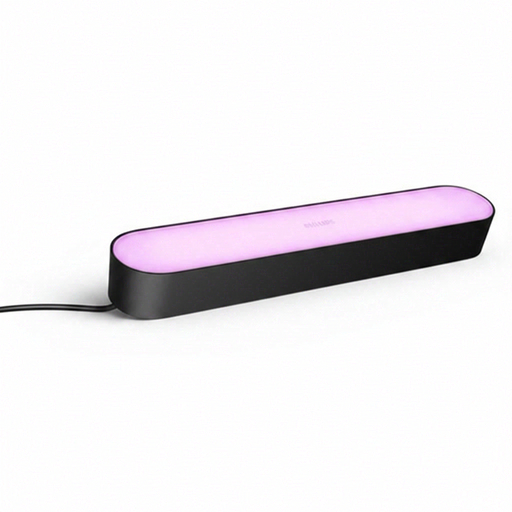
The Philips Hue Play Lightbar is an established product for creating indirect ambient lighting. It is primarily designed for placement behind monitors or TVs and can be positioned horizontally or vertically, or mounted directly to the screen.
-
Why we're featuring this product: The Play Lightbar's strength lies in its seamless integration into the mature Philips Hue ecosystem and the powerful Hue Sync technology. The desktop app synchronizes the light output precisely and with low latency to the content displayed on the screen, which ensures high immersion, especially for movies and games.
-
Pros:
- Effective Backlighting: Creates a soft, diffuse light that can reduce eye strain and improve perceived contrast.
- Powerful Synchronization: The Hue Sync software for PC/Mac offers one of the most responsive screen-mirroring functions on the market.
- Flexible Ecosystem: Can be combined with a variety of other Hue products and controlled centrally.
- Flexible Positioning: Included stands and mounts allow for horizontal, vertical, or mounted placement.
-
Who it's for: Users looking for reliable and immersive TV backlighting or monitor backlighting. Especially suitable for users who already own a Philips Hue system or are planning to build a comprehensive smart home lighting system. A Philips Hue Bridge is required for full functionality, including Hue Sync.
More Options for Your Desk Setup
While dedicated gaming lights provide dynamic effects, the overall aesthetic of a setup is also influenced by other elements. For more inspiration on organizing and visually enhancing your workspace or gaming area, the Desk Decoration category can offer additional ideas.
Frequently Asked Questions (FAQ)
1. What is the difference between RGB and RGBIC? RGB LED strips can only display one color at a time per segment. This means the entire strip lights up in the same color. RGBIC (Independent Control) lights have an additional chip that allows multiple colors to be displayed simultaneously on a single strip. Each segment can be controlled individually, enabling flowing color gradients and "rainbow" effects.
2. Does all smart gaming lighting require a bridge? No. The need for a bridge depends on the manufacturer and the specific ecosystem. Systems like Philips Hue use a bridge as a central control unit, which can improve stability and responsiveness in large networks. Many other brands, including Yeelight, rely on Wi-Fi-based products that connect directly to the router and require no additional hardware.
3. How do I synchronize my lighting with games? Synchronization is typically done through software from the light manufacturer or a third-party platform. For a direct reaction to in-game events, the lighting must be compatible with platforms like Razer Chroma, Corsair iCUE, or Overwolf. For general synchronization with screen content (screen mirroring), a desktop app like Philips Hue Sync or the Yeelight Station is used, which analyzes the screen's content.
Authored by: Joybuy Product Recommendation Officer