
Buyers Guide for Gaming Keyboards
A new gaming keyboard can significantly impact your precision and overall gaming experience. But the market is flooded with marketing jargon and features that often create more confusion than clarity. Many buyers invest in models that don't meet their needs or are unnecessarily expensive due to superfluous functions. This guide will help you identify the crucial features and avoid common purchasing pitfalls.
By a Joybuy Product Recommendation OfficerPublished July 28, 2026
The 3 Most Common Pitfalls When Buying a Gaming Keyboard
Before we dive into the technical details, it's important to know the most common traps that can lead to a bad purchase.
- The "Mechanical-Feel" Fallacy: Many budget-friendly keyboards advertise a "mechanical feel" but actually use conventional rubber dome technology. These membrane keyboards merely simulate the typing sensation but offer neither the precision nor the durability of a true mechanical keyboard. The result is often a mushy key feel and a shorter lifespan.
- Wrong Keyboard Layout (QWERTY vs. QWERTZ): A common frustration with online shopping is receiving a keyboard with the American QWERTY layout. For users in Germany accustomed to the QWERTZ layout, this leads to constant typos and problems using umlauts (?, ?, ü) and special characters.
- Overloaded Features with No Added Value: An elaborate RGB keyboard with countless lighting modes or complex macro functions looks impressive but drives up the price. Many users find that they rarely use these extras after the purchase. Focusing on core functionality is often the more economical choice.
Crucial Buying Criteria: What to Look For
To find the right PC keyboard for your needs, you should evaluate three core aspects: switch technology, form factor, and connectivity options.
The Switch: The Heart of Every Mechanical Keyboard
The switch type determines the typing feel and response speed. Each switch has a unique actuation behavior. The three main categories are:
- Linear Switches (e.g., Red, Black): These switches offer a smooth, consistent keystroke from top to bottom with no resistance. They are quiet and allow for rapid, repeated inputs, making them a popular choice for FPS and action games.
- Tactile Switches (e.g., Brown): They provide noticeable but quiet feedback (a small "bump") upon actuation. This tactile point confirms the input without producing a loud clicking sound. They are a great all-rounder for both gaming and productive typing.
- Clicky Switches (e.g., Blue): A keyboard with blue switches produces both tactile feedback and a distinct, audible clicking sound. Many users appreciate this acoustic signal when typing, but it can be considered disruptive in quiet environments or when using a microphone.
The Form Factor: From Full-Size to 60% Keyboard
The size of the keyboard affects ergonomics and the available space on your desk.
- Full-Size (100%): The standard format with a number pad, function keys, and navigation cluster. Suitable for users who frequently need the numpad for work or gaming.
- TKL Keyboard (Tenkeyless, 80–87%): These models omit the number pad. The more compact design creates more space for mouse movement, which is especially beneficial in games that use low mouse sensitivity.
- Compact Formats (75%, 65%, 60%): A 60% keyboard reduces the layout to the essential keys, integrating functions like arrow or F-keys into a secondary layer (accessible via the Fn key). These formats are extremely space-saving and portable.
Connectivity and Customisation
The choice between a wired and a wireless gaming keyboard depends on personal preference. Wired models offer a stable connection with no latency or battery concerns. However, modern wireless technologies (2.4 GHz) are now so advanced that they provide comparable performance without the cable clutter.
For enthusiasts, a hot-swap keyboard is also an interesting option. On these models, the mechanical switches can be replaced without soldering, allowing for easy customisation of the typing feel to suit individual preferences.
For Your Specific Needs
Here are some recommendations tailored to different needs and budgets.
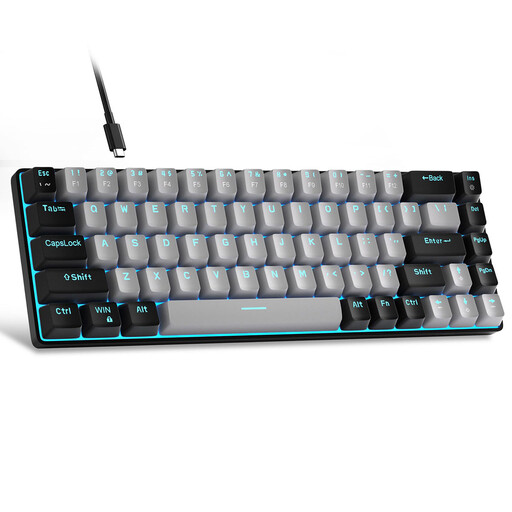
MageGee MK-Box 60% Wired Mechanical Gaming Keyboard
Why This Fits Their Persona: This model offers a solid entry into the world of mechanical keyboards. The compact 60% format is ideal for setups with limited space, and its focus on core functions keeps the price low.
It avoids the 'mechanical-feel' trap by using genuine mechanical Blue switches that provide clear, tactile feedback instead of just simulating it.
True mechanical switches for precise feedback; very space-saving 60% design with a detachable USB-C cable.
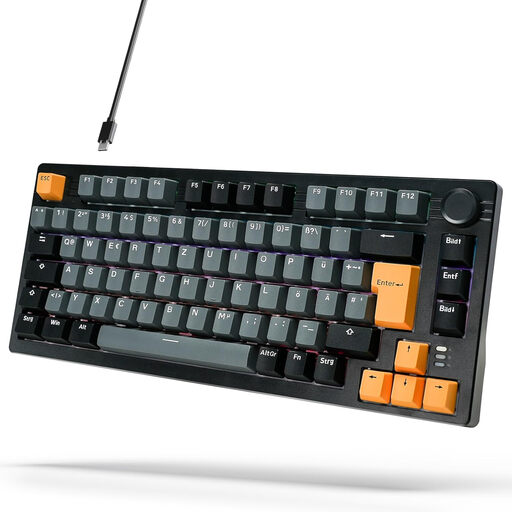
ARZOPA 75% German Layout Mechanical Keyboard
Why This Fits Their Persona: This model is an excellent compromise for users who need a keyboard for both gaming and daily typing. The 75% layout retains essential keys, while the volume knob adds extra convenience.
It directly solves the layout problem by offering a native German QWERTZ gaming keyboard layout. This makes it ready to use out of the box for the German market without any adjustment period.
German QWERTZ layout; gasket-mount structure for a dampened and pleasant typing feel; convenient volume knob.
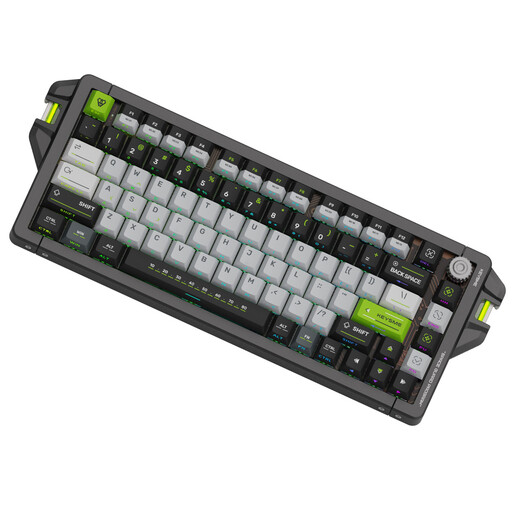
KEYSME AHD-HCKR-C 75% Gaming Keyboard
Why This Fits Their Persona: Designed for competitive gaming where every millisecond counts. This model offers cutting-edge technology like magnetic switches with an adjustable actuation point and an extremely high polling rate for virtually lag-free inputs.
Instead of focusing on visual gimmicks, this keyboard relies on functional, premium features. The adjustable actuation points are a real performance advantage for demanding gamers, not just a marketing gimmick.
Gateron Magnetic Switches with an adjustable actuation point (0.1–4.0 mm); 8000 Hz polling rate for minimal latency; high-quality CNC aluminium body.
Looking for More Options?
We have compiled a complete, real-time updated list of products that fully meet these strict selection criteria and relevant safety regulations.
Frequently Asked Questions (FAQ)
What distinguishes a mechanical keyboard from a standard PC keyboard?
The main difference lies in the technology beneath the keys. A mechanical keyboard uses an individual, physical switch for each key. This provides a more precise, consistent typing feel and significantly higher durability (often 50 million clicks or more per key). Standard keyboards typically use a rubber membrane (rubber dome) that wears out over time and provides a mushier feel.
What is the lifespan of a mechanical gaming keyboard?
The lifespan is generally determined by the durability of the switches. Most mechanical switches are rated for 50 to 100 million keystrokes. With average use, a well-maintained mechanical keyboard can last for many years, often significantly longer than a conventional membrane keyboard.
Is a QWERTZ gaming keyboard necessary for users in Germany?
Yes, for most users in Germany, a QWERTZ gaming keyboard is highly recommended. This layout corresponds to the German standard, which makes typing texts, emails, and using special characters and umlauts in daily life much easier. While you can get used to a QWERTY layout for gaming-only purposes, using it for anything else quickly becomes cumbersome.