
Complete Gaming Headset Buyer's Guide
The search for the right gaming headset can quickly become overwhelming. Manufacturers advertise with technical specs and marketing buzzwords that often promise more than they deliver. A bad purchase is not only frustrating but also detracts from the gaming experience and team communication. Before you make a decision, it's crucial to understand the most common pitfalls that lead to unsatisfying results.
Common Pitfalls When Buying a Gaming Headset:
- The "Virtual Surround Sound" Myth: Many headsets advertise 7.1 surround sound, which is often just software-based emulation. In practice, this feature can distort the soundscape and make it harder, not easier, to pinpoint sounds in competitive games. A high-quality stereo soundstage is frequently the more reliable foundation.
- Poor Comfort During Long Sessions: A headset might have impressive specs on paper, but if it starts to pinch after an hour, is too heavy, or makes your ears overheat, it becomes unusable. Clamping force, weight, and ear cup materials are critical factors that are often overlooked.
- Inadequate Microphone Quality: Crystal-clear game audio is of little use if your teammates can only hear you choppily or drowned out by background noise. Many integrated microphones fail to effectively filter out background sounds like keyboard clicks or case fans.
What Really Matters When Making Your Choice
To make an informed decision, you should focus on a few crucial technical parameters. These are the primary determinants of your equipment's performance and longevity.
1. Driver Technology and Sound Profile
The audio drivers are the speakers inside the earcups. While their size, often given in millimeters (e.g., 50mm drivers), is an indicator of potential power, the driver tuning is more critical. A balanced sound profile that clearly separates highs, mids, and lows is more advantageous for locating footsteps and other important in-game sounds than an overly bass-heavy sound. Look for product descriptions that emphasize a nuanced sound reproduction rather than just boasting about bass performance.
2. Microphone Pickup Pattern and Type
For clear communication, a good headset with a microphone is essential. The pickup pattern (or polar pattern) describes the direction from which the microphone captures sound.
- Cardioid: This pattern primarily captures sound from the front, rejecting noise from the sides and rear. This is ideal for isolating your voice and minimizing keyboard clatter or other ambient sounds.
- Omnidirectional: Captures sound equally from all directions. This often results in less clear voice transmission in noisy environments.
For demanding users or streamers, a separate streaming microphone, often in the form of a USB microphone, can offer a significant quality upgrade over integrated solutions.
3. Connection Type and Platform Compatibility
The choice of connection depends directly on your primary platform.
- 3.5mm Jack: Offers universal compatibility with almost all devices, including controllers for a PS5 headset or Xbox, PCs, and mobile devices. Functionality is limited to audio and microphone transmission.
- USB Connection: Primarily used for a PC headset. USB connections often enable additional features like integrated sound cards, customizable EQ settings via software, and a more stable power supply for features like RGB lighting.
Always check the manufacturer's compatibility list before purchasing to ensure the headset will work as intended on your console or PC.
Leading Choices For You
Here are some product recommendations tailored to specific user profiles and their needs.
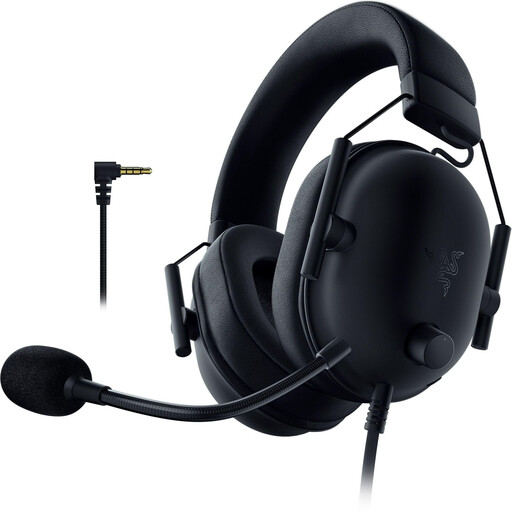
Razer BlackShark V2 X (PlayStation Licensed) Gaming Headset
Why It's a Great Fit: Specifically designed for use with PlayStation 5 and 4. Its low weight of only ~240 grams and memory foam ear cushions ensure high comfort during long gaming nights. The 3.5mm jack connects directly to the controller.
Relies on high-quality Razer TriForce 50mm drivers for clear, nuanced stereo sound instead of software gimmicks. The Razer HyperClear Cardioid Mic ensures clear voice transmission, and the lightweight design prevents comfort issues.
Advanced passive noise cancellation thanks to closed-back earcups. High compatibility with PC, Switch, and mobile devices via the universal 3.5mm jack.
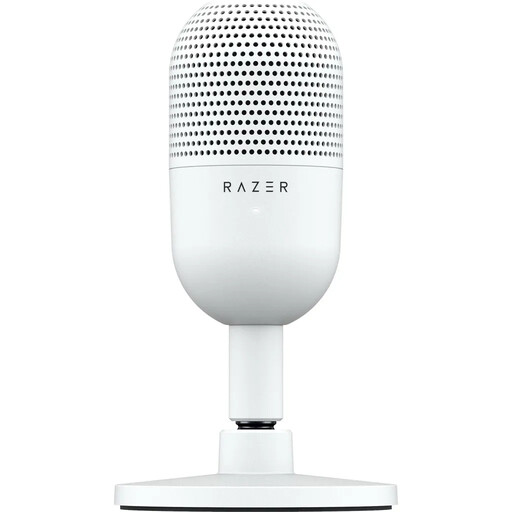
Razer SEIR?N V3 MINI Ultra-Compact USB Microphone
Why It's a Great Fit: For streamers and podcasters who want to elevate their audio quality to a more professional level. This dedicated USB microphone is a significant upgrade from any headset mic and is ready to use instantly thanks to its plug-and-play design.
Fundamentally solves the problem of inadequate microphone quality. The Supercardioid pickup pattern focuses precisely on the voice and suppresses ambient noise even more effectively than a standard cardioid mic.
Convenient tap-to-mute sensor with an LED status indicator for instant control. The ultra-compact design saves desk space and is ideal for minimalist setups.
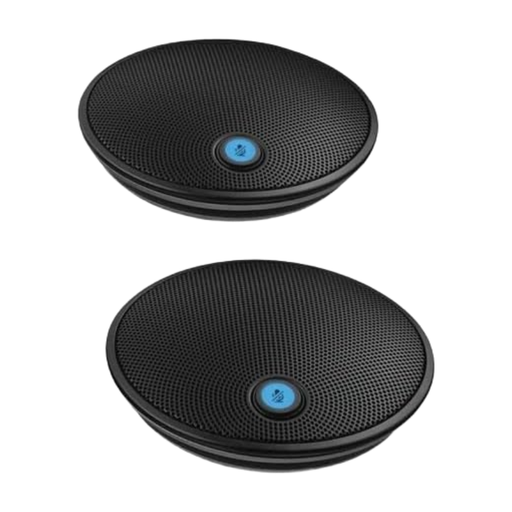
Logitech ConferenceCam Group Expansion Microphones
Why It's a Great Fit: A specialized solution for scenarios with multiple speakers in one room, such as for podcasts, local co-op streams, or esports team meetings. These expansion microphones are designed for the Logitech Group conference system.
Solves a problem that individual gaming headsets cannot handle: clear audio capture of an entire group. It bypasses typical headset issues by providing a dedicated solution for room acoustics.
Extends the audio pickup radius to up to 8.5 meters (28 feet). Simple plug-and-play setup with automatic detection and separate mute buttons on the microphones for greater control.
Looking for More Options?
If you need specialized solutions or accessories for your setup, you can find more products that meet strict selection criteria in our curated collection.
Frequently Asked Questions (FAQ)
1. How long does a good gaming headset last? The lifespan heavily depends on build quality and care. Models with a robust metal frame and replaceable cables or ear pads generally last longer. With proper care, a high-quality headset can function reliably for several years. Pay special attention to the cables, as cable failure is a common cause of malfunction.
2. Is a wired or wireless gaming headset better? Both types have pros and cons. Wired headsets offer a latency-free connection and don't require charging, making them highly reliable for competitive gaming. Wireless headsets provide maximum freedom of movement but must be charged regularly. Modern wireless technologies have significantly reduced latency, but for professional gamers, the wired option often remains the top choice.
3. Do I need special software for my PC headset? That depends on the connection. Headsets with a 3.5mm jack are pure plug-and-play devices and require no software. A USB headset, such as a Razer headset, often comes with optional software (e.g., Razer Synapse). This software allows you to customize EQ settings, adjust the microphone, or manage surround sound profiles. However, the software is usually not mandatory for basic functionality.