
The Right Computer Mouse: Buyer's Guide
Choosing a new computer mouse can be daunting given the vast array of models, features, and designs. Whether for a home office, intense gaming sessions, or to relieve wrist strain, the requirements are as unique as the users themselves. This guide will help you understand the technical features and make an informed decision that is perfectly tailored to your needs. As your Joybuy Product Recommendation Officer, I have compiled the essential criteria and several recommended models for you.
What to Look for When Buying a Computer Mouse
To find the right mouse for your PC or laptop, it's helpful to consider a few key factors. The following points will provide you with guidance.
Connection Type: Wired or Wireless?
The choice between a wired mouse and a wireless mouse depends on your priorities.
- Wired Models: These mice connect directly to the computer via a USB cable. They offer a consistently stable, latency-free connection and do not require batteries, making them a reliable and low-maintenance choice for stationary workstations.
- Wireless Models: A wireless mouse offers maximum flexibility and a clutter-free desk. The connection is established either via a small USB receiver (2.4 GHz) or directly through a Bluetooth mouse connection. Modern wireless mice provide long battery life and stable connections sufficient for most use cases, including gaming.
Ergonomics and Design for Enhanced Comfort
Long hours at the computer can lead to strain in the wrist and arm. An ergonomic mouse is designed to support a more natural hand posture.
- Standard Design: Symmetrical mice are equally suitable for left- and right-handed users and are designed for general use.
- Ergonomic Design: These models are contoured to the shape of the right or left hand, offering a more comfortable resting surface.
- Vertical Mouse: A vertical mouse positions the hand in a "handshake" posture. This neutral position can help reduce strain on the forearm and wrist.
Use Case: Gaming, Office, or Both?
A mouse's features should match its primary purpose.
- Office Mouse: For everyday tasks in the office or at home, a simple, reliable mouse with standard functions is sufficient. A silent mouse with muted click sounds is particularly beneficial in open-plan offices or quiet environments.
- Gaming Mouse: A gaming mouse is distinguished by additional features, such as a high and adjustable DPI count for precise and fast cursor movements, programmable buttons, and very low latency.
Top Computer Mouse Recommendations
Here is a selection of models that cover a range of needs—from a basic office mouse to a specialized gaming mouse.
Logitech B100 Wired Mouse
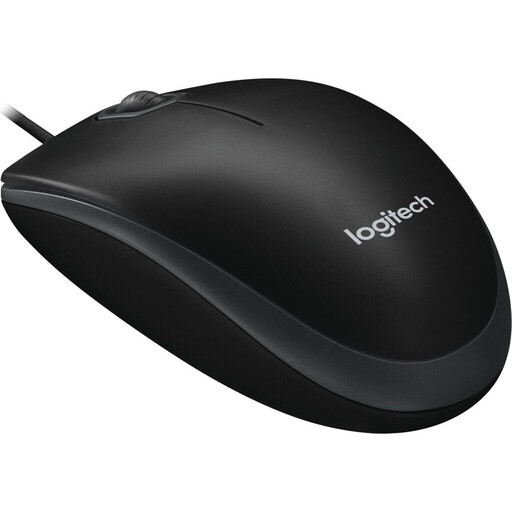
Why it stands out: The Logitech B100 is a prime example of functionality and reliability. It focuses on the essentials and works right out of the box without any software installation.
Pros:
- Plug-and-Play: Simply connect via USB and get started immediately.
- Ambidextrous Design: Suitable for both left- and right-handed users.
- Precise Sensor: The 800 DPI optical sensor ensures smooth and accurate control for everyday tasks.
- Maintenance-Free: As a wired mouse, it requires no batteries.
Who it's for: Users looking for a straightforward, durable, and cost-effective mouse for daily use in the office or at home.
MSI Versa 300 Wireless Gaming Mouse
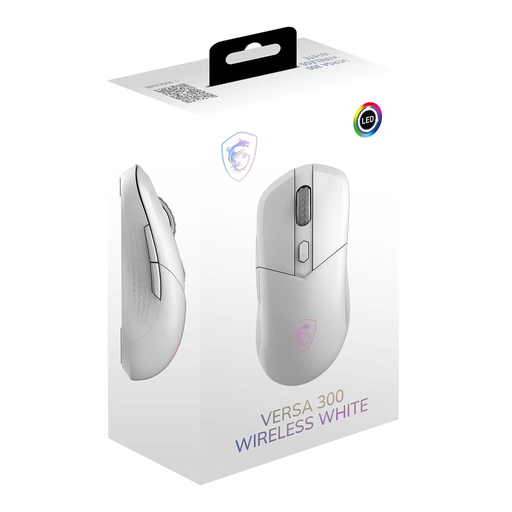
Why it stands out: The MSI Versa 300 combines an ultra-lightweight design with high-performance technology and flexible connectivity options. It's an excellent choice for both gamers and demanding power users.
Pros:
- Tri-Mode Connectivity: Use it wirelessly via 2.4 GHz, Bluetooth 5.3, or wired with USB-C.
- High Precision: The optical sensor offers an adjustable resolution of up to 8000 DPI and a 1 ms latency.
- Lightweight: Weighing just 60g, it allows for fast, fatigue-free movements.
- Long Battery Life: According to the manufacturer, the battery provides up to 50 hours of use.
Who it's for: Gamers and power users seeking a lightweight, responsive, and versatile gaming mouse with wireless freedom.
RAPOO M300G Silent Wireless Mouse
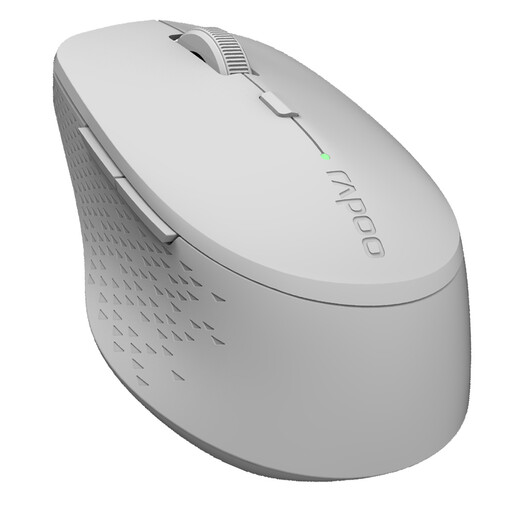
Why it stands out: The RAPOO M300G is a silent mouse specifically designed for use in quiet environments. Its ability to connect to multiple devices makes it a flexible companion.
Pros:
- Quiet Clicks: The buttons are designed to reduce click noise by up to 90%.
- Multi-Mode Connection: Seamlessly switch between up to two devices (via Bluetooth and a 2.4 GHz receiver).
- Adjustable Sensitivity: DPI levels can be adjusted between 800 and 2400.
- Long Battery Life: With a single AA battery, it achieves a runtime of up to 12 months, according to the manufacturer.
Who it's for: Professionals in open-plan offices, students in libraries, and anyone who needs a quiet and flexible wireless mouse for working across multiple devices like a PC, laptop, or tablet.
Anker CE100 Wired Vertical Mouse
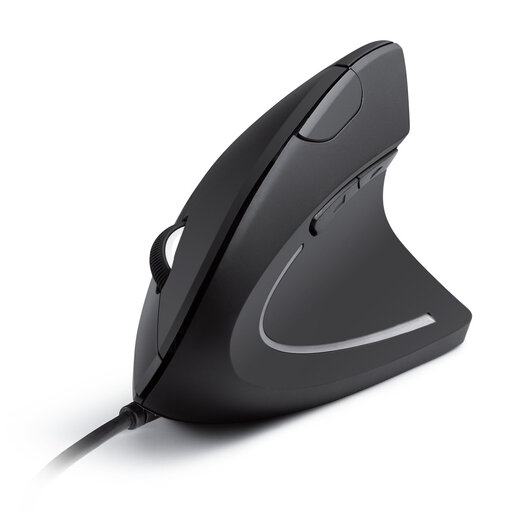
Why it stands out: The Anker CE100 features an ergonomic design to enhance comfort during prolonged use. Its vertical orientation promotes a natural posture for your hand and arm.
Pros:
- Ergonomic Design: The "handshake" position can help reduce wrist strain.
- Precise Control: The optical sensor offers two adjustable levels (1000/1600 DPI) for accurate navigation.
- Additional Buttons: Forward and back buttons make web browsing easier.
- Easy to Use: As a wired mouse, it's ready to use instantly with plug-and-play.
Who it's for: Individuals who spend long hours at the computer and want to proactively prevent wrist strain. A great choice for office workers, writers, and designers looking for an ergonomic mouse.
Looking for More Options?
If you haven't found the right model among these recommendations, you can find an even larger selection in our collection. Discover more models that meet your specific needs.
Explore our full range of USB optical mice
Frequently Asked Questions
What is the difference between an optical and a laser mouse?
Optical mice use an LED to illuminate the surface, while laser mice use a laser beam. In practice, modern optical mice are very well-suited for most surfaces, except for glass. Laser mice often offer higher precision and also work on glossy surfaces, but they can be more sensitive to dust. For most users, an optical mouse is perfectly sufficient.
How important is the DPI value for a computer mouse?
DPI (Dots Per Inch) describes the sensitivity of a mouse. A higher DPI value means the cursor moves further across the screen with the same physical movement of the mouse. For standard office applications and Full HD resolution screens, values between 800 and 1600 DPI are generally ideal. Gamers or users with very high-resolution monitors (4K) benefit from higher DPI values, as they allow for fast and wide movements with minimal effort.
Can an ergonomic mouse help prevent wrist pain?
An ergonomic mouse, especially a vertical mouse, is designed to hold the hand in a more natural, neutral position. This can help reduce the tension in the muscles and tendons of the forearm and wrist that can arise from using a conventional flat mouse. Many users report noticeable relief during prolonged computer use. However, it is not a medical device and does not replace medical advice for existing conditions.