
Ergonomic Mouse Guide and Top Picks
By Joybuy Product Recommendation Officer, July 04, 2026
Long days at the computer are a daily reality for many. However, hours of clicking and scrolling with a conventional mouse can lead to strain in your hand, wrist, and forearm. An ergonomic mouse is designed to promote a more natural hand posture, which can help reduce this strain.
This article serves as your guide. We'll introduce different types of ergonomic mice and present a selection of models to help you choose the right device for your needs.
What to Look for When Buying an Ergonomic Mouse
Choosing the right model depends on your individual needs and workflow. Three key criteria will help guide your decision.
1. Form Factor: Vertical or Contoured?
The most striking feature of many ergonomic mice is their shape. They are generally divided into two types:
- Vertical Mouse: These models, like the Logitech MX Vertical, place your hand in a "handshake" position. This 57-degree angle reduces forearm twisting (pronation), which can decrease muscle activity, according to the manufacturer. A vertical mouse is often worth considering for users seeking relief to prevent issues like tendonitis or for those with existing wrist pain.
- Contoured Mouse: These mice maintain a more horizontal orientation but are highly sculpted to fit the natural curve of the hand. Models like the Logitech MX Master 4 offer a generous thumb rest and a sweeping shape that fully supports the hand. They are often ideal for users who want to combine high functionality with improved comfort without switching to a completely new hand posture.
2. Connectivity and Flexibility
A wireless ergonomic mouse offers maximum flexibility and a clutter-free workspace. Most models connect via Bluetooth or an included USB receiver. Pay attention to battery life and charging options. Some mice use replaceable batteries, while others are rechargeable via a USB-C port, allowing for uninterrupted use.
3. Specific Needs: Left- or Right-Handed
Most mice are designed for right-handed users. The selection for left-handers is more limited, but there are dedicated models that offer mirror-image ergonomics. A specific mouse for left-handers is crucial to fully leverage the ergonomic benefits, rather than using an ambidextrous but often unergonomic mouse.
Top Ergonomic Mouse Recommendations
Based on functionality, design, and user needs, we've compiled a selection of models that cater to different requirements.
Logitech MX Master 4 Ergonomic Wireless Mouse
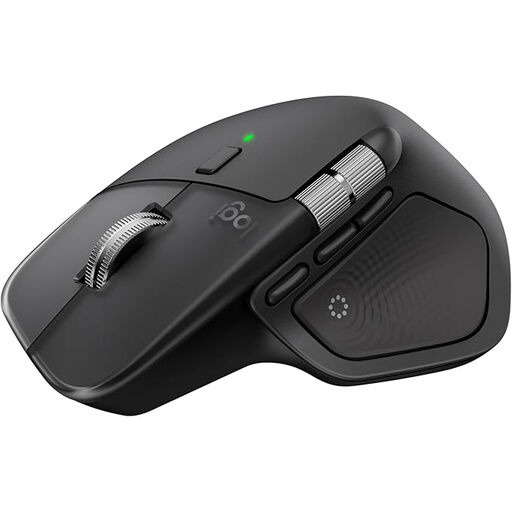
View the Logitech MX Master 4 on Joybuy.de
Why It Stands Out: The MX Master 4 is less of a purely vertical mouse and more of a productivity powerhouse with a highly contoured, ergonomic design. It stands out with advanced features like a haptic feedback system and the MagSpeed scroll wheel, which allows for scrolling up to 1,000 lines per second. The 8K DPI sensor tracks precisely on almost any surface, including glass.
Pros:
- Highly customisable with Logi Options+ software
- MagSpeed scroll wheel for fast and precise scrolling
- Thumb wheel for horizontal scrolling
- Multi-device connectivity for up to three devices
- Quick-charge feature via USB-C
Who It's For: Power users, developers, and creative professionals seeking maximum functionality, customisation, and efficiency in an ergonomically shaped ergonomic office mouse.
Logitech Lift Left Vertical Ergonomic Mouse
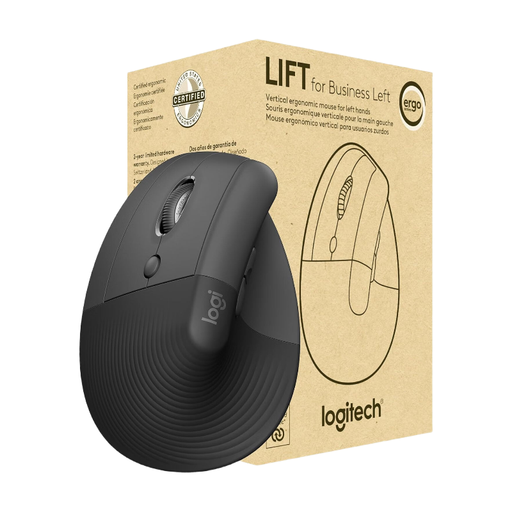
View the Logitech Lift Left on Joybuy.de
Why It Stands Out: This model is the answer for anyone looking for a dedicated mouse for left-handers. The Logitech Lift Left adopts the proven vertical mouse concept with a 57° angle to bring the wrist into a natural handshake position. Its quiet clicks and SmartWheel scroll wheel make it a discreet office companion.
Pros:
- Specifically designed for left-handers
- Vertical 57° design to promote a natural hand posture
- Very quiet clicks
- Long battery life of up to 24 months (with one AA battery)
- Dual connectivity via Bluetooth and Logi Bolt USB receiver
Who It's For: Left-handed office workers and users looking for a straightforward and effective vertical mouse to relieve wrist strain during daily computer work.
Logitech MX Vertical Ergonomic Mouse
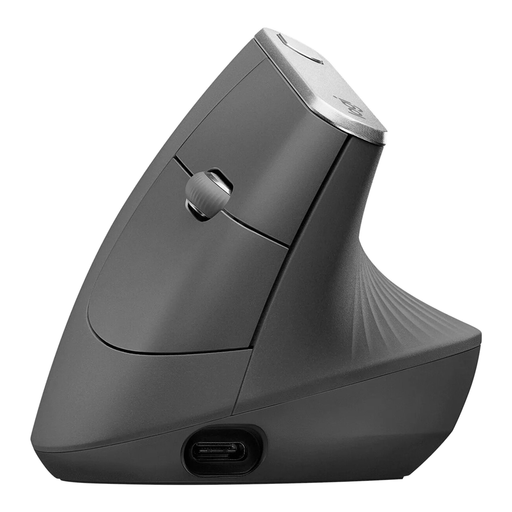
View the Logitech MX Vertical on Joybuy.de
Why It Stands Out: The Logitech MX Vertical is an established model that puts ergonomics front and centre. Its science-backed design, with the characteristic 57° angle, aims to reduce muscle strain. The high-precision 4000 DPI sensor requires less hand movement for the same cursor distance, which can further reduce fatigue.
Pros:
- Advanced ergonomic design to reduce muscle strain
- High-precision sensor with customisable speed
- Rechargeable battery with USB-C quick-charge function
- Switch between up to three devices at the touch of a button
- Customisable buttons via Logi Options+ software
Who It's For: Users specifically looking for a mouse for wrist pain or for prevention who prefer a vertical hand posture. It's a great choice for long workdays in the office or at home.
Explore More Options
This selection covers common use cases, but the market offers many other models for different hand sizes, budgets, and feature preferences. If you haven't found the right device here, there are more alternatives to explore.
Explore our full range of ergonomic computer mice and find the model that perfectly fits your needs.
Frequently Asked Questions
What defines an ergonomic mouse?
An ergonomic mouse is characterised by a design that supports a more natural posture for the hand, wrist, and forearm. The goal is to reduce the muscle strain and pressure on tendons that can occur when using a conventional mouse for long periods. This is usually achieved through a vertical or a highly contoured design that is sculpted to the shape of the hand.
How long does it take to get used to a vertical mouse?
The adjustment period for a vertical mouse varies by individual but typically takes a few days to a week. During this time, your muscle memory adapts to the new hand posture and movement. It can be helpful to start by using the mouse for less precision-critical tasks and gradually increase your usage time.
Can an ergonomic mouse help with wrist pain?
An ergonomic mouse is designed to reduce strain on muscles and tendons. By promoting a more neutral wrist position, it can help prevent or alleviate discomfort caused by repetitive strain. However, it is not a medical device and does not replace consulting a doctor or physical therapist for persistent or severe pain.