
Buying a Dolby Atmos soundbar: a guide for TV, films and gaming
A Dolby Atmos soundbar can make your TV’s sound feel much more immersive. However, many products are advertised with high wattage, lots of channels or “3D sound” without explaining what you need for convincing playback. It’s not individual headline figures that matter, but how the speaker layout, connections, room and positioning work together.
Common buying and marketing pitfalls
1. Mistaking the channel count for genuine surround sound
A 5.1 or 7.1 soundbar can create surround effects. However, the number doesn’t always tell you how many physical speakers there are. Some systems use virtual sound fields, while others come with separate rear speakers. To understand what you’re getting, check the technical specifications to see whether additional speakers are included.
Dolby Atmos also adds height effects. Soundbars create these using either up-firing speakers or digital simulation. Reflective ceilings and a suitable ceiling height can affect the result.
2. Looking at wattage in isolation
Peak power figures are momentary readings and tell you little about sound quality during everyday use. More useful details include the speaker configuration, frequency range, connection types and what’s included in the box. A large subwoofer, for example, can deliver deeper bass, but it needs floor space and a power socket.
3. Overlooking connections and TV compatibility
For current film and gaming formats, HDMI-eARC is often the most practical connection. It can carry compatible audio formats with high bandwidth and, depending on your TV and soundbar, lets you control both devices with one remote. Standard HDMI-ARC or an optical input may be enough, but they don’t offer the same audio options in every setup.
Key things to check before you buy
Dolby Atmos, DTS:X and speaker layout
Dolby Atmos is an object-based audio format that processes vertical as well as horizontal sound information. A Dolby Atmos soundbar needs the right decoding and suitable speakers to deliver it. For example, a 3.1.2-channel model has three main channels, one bass channel and two height channels.
A system with separate rear speakers can create a different sense of spatial separation from a single soundbar. So check:
- Does it have up-firing speakers?
- Are rear speakers included?
- Does the device support Dolby Atmos through the input you want to use?
- Does it also support DTS:X, Dolby Digital Plus or Dolby TrueHD?
Subwoofer and placement
A soundbar with a subwoofer can play low frequencies separately. With a wireless subwoofer, there’s no audio cable between the soundbar and the bass speaker, although a power cable is usually still needed. Choose a stable position with enough ventilation and space from the walls, as the subwoofer’s location affects the bass.
If space is limited, a compact TV soundbar may be a better choice. For films, gaming and larger rooms, systems with additional speakers offer more options, but need more space and cable management.
Connectivity and controls
For connecting to your TV, HDMI-eARC, HDMI-ARC, an optical input and Bluetooth are particularly useful. Bluetooth is mainly for playing music from your mobile phone; it doesn’t generally replace a wired TV connection. Wi-Fi, AirPlay, Chromecast or a manufacturer’s app can offer extra streaming and adjustment options.
Also check whether the soundbar will block the TV’s sensor and whether it’s suitable for wall mounting. A soundbar that sits too high could cover the edge of the screen or interfere with the remote control.
Our picks for different needs
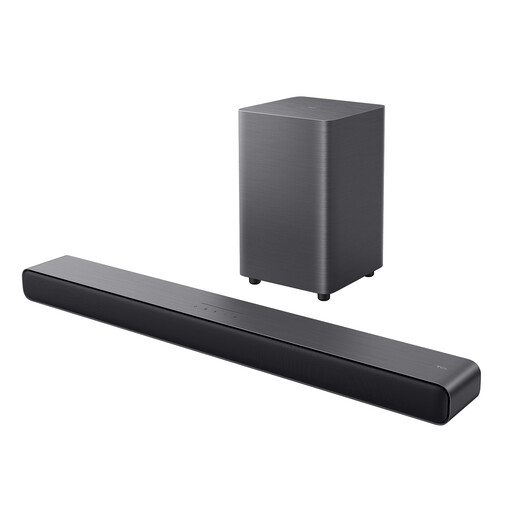
TCL S55HE 2.1-channel soundbar with wireless subwoofer
Why this product suits this profile: The 2.1 system is designed to connect easily to your TV and offers HDMI-eARC, Bluetooth, USB and an optical input.
The specifications clearly state that it has a 2.1-channel layout and a separate 4-inch subwoofer. This makes it easy to distinguish from a purely virtual multi-channel system.
Dolby Atmos, DTS Virtual:X, six sound modes and a wireless subwoofer in a compact system.
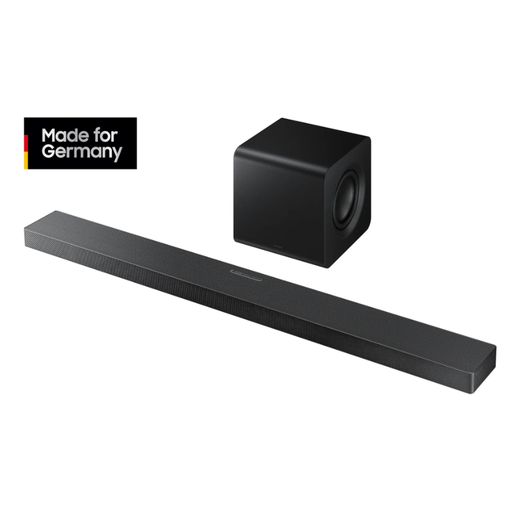
Samsung Q-Series HW-QS710GF 3.1.2 soundbar with wireless subwoofer
Why this product suits this profile: Its combination of 3.1.2 channels, up-firing speakers, Wi-Fi, Bluetooth and multiple HDMI features is well suited to TV owners with a versatile setup.
The box contents and connections are listed in detail. HDMI-ARC, an optical input, and 4K and HDR10+ pass-through make it easier to plan a setup with multiple devices.
Dolby Atmos and DTS:X, SpaceFit Sound Pro, Adaptive Sound, Wi-Fi, Bluetooth 5.2 and compatibility with optional rear speakers.
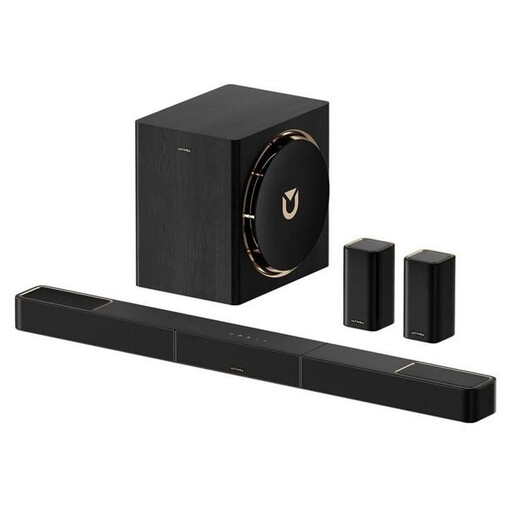
Ultimea Skywave X60 7.1.4 Dolby Atmos soundbar
Why this product suits this profile: This system is for anyone planning a home cinema sound setup with rear speakers, a wireless subwoofer and app control.
The 7.1.4 layout, wireless rear speakers and connection types are listed separately. This makes it clear which components are actually part of the system.
Dolby Atmos, 7.1.4-channel layout, 8-inch subwoofer, wireless rear speakers, HDMI-eARC and app-based sound adjustment.
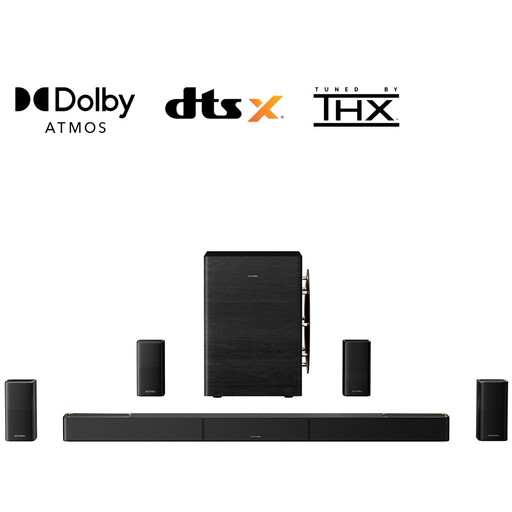
Ultimea Skywave X100 9.1.6 Dolby Atmos soundbar
Why this product suits this profile: For larger rooms and setups with multiple source devices, its many speakers, HDMI 2.1 features and separate system components are worth considering.
The specifications list 19 speakers, four wireless rear speakers and a 10-inch subwoofer separately. This makes it easy to distinguish from compact all-in-one solutions.
9.1.6-channel layout, Dolby Atmos and DTS:X, HDMI 2.1 with 4K/120 Hz and 8K/60 Hz pass-through, plus app EQ.
Looking for more options?
We’ve put together a complete, regularly updated list of products that meet these strict selection criteria and the safety regulations in force in the EU.
Frequently asked questions about Dolby Atmos soundbars
Do I need HDMI-eARC for Dolby Atmos?
Not necessarily. Depending on your TV, soundbar and audio source, HDMI-ARC or an optical input may also work. HDMI-eARC offers greater bandwidth and is the more flexible option for compatible lossless formats. Check that both your TV and soundbar support the connection you need.
Where should I place a Dolby Atmos soundbar?
Place the soundbar centrally, beneath or in front of the TV. Make sure furniture or a wall mount doesn’t block the up-firing speakers. For reflective height effects, it helps to have a clear ceiling that doesn’t absorb too much sound. The subwoofer should sit on a flat surface and not directly in a corner, unless the manufacturer recommends otherwise.
How long does a soundbar last?
Its lifespan depends on how often you use it, ventilation, volume, firmware maintenance and power supply. There’s no reliable way to estimate a fixed lifespan based on the product category alone. Keep it in a dry environment, leave the ventilation openings clear and make sure the cables are securely connected. With systems that include a wireless subwoofer and rear speakers, you should also check all power supplies and plug connections regularly.