
Custom Mechanical Keyboard Buyer's Guide
The search for a high-quality, customisable mechanical keyboard can quickly become overwhelming. The market is filled with technical jargon, marketing promises, and products that appear identical at first glance. As a Joybuy Product Recommendation Officer, I see the daily pitfalls that lead to disappointment and costly buyer's remorse. This guide focuses on the objective criteria that truly matter, helping you make an informed decision.
The 3 Most Common Pitfalls When Buying a Custom Keyboard
Before we dive into the technical details, it's important to understand the most common issues buyers face.
- The "Custom" Illusion: Many keyboards advertised as "custom" or "customisable" offer only superficial modifications, like swapping keycaps. True customisation, however, includes the ability to change switches without soldering (hot-swap keyboard) and remap keys using open standards like VIA. Products lacking these features will severely limit you in the long run.
- The Layout Conflict (ANSI vs. ISO-DE): A vast majority of mechanical keyboards sold online use the American ANSI layout. For users in Germany, this is impractical: the Enter key has a different shape, the left Shift key is wider, and most importantly, dedicated keys for umlauts (?, ?, ?) and the ? are missing. A mechanical keyboard with an ISO-DE layout is essential for fluent typing in the German-speaking world.
- Hidden Costs of Barebone Kits: So-called "barebone" kits are sold without switches and keycaps. The initially low price is tempting, but the cost of high-quality switches and a compatible ISO-DE keycap set can easily double the total price. Always check whether you're buying a complete package or a base kit.
Crucial Technical Features for Your Selection
To make a future-proof investment, you should carefully examine three core parameters. These define the quality, typing experience, and longevity of your keyboard.
1. Layout and Form Factor: Desk Efficiency
The size and arrangement of the keys determine how you interact with the keyboard. While full-size keyboards offer a number pad, more compact form factors are gaining popularity.
- German 75% Keyboard: This layout is an excellent compromise. It removes the number pad and compresses the navigation cluster (arrow keys, Del, Home, etc.) but retains the complete F-key row (F1-F12). The result is a significantly smaller footprint on your desk without sacrificing critical functions. It's ideal for gamers and power users who need more space for their mouse.
- ISO-DE Layout: As mentioned earlier, this is not an option but a necessity for most users in Germany. Look for this specification explicitly in the product description.
2. Mounting Style: The Foundation of the Typing Feel
The way the circuit board (PCB) is mounted inside the case has a huge impact on the typing feel and acoustics.
- Leaf Spring Mount: This is an advanced mounting method found in premium keyboards. The PCB is suspended on flexible, leaf-spring-like arms within the case. Unlike more rigid mounting styles (Tray Mount) or simple seals (Gasket Mount), Leaf Spring Mount allows for noticeable vertical flex as you type. The result is a softer, bouncier, and acoustically dampened typing experience that feels very comfortable during long writing or gaming sessions.
3. True Customisation: Hot-Swap and VIA Compatibility
These two features are at the heart of a true custom mechanical keyboard.
- Hot-Swap Capability: A hot-swap keyboard has sockets on the PCB that allow you to easily pull out the mechanical switches with a special tool and replace them with others—no soldering iron required. This gives you the freedom to change the typing feel (e.g., from linear to tactile) to match your preferences at any time.
- VIA Compatibility: A VIA-compatible keyboard can be configured using the open-source software of the same name. Instead of relying on often clunky and outdated manufacturer software, VIA allows you to intuitively remap any key, create complex macros, and set up different layers for various applications. This is a crucial advantage for programmers and power users.
Product Recommendations for Specific User Profiles
Here are a few models that represent a considered choice for different user profiles, based on the criteria mentioned above.
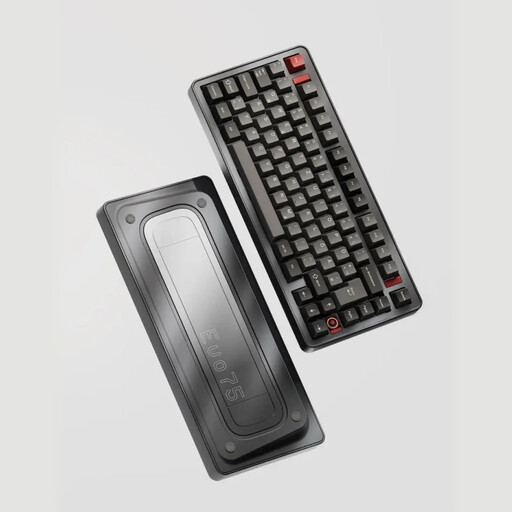
Ticktype EVO75 Custom Tri-Mode Wireless Mechanical Keyboard, ISO-DE Layout - Anodized Basalt Grey
Why This Fits Their Persona: Ideal for programmers, prolific writers, and gamers who need a compact yet fully functional German layout. The 75% form factor saves space without sacrificing the F-keys, which is crucial for many applications and games.
This model comes explicitly with an ISO-DE layout, thus avoiding the most common pitfall. It is a complete, pre-assembled set, not a barebone keyboard. Its VIA compatibility frees you from proprietary software.
The combination of a Leaf Spring Mount, a solid aluminium keyboard case, and full hot-swap capability offers a typing experience typically found only in expensive custom builds.
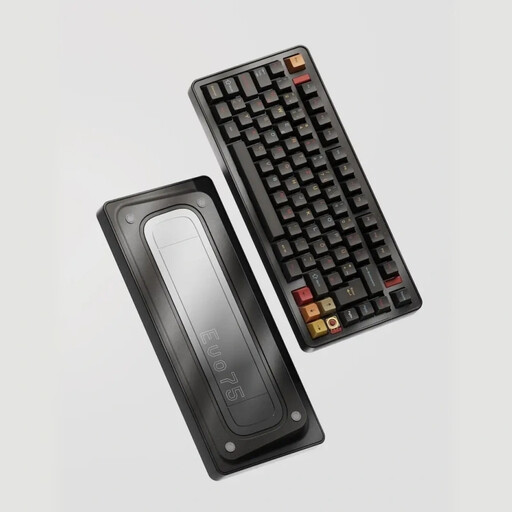
Ticktype EVO75 Custom Tri-Mode Wireless Mechanical Keyboard, ISO-DE Layout - Spray-coated Nebula
Why This Fits Their Persona: For users whose desk setup is an expression of their personality. This keyboard combines all the high-end specs with a unique, cosmic-inspired finish that makes it stand out from the crowd.
Despite its focus on aesthetics, it makes no compromises on core features. You get a full-fledged ISO-DE layout, hot-swap sockets, and a flexible wireless mechanical keyboard with three connection modes (Tri-Mode).
The high-quality spray-coated finish ensures a durable and eye-catching look. The technical foundation is identical to the proven EVO75 platform, which guarantees high performance.
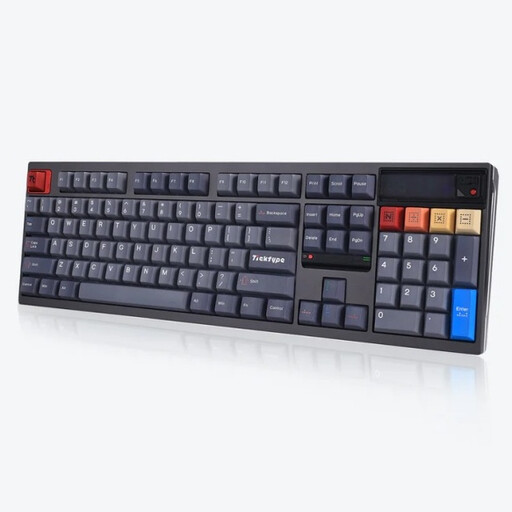
Ticktype DP104 Custom Tri-Mode Wireless Mechanical Keyboard, Full-Size US Layout
Why This Fits Their Persona: Suitable for users who prefer or require a US layout for their work (e.g., programming) and can't do without a number pad. The full-size format offers maximum functionality.
Although it's a US layout, this is communicated transparently. It avoids the "custom" illusion by including genuine premium features like a Leaf Spring Mount, hot-swap capability, and a full aluminium case.
Offers a full-size layout with a number pad and a unique, customisable pixel screen for GIFs or system information. The 8000 mAh battery ensures long wireless usage.
Looking for more options?
We have compiled a complete, up-to-date list of products that fully meet these strict selection criteria and German safety regulations.
Frequently Asked Questions (FAQ)
What is the difference between an ISO-DE and an ANSI layout?
The ISO-DE layout is the standard in Germany and Austria. It is characterised by a tall, two-row Enter key, a short left Shift key, and additional keys for umlauts (?, ?, ?) and other special characters. The American ANSI layout has a wide, single-row Enter key and a long left Shift key, which eliminates one key used for special characters. For typing in German, ISO-DE is significantly more comfortable.
How long is the battery life of a wireless mechanical keyboard?
Battery life depends heavily on the battery's capacity and the use of RGB lighting. Models with large batteries, like the ones featured here with 8000 mAh, can last for several weeks or even months on a single charge with moderate use and the backlight turned off. With full RGB lighting, the battery life is reduced to several days or a week, which is still an excellent figure.
What does "hot-swap" mean, and is it complicated for beginners?
"Hot-swap" means you can change the keyboard's mechanical switches without soldering. The process is very beginner-friendly: using an included tool (a switch puller), you pull the old switch vertically out of its socket and press a new switch with straight pins back in. This allows anyone to change their keyboard's typing feel easily and safely.