
Curved Gaming Monitor: Expert Buyer's Guide for 2026
Choosing a monitor requires an analysis of technical specifications matched to your intended use case. A Curved Gaming Monitor offers a more immersive viewing experience, as its curved design more closely matches the natural field of view of the human eye. This can enhance visual perception, especially for peripheral content, and reduce the need for head movement. Beyond gaming, these monitors are also well-suited for use as a Home Office Monitor and for content creation, where a wide field of view is beneficial.
Buyer's Guide: What to Look For When Choosing
The decision to buy a curved monitor should be based on an evaluation of objective parameters. The following criteria are essential for making an informed choice.
Curvature Radius (R-Value)
The curvature radius, specified in millimetres (e.g., 1500R, 3000R), describes the degree of the curve. A smaller R-value indicates a more pronounced curve.
- 1500R: A pronounced curve that offers a high degree of immersion. It is particularly suitable for gaming and watching films, creating a sensation of being enveloped by the image.
- 3000R: A more subtle curve that strikes a balance between a flat screen and a sharply curved model. It is ideal for users who want the benefits of a curve without a dramatic visual change.
Resolution and Screen Size
Pixel density—the ratio of resolution to screen size—is crucial for image sharpness.
- Full HD (1920x1080): An established standard that provides sufficient sharpness for screen sizes up to about 25 inches. A Full HD Monitor is a solid foundation for gaming and general office applications.
- WQHD / 2K (2560x1440): Offers a significantly higher pixel density than Full HD. A WQHD Monitor is highly recommended for screen sizes of 27 inches and larger to ensure a sharp, detailed image. This is advantageous for high-resolution games and photo or video editing.
Refresh Rate and Synchronisation Technology
The refresh rate, measured in Hertz (Hz), indicates how many frames the monitor can display per second.
- 120 Hz / 144 Hz / 165 Hz: A high refresh rate ensures smoother motion rendering. A 144Hz Monitor or higher is beneficial for fast-paced games (e.g., first-person shooters, racing games) as it reduces motion blur and input lag.
- Adaptive Sync (FreeSync/G-Sync): These technologies synchronise the monitor's refresh rate with the graphics card's frame output. This prevents screen tearing and ensures a stutter-free gaming experience.
Connectivity and Ergonomics
Connectivity and physical adjustment options are crucial for practical use.
- Ports: HDMI and DisplayPort are the common standards. For modern consoles like the PS5, an HDMI 2.0 port or higher is necessary to leverage higher refresh rates at WQHD resolution. A Monitor for PS5 should meet this requirement.
- Ergonomics: Tilt functionality is standard. A VESA Monitor allows for mounting on a wall bracket or monitor arm (e.g., 75x75 mm or 100x100 mm), increasing workplace flexibility.
- Additional Features: An integrated blue light filter and a flicker-free backlight can reduce eye strain during long periods of use, qualifying it as a screen designed for eye comfort. A Monitor with Speakers offers a simple audio solution without the need for external speakers.
Our Top Picks for 2026
Based on the technical criteria mentioned, we present two models that cater to different user profiles.
CRUA 32-Inch Bezel-less 1500R Curved Gaming Monitor
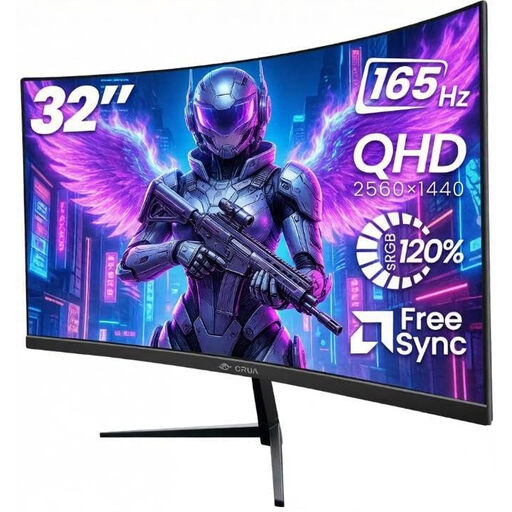
Why We Recommend This Product This model combines a large 32-inch screen with a high WQHD resolution (2560x1440) and a 165 Hz refresh rate. The sharp 1500R curve creates an immersive field of view, making it especially suitable for gaming and multimedia applications. According to the manufacturer, the VA panel offers wide 120% sRGB colour gamut coverage and a high contrast ratio, ensuring detailed and colour-accurate visuals.
Pros
- Display: 32-inch VA panel with 2K QHD resolution (2560x1440) and a 1500R curve.
- Performance: High 165 Hz refresh rate with Adaptive Sync to reduce tearing and stuttering.
- Colour Reproduction: 120% sRGB colour gamut and a 3000:1 contrast ratio for deep blacks.
- Connectivity: Equipped with two HDMI and two DisplayPort ports.
- Ergonomics: Supports VESA mounting (100x100 mm) and tilt adjustment.
Who It's For This model is aimed at PC gamers and content creators who need large screen real estate, high resolution, and fluid image playback. It also serves as a versatile PC Monitor for the home office, especially for multitasking.
Gawfolk 24.5-Inch 1K FHD Curved Monitor
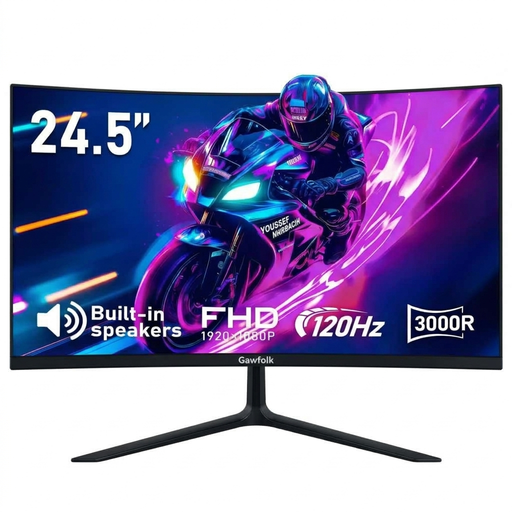
Why We Recommend This Product The Gawfolk monitor offers a more compact 24.5-inch screen with Full HD resolution. Its 120 Hz refresh rate is significantly higher than the 60 Hz standard, enabling fluid motion in games and during fast-paced scenes. The more subtle 3000R curve and integrated speakers make it a practical all-in-one solution for both work and entertainment.
Pros
- Display: 24.5-inch panel with Full HD resolution (1920x1080) and a 3000R curve.
- Performance: 120 Hz refresh rate and AMD FreeSync for smooth visuals.
- Contrast: High 3500:1 contrast ratio for clear definition between light and dark areas.
- Additional Features: Integrated stereo speakers and eye-care technologies (TÜV certified).
- Flexibility: Supports VESA mounting (75x75 mm) and features HDMI and VGA ports.
Who It's For This model is a great choice for users with limited desk space, console gamers (Monitor for PS5), and home office users looking for a responsive and versatile screen for everyday tasks and occasional gaming.
Complementary Products and Accessories
An optimised setup is more than just the monitor. The right peripherals and personal accessories also contribute to the overall experience. For instance, those looking for a subtle yet stylish accessory might find a black ring to be the perfect addition to their look.
Frequently Asked Questions (FAQ)
1. Is a curved monitor better for your eyes? A curved screen can potentially reduce eye strain because its curvature aligns with the natural field of view of the human eye. This keeps the viewing distance to all points on the screen, including the edges, more consistent. This can reduce eye movement and the need to refocus. Technologies like Flicker-Free and a blue light filter further help qualify a monitor as a screen designed for eye comfort.
2. What curvature is best for a gaming monitor? The choice depends on personal preference and the intended use. A more pronounced curve like 1500R enhances immersion and is ideal for single-player experiences and simulations. A more subtle curve like 1800R or 3000R offers a good compromise and is also suitable for competitive games and general desktop applications where straight lines are important.
3. Can you use a curved monitor for home office work? Yes, a curved monitor can also offer advantages in a Home Office. Especially with wide ultrawide models, the curve improves the readability of content at the screen edges. This is useful for working with multiple windows side-by-side. However, for applications that require precise representation of straight lines (e.g., architectural software, spreadsheets), some users may still prefer flat screens.