
Creality 3D Printers: A Professional User's Guide for 2026
The demands on FDM 3D printing have shifted for advanced users and professional applications. Long waiting times, complex manual calibrations, and limitations to standard filaments like PLA are no longer viable for rapid prototyping or manufacturing functional parts. What's needed now is efficiency, precision, and material versatility.
This article serves as an objective guide. It highlights the technical features of current Creality 3D printers and presents a selection of models designed for speed, expanded material compatibility, and automated processes. The goal is to provide you with a solid foundation for making a decision based on your specific requirements.
What to Look for When Choosing a Professional FDM Printer
Choosing the right device depends on its intended use cases. Three technical aspects are particularly relevant for achieving professional results.
1. Kinematics and Print Speed
A high-speed 3D printer is essential for the rapid production of prototypes or small batches. Models with CoreXY kinematics often have an advantage here. In this setup, two motors coordinately move the lightweight printhead in the XY plane, while the print bed only moves along the Z-axis. This allows for high acceleration and print speeds of up to 600 mm/s without causing significant vibrations that could compromise print quality.
2. Material Compatibility and Extruder System
The ability to process engineering filaments significantly expands the range of applications. A 3D printer for carbon fibre (CF) or other abrasive composite materials (e.g., PA-CF, PET-CF) requires specific components. These include a hotend that can reach temperatures of 300°C or more, a hardened steel nozzle to withstand abrasion, and ideally, an enclosed build chamber. When used professionally, such an FDM printer can produce strong and lightweight functional parts.
3. Automation and Firmware
Workflow efficiency is largely determined by automation features. A 3D printer with auto-levelling is now a standard feature for reliable print results. Sensors measure the print bed, and the firmware automatically compensates for any unevenness, ensuring an optimal first layer without manual adjustment. Modern Klipper-based operating systems (Klipper 3D printers) also offer advanced features like "Input Shaping" to reduce artifacts at high speeds.
Our Selection of Creality 3D Printers for 2026
Based on the criteria mentioned above, we have compiled a selection of Creality models suitable for various professional and semi-professional applications.
Creality K2 Plus Combo
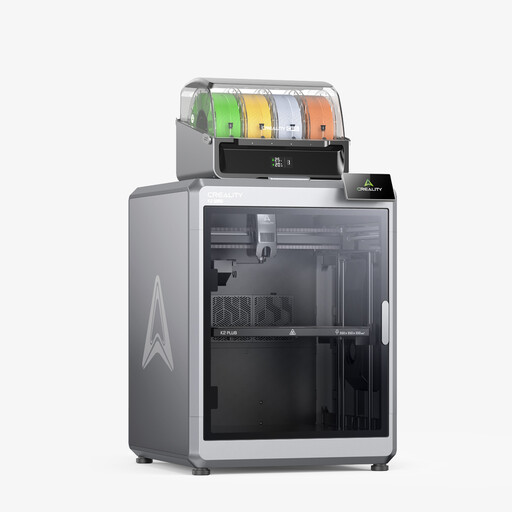
Why it stands out: The K2 Plus Combo is designed for large-volume and complex print jobs. The integrated Creality Filament System (CFS) enables automated multi-colour 3D printing with up to 16 different colours or materials. Its large, actively heated build chamber creates stable conditions for demanding engineering filaments.
Advantages:
- Large build volume: 350 × 350 × 350 mm for large models or parallel production of multiple parts.
- Multi-colour and multi-material printing: The CFS module manages up to 4 spools (expandable to 16) for complex, colourful prints.
- High temperatures: The nozzle reaches up to 350°C, the heated bed up to 120°C, and the chamber up to 60°C, enabling the processing of high-performance polymers like PA-CF and ASA.
- High speed: Maximum print speed of ≤600 mm/s with an acceleration of ≤30000 mm/s².
- Intelligent monitoring: Two AI cameras monitor the printing process and detect errors.
Who is it for? This model is aimed at small business owners, engineers, and prosumers looking for a solution to produce large prototypes, functional end-use parts, or complex, multi-coloured objects. Those who choose to buy the Creality K2 Plus are investing in a comprehensive manufacturing system.
Creality K1C
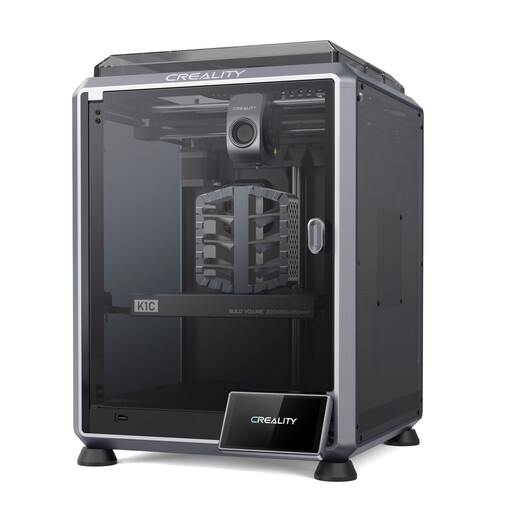
Why it stands out: The Creality K1C is designed as a robust and fast printer for carbon fibre-reinforced filaments. Its clog-free direct drive extruder and "Unicorn" tri-metal nozzle are specifically engineered for abrasive materials. The integrated AI camera and enclosed build chamber make it a reliable tool for technical applications.
Advantages:
- Specialised for carbon fibre: Optimised for printing filaments like PLA-CF, PA-CF, and PET-CF.
- Reliable extruder: The extruder, with its bolster spring and ball plunger, ensures a consistent filament grip.
- High speed: Leverages the CoreXY structure for print speeds of up to ≤600 mm/s.
- Integrated AI camera: Enables remote monitoring and error detection.
- Quiet operation: A selectable silent mode reduces the operating noise to under 45 dB.
Who is it for? The K1C is an excellent choice for users who regularly produce functional parts from durable materials. Engineers and advanced hobbyists considering a detailed Creality K1C review will appreciate its specialisation in engineering filaments.
Creality K1 SE
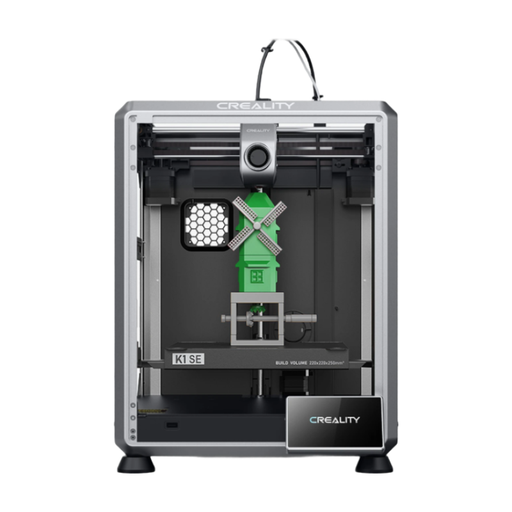
Why it stands out: The K1 SE offers the high speed of the K1 series in an accessible package. It comes pre-assembled and calibrated, allowing for setup in just a few minutes. With features like fully automatic levelling and a robust extruder, it provides a straightforward entry into high-speed CoreXY printing.
Advantages:
- Quick setup: Pre-assembled and featuring one-click auto-calibration for a fast start.
- High print speed: Also reaches up to ≤600 mm/s thanks to its CoreXY system and lightweight printhead.
- Upgraded extruder: Uses the same extruder as the K1C for reliable filament feeding, even with flexible materials like TPU.
- Fast-heating hotend: The 60W ceramic heater reaches 300°C in 75 seconds, according to the manufacturer.
- Open-source OS: The Klipper-based Creality OS allows for advanced customisation.
Who is it for? This model is ideal for ambitious hobbyists looking to upgrade from a slower printer. The attractive Creality K1 SE price point makes the high speed and convenience of CoreXY technology accessible to a wider user base.
Looking for Other Options?
The models featured here cover many, but not all, use cases. If you are looking for different specifications, build volumes, or printing technologies, you can find a broader selection of devices in our Personal Printers category.
Frequently Asked Questions (FAQ)
1. What is the advantage of a CoreXY 3D printer like the Creality K-series? In a CoreXY system, the printhead is very lightweight and is driven by two motors on the side of the frame. The print bed only moves vertically (Z-axis). This design reduces the moving mass, which allows for higher acceleration and speeds with less vibration. The result is often faster print times while maintaining consistent surface quality.
2. Can Creality 3D printers process engineering filaments like carbon fibre? Yes, certain models are designed for it. The Creality K1C and K2 Plus are examples of printers that have the necessary equipment: a high-temperature hotend (300°C or more), a wear-resistant hardened steel nozzle, and an enclosed build chamber to control the ambient temperature. This is crucial for processing abrasive composite materials like PA-CF (nylon-carbon fibre) or PET-CF.
3. What does "auto-levelling" mean on a 3D printer? "Auto-levelling," or automatic bed levelling, refers to a system where the printer independently measures the distance between the nozzle and the print bed at multiple points. This is usually done with an induction or strain gauge sensor. The firmware then creates a digital map of the print bed's surface from these measurement points and dynamically adjusts the Z-height during the first few layers to compensate for any unevenness. This ensures consistently good model adhesion and eliminates the need for manual calibration with paper.