
CPU Cooler Buyer’s Guide: How to Choose the Right Cooler
Choosing the right CPU cooler is a crucial step when building or upgrading a PC. A suitable cooler not only ensures stable temperatures and a longer lifespan for your processor but can also significantly reduce system noise. However, given the vast array of models on the market—from compact solutions for small cases to high-performance tower coolers for high-end systems—the decision can be complex.
This guide is designed to provide you with objective information and clear guidance. We will introduce various models and explain the key criteria you should consider in your selection to make an informed decision for your system.
What to Look for When Choosing a CPU Cooler
Before you decide on a model, several technical aspects should be checked. These ensure that the cooler not only fits your processor but also the rest of your system.
Compatibility: Socket, Case, and RAM
The most fundamental requirement is compatibility with your motherboard's CPU socket. Current platforms, for example, use the LGA 1700 cooler for Intel processors or the AM5 cooler for AMD CPUs. Always check the manufacturer's specifications to ensure the cooler is compatible with your socket.
Equally important is the cooler's height. Measure the available space in your PC case from the CPU surface to the side panel. This space is especially limited in compact SFF (Small Form Factor) cases. A tower cooler that is too tall could prevent the side panel from closing. Also, pay attention to the cooler's width to avoid conflicts with high-profile RAM modules or the motherboard's VRM heatsinks.
Cooling Performance and TDP Value
The cooling performance of a CPU cooler is often stated in relation to its Thermal Design Power (TDP). The TDP value, measured in watts, describes the maximum amount of heat a processor generates under full load that must be dissipated by the cooling system. Choose a cooler whose specified cooling capacity at least meets or exceeds your CPU's TDP value, especially if you use demanding applications or plan to overclock.
Design and Noise Level: Tower Coolers vs. Top-Blowers
CPU air coolers can be broadly divided into two types:
- Tower Coolers: This common design transfers heat via heatpipes to a vertical fin stack, where it is dissipated by one or more fans. They often offer high cooling performance and are available in many sizes.
- Top-Blowers: In this design, the fan blows air downwards onto a flat heatsink. They are typically more compact and also cool surrounding motherboard components like voltage regulators (VRMs) and RAM. However, their cooling performance is often lower than that of similarly sized tower coolers.
For users aiming for particularly quiet operation, a quiet CPU cooler with a large fan and a low maximum speed (RPM) is a good choice. Larger fans can move the same amount of air at a lower speed as smaller, faster fans, resulting in a lower noise level.
Our Selection of CPU Coolers for 2026
Here is a selection of CPU coolers that cover different requirements for budget, performance, and aesthetics.
ARCTIC Alpine 17 CPU Cooler
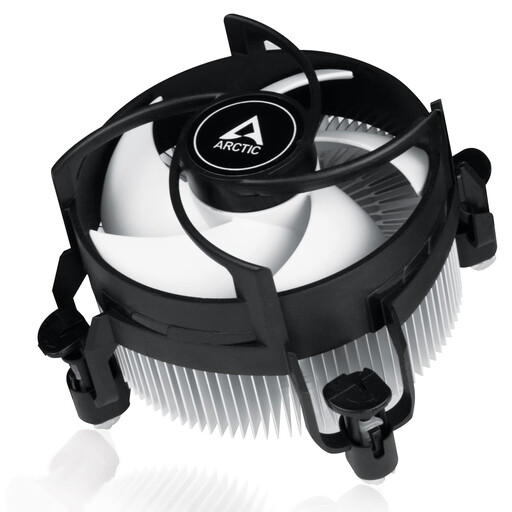
Why It Stands Out: The ARCTIC Alpine 17 is a specialized and straightforward cooling solution designed exclusively for Intel processors on LGA1700 and LGA1851 sockets. Its extremely compact design makes it a fitting choice for all-in-one systems and cases with very limited space. Installation is simplified by pre-installed push-pins and pre-applied MX-4 thermal paste.
Pros:
- Exclusive compatibility with Intel sockets LGA1700 and LGA1851.
- Very low installation height of only 68.2 mm, fitting most SFF cases.
- PWM-controlled 92 mm fan for a flexible speed range.
- Y-shaped fin design to optimize heat dissipation.
- Tool-free installation thanks to pre-applied thermal paste and push-pins.
Who Is It For?: Users building a compact system based on an Intel CPU (e.g., Alder Lake) in a Mini-ITX or ?ATX case who are looking for a cost-effective, easy-to-install cooling solution.
NZXT T120 RGB CPU Air Cooler
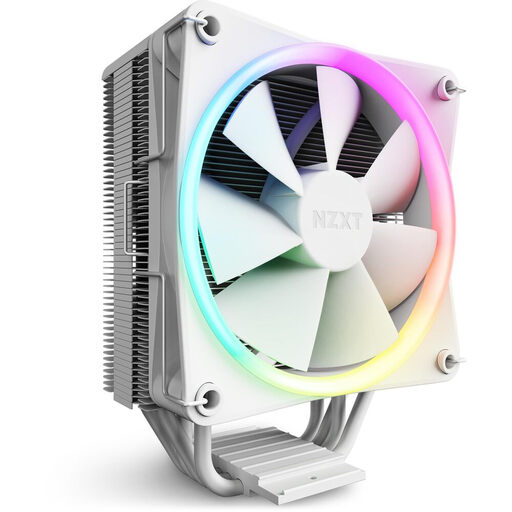
Why It Stands Out: The NZXT T120 is an RGB CPU cooler that combines performance with a clean, modern aesthetic. The four copper heatpipes have direct contact with the CPU (Direct Contact Technology), which ensures efficient heat transfer. An elegant aluminum cover conceals the heatpipe ends, providing a tidy appearance. The included mounting hardware makes it a CPU cooler for both Intel and AMD.
Pros:
- Direct Contact technology for maximum heat transfer.
- Elegant aluminum cover for a clean look.
- A 120 mm fan with high static pressure and a fluid dynamic bearing.
- Comprehensive mounting hardware for common AMD and Intel sockets.
- Option to mount a second fan for a push-pull configuration.
Who Is It For?: PC builders who value a stylish system design with RGB lighting and need reliable cooling performance for mid-range processors from Intel or AMD.
be quiet! Dark Rock 5 CPU Air Cooler
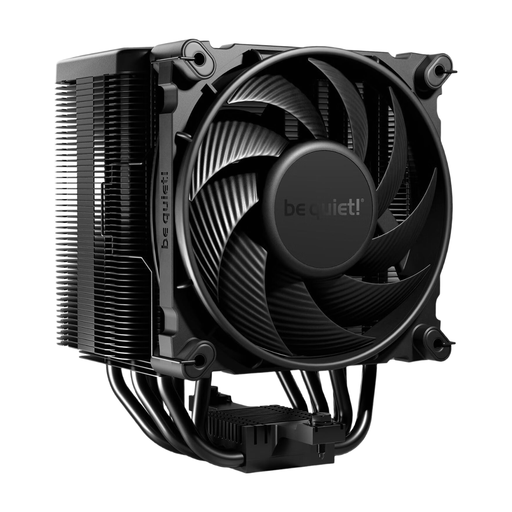
Why It Stands Out: The be quiet! Dark Rock 5 is designed for high cooling performance with minimal noise. Six high-performance copper heatpipes and a special black coating with ceramic particles ensure excellent heat dissipation. The included Silent Wings 4 120 mm PWM fan is known for its quiet operation and high air pressure. The asymmetrical design and cutouts in the heatsink ensure high compatibility with large RAM modules and VRM coolers.
Pros:
- High cooling performance thanks to six copper heatpipes and a dense fin stack.
- Very quiet operation due to the Silent Wings 4 120 mm PWM fan.
- Asymmetrical design for high compatibility with RAM and VRM heatsinks.
- Simplified installation with a pre-mounted mounting bridge and included screwdriver.
- High-quality look with a magnetic mesh top cover.
Who Is It For?: Enthusiasts and users building a high-end gaming or workstation system who need maximum air cooling performance while maintaining very quiet operation.
Looking for a Different Cooling Solution?
While CPU air coolers are a reliable and efficient choice for most systems, there are scenarios where alternative cooling methods can be advantageous. For extremely overclocked high-end CPUs or systems where a special aesthetic is a priority, liquid cooling can be an interesting option.
If you are interested in such solutions, explore our selection of all-in-one liquid coolers to compare more options for your system.
Frequently Asked Questions (FAQ)
Does every CPU cooler fit on every motherboard?
No. Compatibility depends primarily on the motherboard's CPU socket. A cooler must have the appropriate mounting hardware for the specific socket (e.g., LGA 1700 for Intel or AM5 for AMD). Additionally, the physical dimensions of the cooler must be compatible with the case and other components like RAM.
How often should you reapply thermal paste?
A general recommendation is to reapply thermal paste every 2 to 4 years. Replacement is always necessary whenever the CPU cooler is removed. Rising CPU temperatures at idle or under load over a longer period can also be an indication that the thermal paste has lost its effectiveness and should be replaced.
What is the difference between a CPU air cooler and an AIO liquid cooler?
A CPU air cooler uses a metal heatsink and a fan to dissipate heat directly from the CPU into the ambient air. An AIO (All-in-One) liquid cooler uses a closed loop in which a liquid transports heat from a CPU block to a radiator, where it is dissipated with the help of fans. Air coolers are often considered very reliable and easy to install, while AIOs can potentially offer higher cooling performance for top-end CPUs and allow for a different aesthetic inside the case.