
Compact Mechanical Gaming Keyboards: Buyer’s Guide and Picks
For PC gamers, especially in competitive genres like FPS or MOBAs, every inch of desk space counts. A large keyboard can restrict mouse movement and hinder fast, sweeping manoeuvres. A compact mechanical gaming keyboard offers a practical solution: it maximises space for your mouse without compromising on response speed and precision.
This guide serves as your reference point. It explains the key features of compact keyboards and presents a selection of models to help you make an informed purchasing decision.
What to Look for When Choosing a Compact Gaming Keyboard?
Choosing the right model depends on your individual needs for size, functionality, and customisation. Three main criteria are particularly important.
1. Form Factor: 60% vs. 65%
The percentage indicates the keyboard's size relative to a standard, full-size model.
- 60% Keyboards: These models are extremely compact, omitting the number pad, the F-key row, and the arrow keys. Functions like the arrow keys are usually accessible via a secondary layer (FN key). They offer maximum space for the mouse and are ideal for a minimalist setup. Anyone looking to buy a 60% keyboard should be comfortable using key combinations.
- 65% Keyboards: A 65% QWERTY keyboard is a popular sweet spot. It integrates the arrow keys and a few navigation keys (e.g., Del, Page Up/Down) into a chassis that is only slightly wider than the 60% format. This enhances everyday usability without significantly reducing the space-saving advantage.
2. Switch Type and Technology
Mechanical switches define the typing feel and response time. For gaming, linear switches are a popular choice due to their smooth, resistance-free actuation.
- Linear Switches (e.g., Cherry MX Red, Gateron Red): No noticeable click or tactile feedback upon actuation. This allows for rapid, repeated keystrokes.
- Optical Switches: These use a beam of light for actuation, which can offer an even faster response time compared to traditional mechanical contacts.
- Low-Profile Mechanical Keyboard: These models use shallower switches and keycaps. The result is a lower overall keyboard height and a shorter key travel distance, which some users find more ergonomic and faster.
3. Connectivity and Customisation
The connection type and the potential for personalisation are also key factors.
- Connectivity: A wireless mechanical keyboard offers a clean, clutter-free setup. Modern wireless gaming keyboard models use a low-latency 2.4 GHz connection for gaming and often add Bluetooth for connecting to multiple devices. Wired connections via USB-C provide a stable link and charge the battery simultaneously.
- Customisation: An RGB keyboard allows for individual adjustment of the key lighting. A hot-swap keyboard goes a step further: it allows you to change the mechanical switches without soldering. This offers maximum flexibility to tailor the typing feel to your preferences later on.
Our Selection of Compact Mechanical Gaming Keyboards for 2026
Based on the criteria mentioned, we have compiled a selection of models that cover a range of different needs.
CHERRY MX-LP 2.1 Wireless Gaming Keyboard
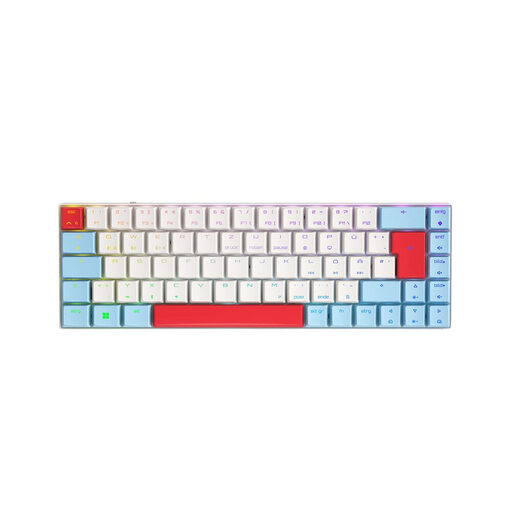
Why It Stands Out: The CHERRY MX-LP 2.1 combines a low-profile design with advanced connectivity. Its Low Profile MX Speed Switches provide a short actuation distance for rapid responses. Its tri-mode connectivity (2.4 GHz, Bluetooth, USB-C) makes it a versatile tool for gaming and productivity across multiple devices.
Advantages:
- Form Factor: Compact 65% layout with arrow keys.
- Switches: CHERRY MX Low Profile Speed Switches for fast, linear actuation.
- Connectivity: Tri-mode connection (2.4 GHz Wireless, Bluetooth, USB-C).
- Multi-Device: Supports connection with up to 3 Bluetooth devices plus the 2.4 GHz dongle.
- Lighting: Per-key RGB, customisable via CHERRY UTILITY software.
Who Is It For? Users looking for a slim, small gaming keyboard with maximum connectivity flexibility. Ideal for those who want to seamlessly switch between their gaming PC, laptop, and tablet without giving up a high-performance mechanical keyboard.
View Product: CHERRY MX-LP 2.1
Razer Huntsman Mini (Linear Red Switch)
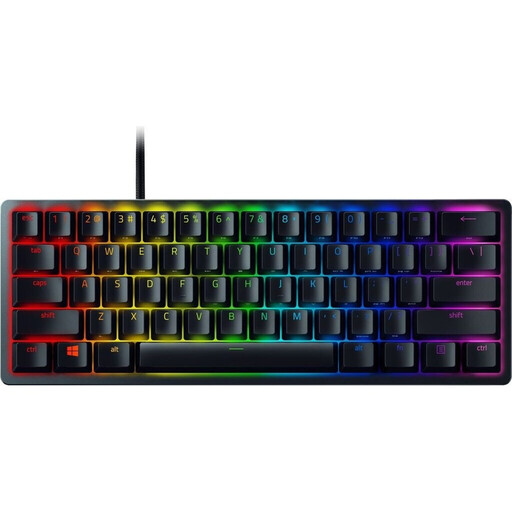
Why It Stands Out: The Razer Huntsman Mini is engineered from the ground up for maximum esports performance. Its ultra-compact 60% form factor creates an enormous amount of space for your mouse. Razer's optical switches use light for actuation, enabling extremely fast signal transmission.
Advantages:
- Form Factor: Extremely compact 60% layout for maximum mouse freedom.
- Switches: Razer Linear Optical Switches for rapid actuation.
- Keycaps: Durable Doubleshot PBT keycaps that are wear- and oil-resistant.
- Portability: Detachable USB-C cable for easy transport.
- Memory: Onboard memory for up to 5 profiles.
Who Is It For? Competitive gamers, especially in FPS titles, who need every inch of desk space and demand a keyboard with an extremely fast response time. Users who prefer a minimalist setup and can do without dedicated arrow and function keys.
View Product: Razer Huntsman Mini
Akko 3068B Plus Tri-Mode Mechanical Keyboard
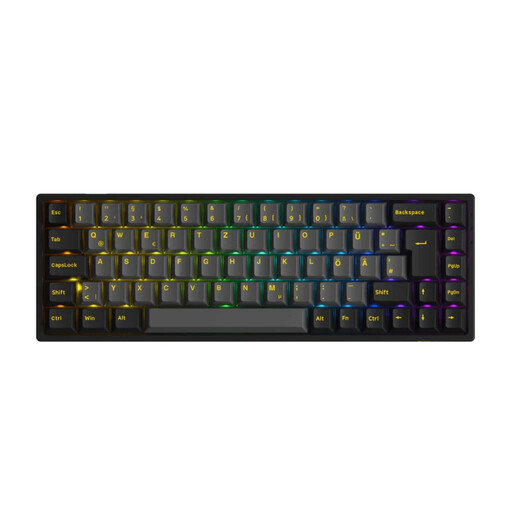
Why It Stands Out: The Akko 3068B Plus is aimed at enthusiasts who value customisation. As a hot-swap keyboard with a German ISO layout, it allows for the easy replacement of mechanical switches (compatible with both 3-pin and 5-pin). Combined with its tri-mode connectivity, it offers a high degree of flexibility for custom setups.
Advantages:
- Form Factor: Functional 65% layout in the German ISO format.
- Customisation: Hot-swappable, allowing for the exchange of 3-pin and 5-pin switches.
- Connectivity: Tri-mode connection (Bluetooth 5.0, 2.4 GHz, USB-C).
- Switches: Equipped with Akko V3 Cream Yellow Pro (linear) switches.
- Package Contents: Comprehensive accessories including extra keycaps and tools.
Who Is It For? Keyboard enthusiasts and gamers who enjoy modifying and personalising their equipment. The hot-swap feature is ideal for users who want to experiment with different switch types without having to buy a new keyboard.
Looking for More Options?
The models presented here cover common user profiles. However, the market offers an even greater variety of designs, switch types, and features. If you are looking for a keyboard with a specific connection or other features, you may find the right model in our wider selection.
Discover our full range of USB Type-C Keyboards.
Frequently Asked Questions (FAQ)
What is the difference between a 60% and a 65% keyboard?
A 60% keyboard is the most minimalist version, omitting the F-key row, the navigation cluster, and the arrow keys. A 65% keyboard is only slightly wider and integrates dedicated arrow keys as well as a few navigation keys, making it more practical for many users in daily use.
What does "hot-swap" mean on a keyboard?
"Hot-swap" means that the keyboard's mechanical switches can be replaced without any soldering. Using a special tool (a switch puller), the switches can be easily pulled from the circuit board and replaced with other compatible switches. This allows for easy customisation of the typing feel.
Are wireless gaming keyboards suitable for competitive play?
Yes. Modern wireless gaming keyboards that use 2.4 GHz wireless technology offer latency that is virtually indistinguishable from a wired connection. They are therefore fully suitable for competitive gaming. Bluetooth connections typically have higher latency and are better suited for everyday tasks and less demanding games.