
Cherry MX Keyboard 2.0S: Key Buyer Considerations
The market for mechanical keyboards can be overwhelming. Countless models boast aggressive designs and complex features, but not all of them live up to their promises. As a Joybuy Product Recommendation Officer, I see daily how clever marketing sways buyers into making decisions they later regret. Before you invest in a new mechanical keyboard, you should know the most common pitfalls to make an informed choice.
The 2 Most Common Mistakes When Buying a Gaming Keyboard:
- Focusing on aesthetics over function: A futuristic case and flashy LEDs don't make a good keyboard. Often, subpar technology is wrapped in an eye-catching design. True performance lies in the switches, build quality, and signal transmission—factors that are invisible at first glance.
- Choosing the wrong switches: The switch type defines the entire typing and gaming experience. A loud, clicky switch might be ideal for one person, but it can become a nuisance for housemates during home office hours or late-night gaming sessions. An ill-considered choice often leads to the keyboard ending up unused in a closet.
What Really Matters: The Key Parameters
To avoid buyer's remorse, focus on the core technical features that make a keyboard durable, precise, and comfortable to use.
1. The Switch Type: The Heart of Every Mechanical Keyboard
Choosing your switches is the most critical decision. For gamers and prolific typists who need fast, repetitive inputs, linear switches have established themselves as a popular choice.
- Linear Switches (e.g., CHERRY MX Red Switches): These switches offer a smooth, resistance-free keystroke from top to bottom. There is no perceptible "click" or tactile bump upon actuation. This allows for extremely fast reactions and fluid double or triple taps, which can be crucial in fast-paced games. The CHERRY MX2A Red Switches used in the CHERRY MX 2.0S Gaming Keyboard are an evolution of this principle, offering improved smoothness and a lifespan of over 100 million actuations, according to the manufacturer.
2. Layout and Form Factor: Everyday Practicality
A keyboard must fit your workspace and your habits. Two aspects are crucial here:
- Full-Size vs. Compact: A full-size gaming keyboard offers a complete key set, including a number pad. This is useful not only for data entry but also for assigning macros in games or applications.
- German Layout (QWERTZ): For users in German-speaking regions, a keyboard with a German QWERTZ layout is essential. Only then are umlauts (?, ?, ?) and special characters directly accessible without cumbersome key combinations.
3. Essential Gaming Technologies
Modern gaming keyboards offer more than just colorful RGB keyboard backlighting. Two features are indispensable for a seamless gaming experience:
- Anti-Ghosting and N-Key Rollover (NKRO):Anti-ghosting ensures that when multiple keys are pressed simultaneously, no inputs are "dropped" or incorrectly registered. NKRO goes a step further, guaranteeing that every single key is detected, no matter how many are pressed at once. A wired keyboard often provides the most reliable, latency-free connection for this.
Our Top Recommendations For You
Based on these objective criteria, we have identified several models that represent a smart choice for different user profiles.
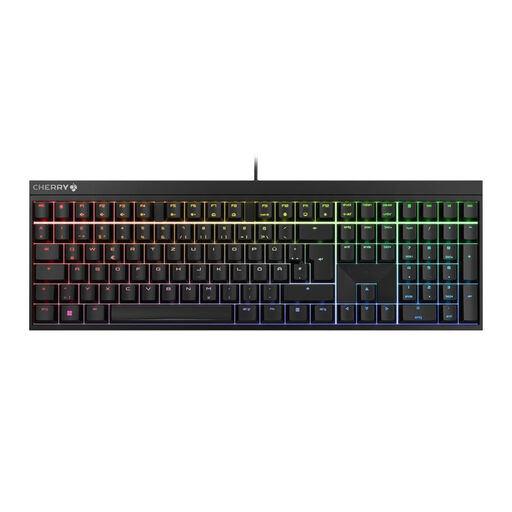
CHERRY MX 2.0S Wired Mechanical Gaming Keyboard
Why This Fits Their Persona: Ideal for competitive gaming and esports. The linear CHERRY MX2A Red Switches enable maximum reaction speed, while full N-Key Rollover and the wired connection ensure precise, latency-free input.
This model focuses on proven, functional performance rather than purely cosmetic gimmicks. The choice of high-quality MX2A switches is an investment in precision and durability, not in short-lived trends.
Precise and responsive CHERRY MX2A Red Switches; Full gaming features (Anti-Ghosting, Win-Key Lock); Customisable RGB backlighting.
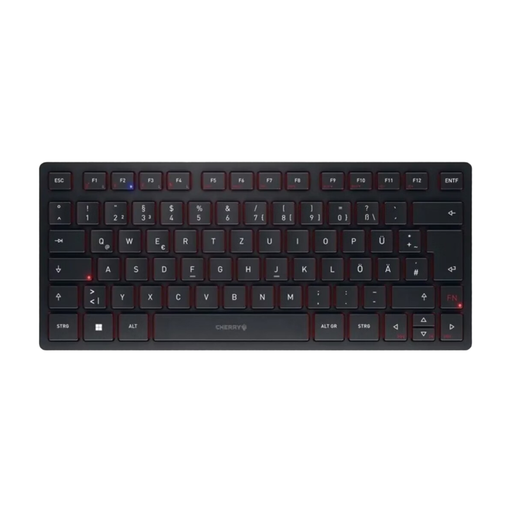
CHERRY KW 9200 MINI Wireless Multi-Device Keyboard
Why This Fits Their Persona: Perfect for users who switch seamlessly between a PC, laptop, and tablet. The compact design saves desk space, while the quiet CHERRY SX scissor switches are ideal for office environments or the home office.
Offers true functional versatility with four connection channels (Bluetooth, wireless RF, cable) instead of just visual gimmicks. The quiet switches bypass the problem of being too loud for the surrounding environment.
Seamless switching between up to 4 devices; Compact, portable design including a travel pouch; Rechargeable battery.
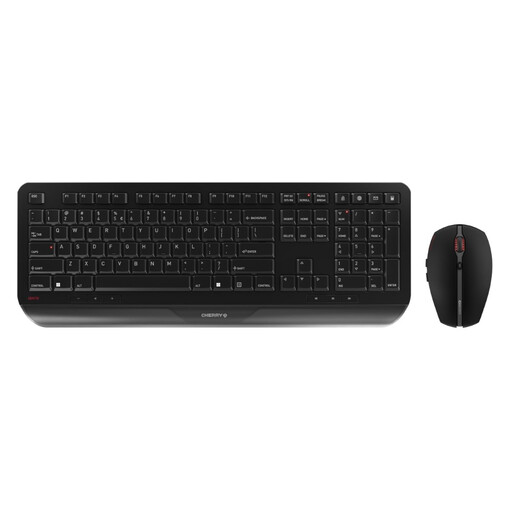
CHERRY Gentix Desktop, Wireless Keyboard and Mouse Set
Why This Fits Their Persona: A complete wireless set for a tidy desk. The integrated wrist rest provides comfort during long workdays, while the long battery life and robust construction guarantee reliability in the daily office routine.
This set focuses on ergonomics and durability. The abrasion-resistant key lettering and long battery life are practical advantages often missing from budget alternatives, saving costs in the long run.
Ergonomic design with an integrated wrist rest; Very long battery life (up to 3 years); Reliable wireless connection.
Looking for more options?
We have compiled a comprehensive, up-to-date list of products that fully meet these strict selection criteria and quality standards.
Is the CHERRY MX 2.0S also suitable for typing?
Yes, absolutely. The linear CHERRY MX Red Switches have a light and smooth keystroke that many prolific typists find very comfortable and less fatiguing. However, individuals who prefer clear tactile or audible feedback when typing might consider other switch types.
How do I customise the keyboard's RGB lighting?
The RGB keyboard's lighting can be customised in detail using the free CHERRY UTILITY software. This allows you to configure various effects, choose from over 16 million colours, and program individual keys. Basic effects and brightness can also be controlled directly on the keyboard using FN key combinations.
What is the difference between CHERRY MX Red and the newer MX2A Red switches?
The MX2A variant is a technical revision of the classic MX switch. According to the manufacturer, it features a new spring design and special lubrication, resulting in an even smoother and quieter keystroke. This reduces the spring's scratching noise and ensures a more consistent feel over its entire lifespan of more than 100 million keystrokes.