
Buyer's Guide to Magnetic iPhone SSDs
By Joybuy Product Recommendation Officer, July 28, 2026
The ability to record ProRes-quality video on the iPhone 15 Pro and newer models is a significant leap forward for content creators and videographers. However, these high-resolution files fill up internal storage extremely quickly. A magnetic external SSD for the iPhone is the logical solution, as it allows for direct recording to an external drive.
But the market is flooded with products making lofty promises. Before you make a purchase, it's crucial to understand the common pitfalls that can lead to disappointment and a wasted investment.
- The Adhesion Trap: Many SSDs marketed as "magnetic" have an inadequate hold. A weak magnetic connection can cause the drive to fall off during movement, which in the worst-case scenario could interrupt a recording or damage the device.
- The Speed Misconception: Manufacturers often advertise maximum read speeds of "up to 2000 MB/s." However, these figures are only achievable under ideal conditions and with a compatible USB 3.2 Gen 2x2 interface on the host device. The iPhone 15 Pro has a USB-C port limited to 10 Gbps (approx. 1250 MB/s). Therefore, a faster SSD offers no speed advantage when connected to an iPhone.
- The Heat Trap: Compact and fast SSDs generate significant heat during intensive use, such as continuous 4K video recording. Without adequate thermal management, thermal throttling can occur: the drive reduces its speed to prevent overheating, which impairs recording performance.
What to Look for When Making Your Choice
To make an informed decision, you should examine three core technical parameters. These determine the actual performance and reliability of your storage expansion for the iPhone.
1. Interface and Sustained Write Speed
For direct recording of SSD for ProRes video, the critical metric is not the maximum read speed, but the sustained write speed. Apple specifies a constant write speed of at least 220 MB/s for recording 4K ProRes at 60 frames per second. Ensure the SSD can reliably achieve this value without performance drops. A fast external drive for video must, above all, be able to write consistently.
Also, check the USB specification. While an SSD with USB 3.2 Gen 2x2 is future-proof for other devices, its speed will be limited by the iPhone 15/16 Pro's built-in USB 3.2 Gen 2 port (10 Gbps).
2. Magnetic Design and Weight
A functional MagSafe SSD needs to be more than just magnetic. The strength of the magnets must be sufficient to hold the drive securely to the iPhone, even during movement. Low weight and compact dimensions are also crucial so that handling the smartphone is not compromised. Some models come with an additional magnetic ring to ensure compatibility with cases that don't have built-in magnets—a practical detail.
3. Capacity and Durability
ProRes files are very large. One minute of 4K video at 60 fps can take up over 10 GB of storage. A 1TB portable SSD is therefore a sensible minimum capacity for serious video projects. For mobile use, a robust housing, ideally made of an aluminum alloy, is also advantageous. It not only protects against impacts but also helps with heat dissipation.
Picks For Every Need
Here are some recommendations tailored to different use cases that avoid the pitfalls mentioned.
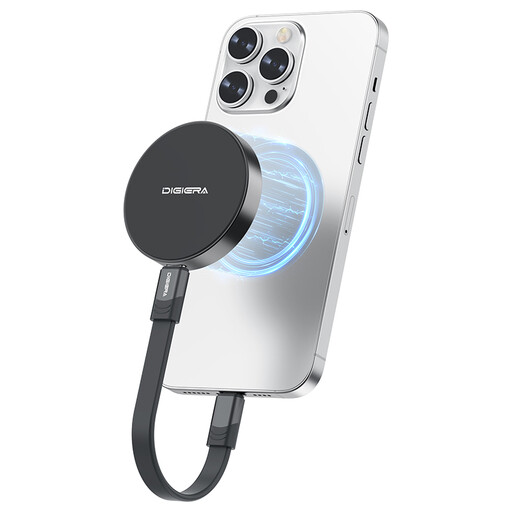
DigiEra 1TB Magnetic Portable SSD – USB 3.2 Gen 2×2
Why It's a Match: This drive is specifically designed for the mobile workflow with the iPhone. It is extremely lightweight (approx. 46 g) and features an integrated magnetic ring that ensures a stable connection for on-the-go recording.
The design is engineered for a secure magnetic grip, thus bypassing the "Adhesion Trap." Its write speed is optimized for 4K ProRes recording.
According to the manufacturer, it directly supports 4K 60fps ProRes video recording on the iPhone 15 Pro and is ideal for mobile use due to its low weight.
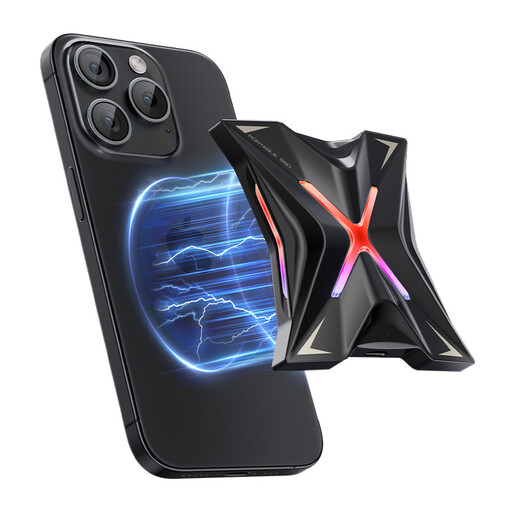
MOVESPEED Portable SSD 1TB, USB 3.2 High-Speed Transfer 2060MB/s
Why It's a Match: For users who need maximum speed not only on their iPhone but also on their PC or laptop. The USB 3.2 Gen 2x2 interface enables extremely fast data transfers on compatible devices.
The zinc alloy housing acts as an effective heat sink, counteracting the "Heat Trap" by dissipating heat during long write operations and thus ensuring stable performance.
According to the manufacturer, it offers read speeds of up to 2060 MB/s, making it a high-performance solution for professional workflows that extend beyond the iPhone.
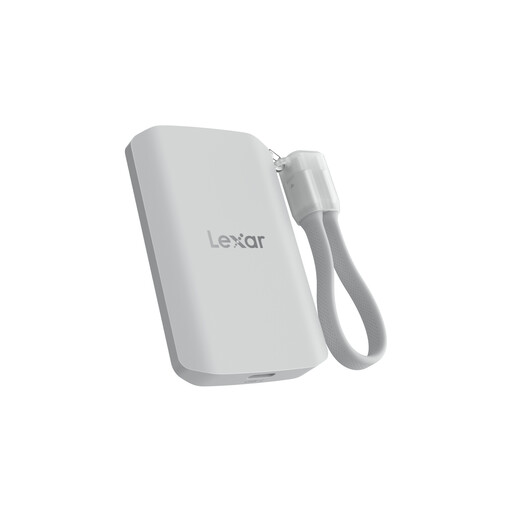
Lexar ES5 Portable SSD 1TB, USB 3.2 Gen2x2
Why It's a Match: This model from Lexar, an established brand in the storage space, combines high performance with exceptional durability. Its IP65 certification provides protection against dust and water, making it a reliable choice for outdoor use.
The rugged construction with drop protection up to 3 meters and IP65 certification addresses concerns about physical damage during mobile use, ensuring high device longevity.
According to the manufacturer, it offers comprehensive protection (IP65) and a thoughtful design including a cable organizer, which enhances everyday usability and portability.
Looking for More Options?
We've compiled a complete, up-to-date list of products that fully meet these strict selection criteria and safety regulations.
Can I use any external SSD for ProRes recording with the iPhone 15 Pro? No. For stable recording of 4K ProRes at 60 fps, you need an SSD that guarantees a sustained write speed of at least 220 MB/s. Additionally, the USB-C cable used must support data transfer rates of 10 Gbps. Slower drives or unsuitable cables can lead to recording interruptions.
Will a magnetic SSD damage my iPhone? No. The magnetic systems used in iPhones and compatible SSDs are designed not to interfere with or damage the phone's electronics. The magnetic fields are precisely aligned and limited to the holding function.
Why doesn't my 2000 MB/s SSD reach full speed on the iPhone? The maximum transfer speed is determined by the slowest link in the chain. The iPhone 15 Pro's USB-C port supports the USB 3.2 Gen 2 standard, with a theoretical maximum speed of 10 Gbps (approx. 1250 MB/s). An SSD with a higher specification like USB 3.2 Gen 2x2 (20 Gbps) will therefore be limited by the iPhone to this lower speed. It can only reach its full potential on a computer with a corresponding 20 Gbps port.