
Buying a card reader: How to find the right model for memory cards and card payments
A card reader can transfer photos, videos and documents from a memory card to a laptop, smartphone or tablet. Other models are designed as card payment terminals for contactless payments in shops, at markets or on the go. These two product groups are often searched for under the same term, but they differ considerably in technical terms.
If you only focus on descriptions such as “fast”, “compact” or “universally compatible”, it is easy to buy something that does not meet your actual needs. Three issues in particular frequently lead to unsuitable purchases:
- The wrong connector type: A USB-A card reader will not connect directly to many modern smartphones, tablets and USB-C laptops.
- Unsupported card formats: An SD card reader does not automatically support microSD cards. For cameras and action cams, having both types of slot is often useful.
- Confusing it with payment devices: A memory card reader processes files. A SumUp card reader, on the other hand, requires an app, Bluetooth and a payment system for transactions.
Which technical details matter when buying
1. Check the connector and compatibility
First, establish which connector the target device uses. Traditional computers often have USB-A, while current laptops, tablets and smartphones increasingly use USB-C. A USB-C card reader is therefore practical for mobile devices, provided the device supports data transfer via USB-C.
For households with a range of devices, a 2-in-1 card reader with USB-A and USB-C can be a flexible solution. The HOCO HB45 Spirit 2-in-1, for example, uses both connector types and is designed for mobile file transfers from microSD cards. Before buying, however, you should check whether your smartphone supports the connector in host or OTG mode.
Ideally, a plug-and-play card reader will not require any additional driver installation. This does not mean that every operating system will automatically support all its functions, however. Check the systems listed in the product description, such as Windows, macOS, Android, iPadOS or Linux.
2. SD, microSD or both formats?
SD cards are commonly used in digital cameras and camcorders. microSD cards, by contrast, are typical of action cams, drones, smartphones and compact recording devices. An SD card reader with an additional TF or microSD slot means you need to change adapters less often.
The supported card standards are also important:
- SDHC and SDXC refer to different capacity ranges.
- UHS-I and UHS-II describe interface standards for higher transfer rates.
- The actual speed also depends on the card, reader, connector and target device.
- A stated maximum speed is not a guaranteed sustained speed under all conditions.
The TP-Link UA440C USB Type-C to SD Card Reader specifies UHS-II compatibility, SD and microSD slots, and a manufacturer-rated speed of up to 312 MB/s. These figures can only be achieved if the memory card and end device also support the relevant standard.
3. Transfer speed, design and everyday use
A basic card reader is sufficient for individual documents. Photographers, videographers and content creators, however, often transfer large RAW files or 4K and 8K videos. In this case, a suitable USB interface, the right card standard and a stable connection are more important than the biggest number on the packaging.
A portable card reader should also:
- have a solid or sufficiently robust casing,
- not take up unnecessary space in your bag,
- come with a suitable cable or integrated connector,
- hold the card securely,
- allow you to eject the data correctly before disconnecting it.
A USB-C hub with card reader adds further functions. The Wozinsky hub combines SD and microSD readers with USB ports, HDMI, DisplayPort, Ethernet, audio and USB-C Power Delivery. This type of hub is suitable for a permanent workstation or home office, but it is larger than a dedicated card reader.
Recommendations by user profile
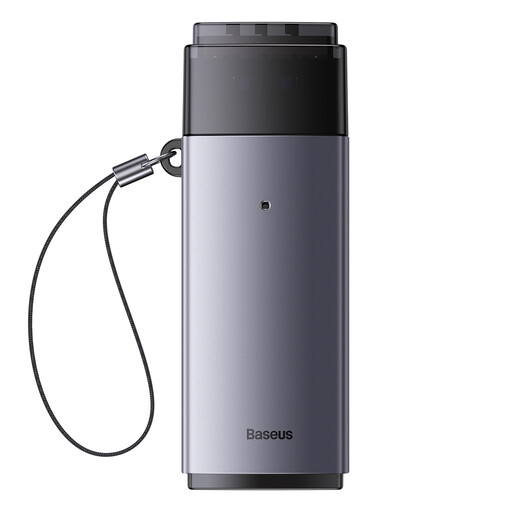
Baseus Lite Series USB-A to SD/TF Card Reader Grey
Why this product suits this profile: This USB-A card reader is designed for straightforward file transfers between a computer and an SD or TF card, while taking up very little space.
The separate SD and TF slots make the supported card formats clearer than on a product with just one unspecified card slot.
USB-A connector, SD and TF support, and a stated maximum transfer rate of 104 MB/s.
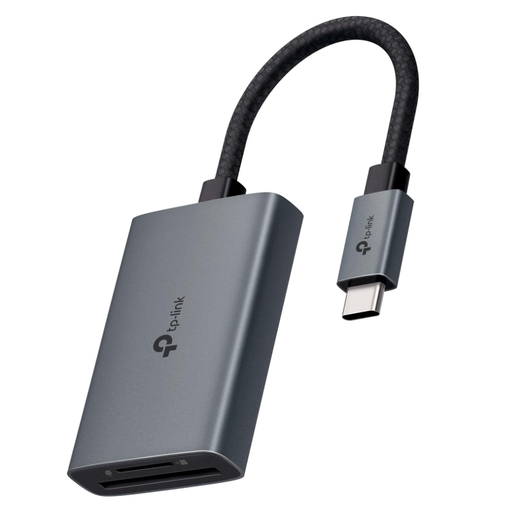
TP-Link UA440C USB Type-C to SD Card Reader
Why this product suits this profile: This model is aimed at users who want to read SD and microSD cards on USB-C laptops, tablets or smartphones and transfer larger files.
USB-C, both common card formats and plug-and-play compatibility are specified clearly, rather than simply being marketed as “universal”.
UHS-II support, simultaneous reading and writing, and compatibility with Windows, macOS, Android, iOS, iPadOS, Linux and Chrome OS according to the product details.
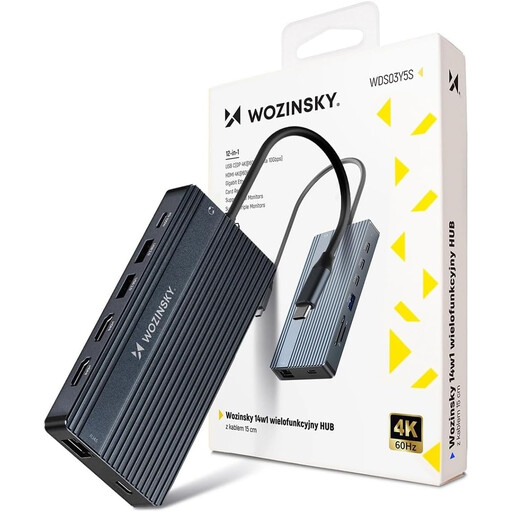
WOZINSKY USB-C Hub Adapter 14-in-1 with Card Reader
Why this product suits this profile: For home-office users and mobile workstations, this hub combines a card reader, display outputs, USB, Ethernet and audio in a single unit.
The required connectors and card formats are listed individually. This allows you to check before buying whether you really need the larger hub.
SD and microSD slots, up to 100 W USB-C Power Delivery and several video connections; the stated 4K output depends on the host device.
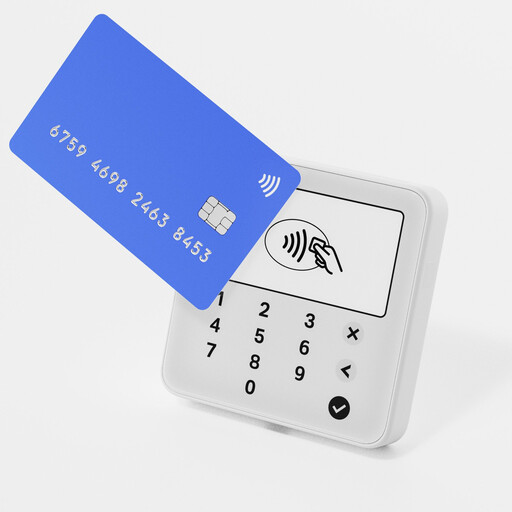
SumUp Solo Lite Mobile Card Reader for Contactless Payments
Why this product suits this profile: This mobile card payment terminal connects to a smartphone or tablet via Bluetooth and is designed for contactless payments and chip-and-PIN transactions.
This is explicitly a payment terminal, not a USB card reader for memory cards. Setup is completed via the SumUp app.
Bluetooth connectivity, integrated display, battery and support for contactless cards, Google Pay, Apple Pay and chip-and-PIN payments according to the product description.
How to use a card reader correctly and protect your data
Insert the memory card fully and without applying pressure into the designated slot. After transferring your files, safely eject the drive through the operating system before removing the card reader. This reduces the risk of file corruption.
A card reader should not be treated as a substitute for a backup when handling important photos and business data. Copy files to an external hard drive or suitable cloud storage as well. Protect the device from moisture, strong impacts and extreme temperatures. Payment devices are also subject to the manufacturer’s guidance on power supply, app use and secure storage.
Looking for more options?
We have put together a complete, regularly updated list of products that fully meet these strict selection criteria and the safety regulations applicable in the EU.
Frequently asked questions about card readers
Which card reader is suitable for a laptop?
That depends on the available connector and card format. A USB-A card reader is suitable for a laptop with USB-A, while devices with USB-C require a USB-C card reader. If both connectors are used in your household, a 2-in-1 model may be a sensible choice. Also check whether you need SD, microSD or both formats.
Does a card reader work with a smartphone?
A card reader for smartphones will work if the phone supports the relevant connector and data transfer. USB OTG is often required on Android devices. For iPhone and iPad models, check the product’s stated compatibility. A USB-C connector alone does not guarantee that every accessory will be supported.
Are there ongoing costs with a SumUp card reader?
That depends on the provider, contract and payment model in question. According to the product description, the SumUp Solo Lite has no stated monthly fixed costs; charges are applied per transaction. Fees, any additional services and the current terms should be checked directly in the provider’s information before use.