
Buying a Card Reader: How to Find the Right Model for Memory and Payment Cards
A card reader can make life much easier for photographers, videographers, content creators and travellers. Small businesses, market traders and service providers also use mobile card payment devices to accept payments without relying on a fixed till terminal. However, the choice can be confusing, as a memory card reader works differently from a device designed for debit and credit cards.
Common Pitfalls When Buying a Card Reader
1. Quoted speed is mistaken for real-world performance
A specification such as 104 MB/s, 312 MB/s or 5 Gbit/s usually describes a theoretical maximum. In practice, transfer speeds also depend on the memory card, the connection being used, the file system and the target device.
A fast card reader can only deliver its full potential if your laptop, smartphone and memory card support the corresponding speed. For large video files, it is worth looking at the entire connection rather than focusing on a single figure.
2. The connection and card format do not match your device
A USB-A card reader is suitable for many older computers, while current laptops, tablets and smartphones often use USB-C. If you need both types of connection, you can choose a 2-in-1 card reader or a USB-C hub with card slots.
The format is equally important: an SD card reader does not automatically accept microSD cards. Action cameras, drones and smartphones generally require a microSD card reader, also known as a TF card reader.
3. Memory cards and payment cards are confused
A USB card reader for SD or microSD cards reads digital storage media. A mobile card payment device, on the other hand, processes bank cards and mobile wallets via NFC, chip and PIN or Bluetooth. Both product groups are often searched for under the term card reader, but they require different technology and software.
Before buying, you should therefore establish whether you want to transfer files or accept payments.
Parameters You Should Check
Connection and compatibility
First, check the interface on your device:
- USB-A: suitable for many desktop PCs, older laptops and existing USB ports
- USB-C: suitable for current notebooks, tablets and compatible smartphones
- Bluetooth: typical of mobile card payment devices that connect to an app
- USB-C hub: useful if you also need HDMI, Ethernet, USB ports or power delivery
For a card reader for smartphones and laptops, operating systems such as Windows, macOS, Android, iOS, iPadOS or Linux are important. “Plug & Play” means that no additional drivers need to be installed; you should still check support for the specific device.
Card slots and capacity
An SD slot is often sufficient for cameras and camcorders. If you also use microSD cards, choose a model with an SD and microSD slot. Supported standards may include SD, SDHC, SDXC, microSDHC or microSDXC.
The maximum card capacity is also relevant for large media archives. According to the product specifications, the TP-Link UA440C supports memory cards up to 2 TB. However, this does not replace checking whether your recording device and memory card are compatible with each other.
Transfer standard and design
Simple USB card readers are often sufficient for photos. For 4K or 8K video files, a model with USB 3.0, UHS-II support and a stable connection can make your workflow easier. According to the product specifications, the TP-Link UA440C supports UHS-II and offers speeds of up to 312 MB/s; the actual achievable speed may vary.
When travelling, a low weight, short cable or integrated connectors can be practical. An aluminium housing can also provide a robust design. If you work at a desk most of the time, you may prefer a card reader with charging dock or a hub with a dedicated stand.
Our Selection by User Profile
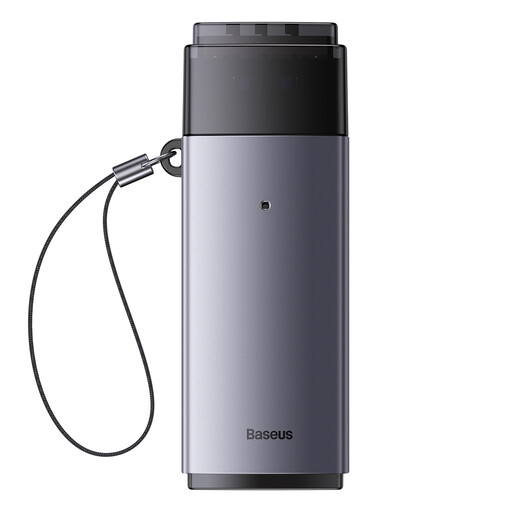
Baseus Lite Series USB-A to SD/TF Card Reader Grey
Why this product suits this profile: This USB-A card reader is suitable for users who want to read SD and microSD cards through a traditional computer connection. Its compact design makes it easy to carry.
The supported input and card formats are clearly specified: USB-A, SD and TF. This makes it easier to check compatibility before buying.
USB-A connection, SD and TF slots, plus a transfer speed of up to 104 MB/s according to the product specifications.
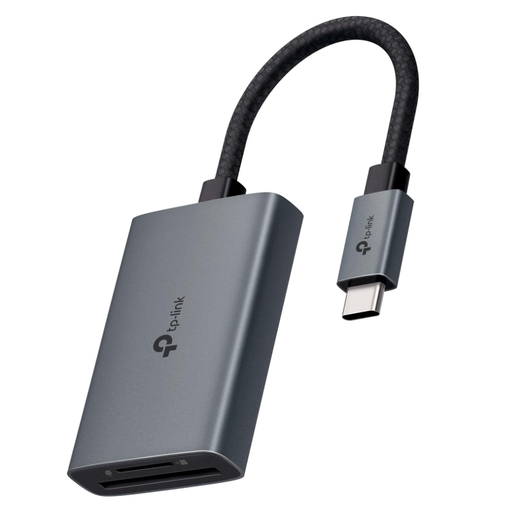
TP-Link UA440C USB Type-C to SD Card Reader
Why this product suits this profile: Photographers and videographers using USB-C devices get two card slots and support for several operating systems. The model is designed for regular file transfers.
SD and microSD cards can be accessed simultaneously, helping to minimise interruptions when changing cards. The UHS-II specification is stated for compatible cards.
USB-C, SD and microSD slots, speeds of up to 312 MB/s with UHS-II according to the product specifications, and support for up to 2 TB.
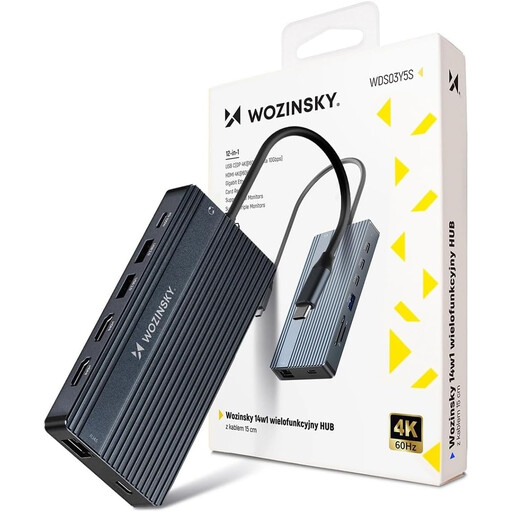
WOZINSKY USB-C Hub Adapter 14 in 1
Why this product suits this profile: For mobile workstations and frequent users, this hub combines card reader functions with connections for monitors, USB devices, networks and audio.
The required connections are listed individually. Buyers can check in advance whether they really need SD, TF, USB-A, HDMI or Ethernet.
SD and TF card reader, USB-C PD up to 100 W, RJ45 at 1,000 Mbit/s, plus several video connections according to the product specifications.
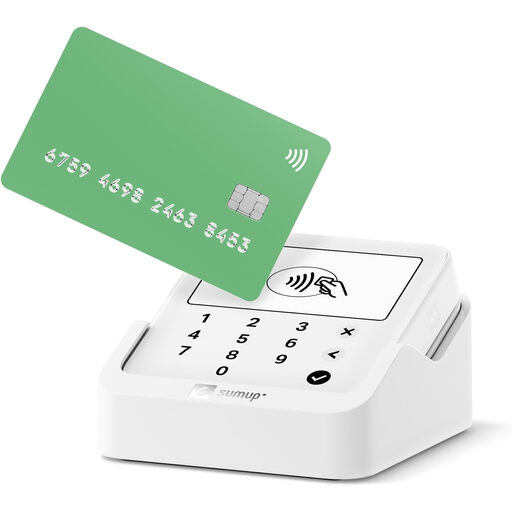
SumUp Solo Lite mobile card reader, including charging dock / stand
Why this product suits this profile: This Bluetooth card reader connects to a smartphone and the SumUp app. It is suitable for mobile sales, markets and services without a fixed till terminal.
The payment methods and connection are clearly stated. Before use, check the app requirements, network connection and current transaction terms.
Bluetooth 4.2, NFC, integrated battery, display with Corning Gorilla Glass, plus a charging dock and USB-C cable included according to the product specifications.
Looking for more options?
We have put together a complete, regularly updated list of products that fully meet these strict selection criteria and the safety regulations applicable in the EU.
Practical Buying and Usage Tips
- For cameras: Check the SD or microSD standard, UHS class and your computer’s interface.
- For smartphones: USB-C support, OTG capability and, where necessary, a suitable file manager are important.
- For video workflows: Look for UHS-II and USB 3.0 or higher if you regularly transfer large files.
- For card payments: Check Bluetooth compatibility, whether an app is required, accepted payment methods, battery power and transaction fees.
- For data security: Safely eject memory cards before removing them to prevent file corruption.
- For a longer service life: Protect the device from moisture, heavy impacts, heat and dust. Store unused card readers in a dry place, away from pressure or strain on the cable.
Frequently Asked Questions About Card Readers
Which card reader is suitable for a smartphone?
For current smartphones, a USB-C card reader with OTG support is usually the right choice. iPhone, Android and tablet models may have different requirements for file access and power supply. Before buying, check the connection, operating system and card format.
How long does a card reader last?
Its service life depends on insertion cycles, cable strain, transport conditions and moisture. A card reader without moving parts can remain usable for a long time with proper use. Mobile card payment devices also depend on the battery, software and support provided by the payment service.
Do mobile card payment devices involve ongoing costs?
This depends on the provider and tariff. In addition to the purchase price, transaction fees and app or account requirements may be relevant. Before using one for your business, check the current terms, payout periods, accepted card types and internet connection requirements.