
Cable Box Buyer's Guide: Avoiding Common Pitfalls
By the Joybuy Product Recommendation OfficerLast updated: July 28, 2026
An uncluttered work or living space boosts concentration and creates a pleasant atmosphere. However, an unsightly tangle of cables and power strips often disrupts the aesthetic. A cable box seems like the simple solution to prevent cable clutter and conceal a power strip. Unfortunately, ill-considered purchases frequently lead to frustration when the box doesn't fit, compromises safety, or is simply impractical.
Before you invest in a cable organizer, you should be aware of the three most common pitfalls that separate a good purchase from a bad one:
- The Size Trap: Many buyers focus only on aesthetics and don't realize until they get home that their power strip—especially with bulky power adapters plugged in—won't fit inside the box. The internal dimensions are crucial but often overlooked.
- The Overheating Risk Factor: Power strips and adapters generate heat. A poorly designed cable management box without adequate ventilation can trap this heat, which can shorten the lifespan of your devices and, in the worst-case scenario, pose a safety risk.
- The Design Dilemma: Cable outlets that are too small or poorly placed make feeding and organizing cables a chore. A lid that doesn't close flush or slides off with a slight touch defeats the entire purpose of the box.
This guide will show you which core features to look for to find a functional and safe solution for your cable management needs.
What Really Matters When Making Your Choice
To avoid the problems mentioned above, you should check three essential parameters before buying. These will ensure that your new cable box not only looks good but is also practical and safe for everyday use.
1. Internal Dimensions and Power Strip Compatibility
The most important factor is size. Measure your power strip not just by its length, but also by its width and height while all necessary plugs and power adapters are connected. Bulky adapters, in particular, require significantly more space vertically and to the sides.
- Length: A standard six-outlet power strip in Europe is often between 30 and 40 cm long. The cable box should be at least 2-3 cm longer on the inside to comfortably accommodate the supply cable as well.
- Width and Height: Pay attention to the dimensions of your largest power adapters. Plan for a buffer of at least 1-2 cm here as well to ensure air circulation and avoid putting pressure on the cables. For example, a box with dimensions of L 32 x W 13.5 x H 12.7 cm is suitable for many common 6-way power strips.
2. Material and Ventilation
The material affects both stability and safety. Common and suitable materials are ABS plastic (Acrylonitrile Butadiene Styrene) or HIPS (High Impact Polystyrene). Both are robust, impact-resistant, and have a degree of heat resistance.
Even more important is ventilation. A good cable box has side slits or other openings that not only serve as cable outlets but also allow for air exchange. This prevents heat buildup from power adapters and chargers and contributes to safety. Check if the box has such ventilation openings.
3. Functional Design
A thoughtful design is the difference between a simple storage container and a true cable organizer.
- Cable Outlets: The box should have generous openings on both short sides to allow for flexible cable entry and exit.
- Lid: A removable or hinged lid that fits securely is ideal. Some models offer a lid with a slight indentation that can be used as a tray for charging smartphones or other small devices.
- Slip Resistance: Rubberized feet on the bottom prevent the box from sliding on smooth floors or desks when a cable is pulled.
Selecting the Right Shovel
Depending on your specific needs, different cable hiding solutions may be more suitable. Here are some recommendations tailored to specific requirements.
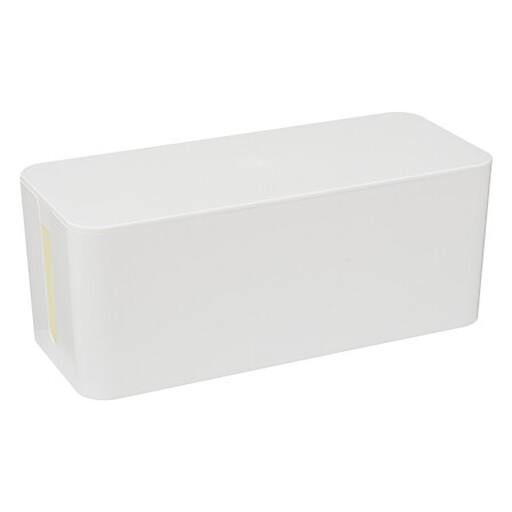
Cable Management Box
Why This Fits Their Persona: Ideal for anyone who wants to completely and discreetly hide a single power strip and its adapters under a desk or behind a TV console. The minimalist design blends seamlessly into modern environments.
With an internal length of 32 cm, it's designed for common 6-way power strips. The side openings serve as both cable outlets and vents, counteracting the risk of overheating.
An all-in-one solution that conceals the entire cable mess of a power strip. Made from durable HIPS material.
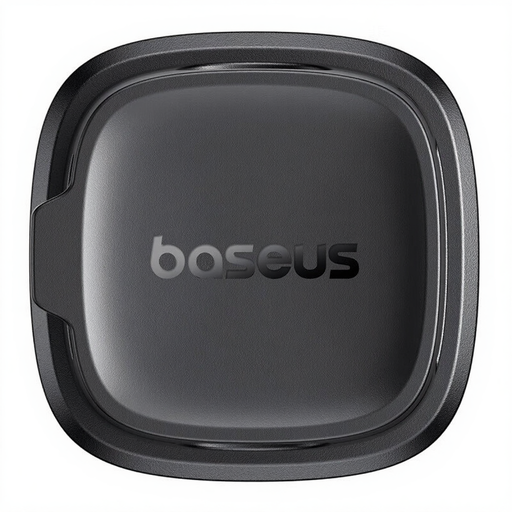
Baseus Lite Series Magnetic Cable Organizer
Why This Fits Their Persona: Perfect for users who want to secure individual charging cables (smartphone, headphones) directly on or at the side of their desk. It keeps cable ends within reach and prevents them from falling behind the table.
As an individual cable guide, this solution bypasses the typical problems of cable boxes like size or heat buildup. It addresses the issue of single cables falling, not hiding an entire power strip.
Magnetic system with a self-adhesive base for flexible positioning. Securely holds individual cable ends in place and keeps them organized.

Self-Adhesive Velcro Cable Ties
Why This Fits Their Persona: A cost-effective and flexible solution for anyone who wants to bundle cable runs behind the TV, in a server rack, or inside drawers. Ideal for situations where cables are frequently added or removed.
As a pure bundling tool, it completely bypasses the specific pitfalls of boxes. There are no size or ventilation issues, as the cables are only held together, not enclosed.
Reusable, flexibly adjustable for different cable diameters, and easy to use. The self-adhesive feature also allows for mounting to surfaces.
Looking for More Options?
We've compiled a complete, up-to-date list of products that fully meet these strict selection criteria and UK/EU safety regulations.
Frequently Asked Questions (FAQ)
1. Can a cable box overheat?
Yes, this is a potential risk, especially with cheap models that lack sufficient ventilation. Power adapters and chargers generate heat during operation. If this heat cannot escape from a sealed plastic box, it creates a heat trap. Therefore, always look for models with ventilation slots and only use certified (e.g., CE-marked) power adapters and power strips.
2. How do I choose the right size for a cable box?
Measure your power strip while all the plugs you intend to use are connected. Note the maximum length, width, and height of this entire setup. Compare these measurements with the internal dimensions of the cable box, not the external ones. Plan for a buffer of at least 1-2 cm on all sides to ensure good air circulation and to avoid kinking the cables.
3. Are there alternatives to a cable box for hiding cables?
Yes, there are various solutions for cable management. Besides the classic cable box, Velcro cable ties, magnetic cable clips, cable sleeves, or self-adhesive cable guides are very popular. The choice depends on the use case: a box is ideal for hiding an entire power strip. Clips and ties are better suited for guiding and organizing individual cables along furniture or walls.