
Bluetooth Adapter for PC: Buyer’s Guide to Avoid Common Pitfalls
A missing or outdated Bluetooth connection on your PC can severely disrupt your workflow. Whether you want to connect wireless headphones, use a clutter-free mouse, or pair a game controller, a Bluetooth adapter for your PC is often the most direct solution. However, the market is flooded with products whose performance claims often don't hold up in practice. Many users invest in an adapter only to be faced with connection drops, poor sound quality, or driver issues.
This guide will help you identify the crucial features and avoid three common pitfalls that can lead to a bad purchase.
3 Common Problems When Choosing a Bluetooth Adapter
Before making a decision, you should be aware of the typical weaknesses found in low-cost or poorly specified models.
- Outdated Bluetooth Standards: Many budget-friendly adapters still use Bluetooth 4.0 or older. These versions are more susceptible to interference, have a shorter range, and higher latency. The result is audio dropouts with headphones or noticeable input lag with controllers.
- Driver and Compatibility Conflicts: The "Plug & Play" claim isn't always reliable. Especially with older operating systems or in combination with certain hardware, installing a Bluetooth dongle for your PC can lead to tedious troubleshooting. An adapter that isn't natively recognised by your system, such as Windows 11, can cause more problems than it solves.
- Bulky Design Blocks Ports: A poorly designed USB Bluetooth adapter can be so wide that it blocks adjacent USB ports. On a laptop or a fully occupied PC front panel, this is a significant nuisance and restricts the use of other peripherals.
What Really Matters: The Core Parameters for a Stable Connection
To avoid these issues, focus on three key technical features. These largely determine the performance and reliability when you upgrade your PC with Bluetooth.
The Bluetooth Version: Why 5.0 and Higher Make a Difference
The version number is not just a marketing gimmick. A Bluetooth 5.3 adapter offers tangible advantages over older standards:
- Lower Latency: Crucial for synchronised audio in videos and responsive controls in gaming.
- Greater Range: You can move more freely around the room without the connection to your Bluetooth headphones dropping.
- Improved Stability: The connection is less prone to interference from other wireless networks like Wi-Fi.
- More Efficient Power Consumption: Particularly relevant for the battery life of connected devices.
Therefore, look for adapters that support at least the Bluetooth 5.0 standard. Newer versions like 5.2 or 5.3 offer further gradual improvements in stability and security.
Operating System Compatibility and Installation
Before purchasing, check for explicit compatibility with your operating system. For users of Windows 11 or 10, many modern adapters offer a driver-free plug-and-play installation. This means you plug in the Bluetooth dongle for your PC, and the system recognises it automatically. If you are using an older operating system or if the manufacturer explicitly states it, you may need to install a driver from the manufacturer's website. This is a straightforward step that can be necessary for stable operation.
Form Factor: USB Dongle or Internal PCIe Card?
The adapter's form factor should match your device and intended use.
- USB Adapters (Dongles/Sticks): This is the most common and flexible solution. They are small, portable, and can be used on any PC or laptop with a free USB port. Models with a "nano" form factor are particularly discreet and can remain plugged in permanently without causing obstruction.
- PCIe Cards: These are installed internally in a free PCIe slot on a desktop PC's motherboard. They often provide a very stable connection and higher performance as they are directly linked to the system. Many models feature external antennas to maximise range and combine Bluetooth with Wi-Fi functionality. This option is ideal for a permanent, high-performance upgrade to a desktop PC.
Top Picks for Different Users
Here are some recommendations tailored to different user needs that specifically avoid the pitfalls mentioned.
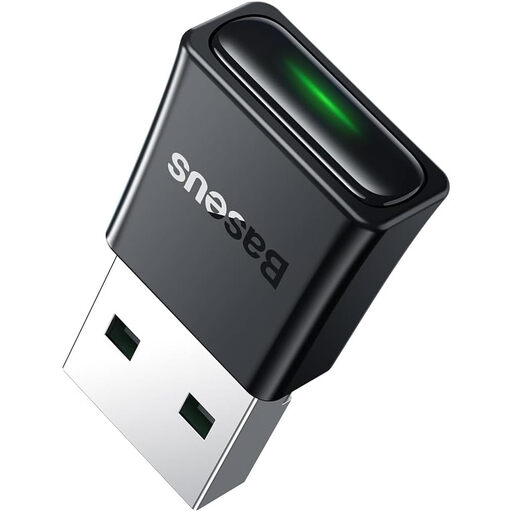
Baseus BA07 Bluetooth Adapter for PC/Laptop-Black
Why This Fits Their Persona: Ideal for users seeking a straightforward and quick solution to connect headphones, a mouse, or a keyboard to their PC or laptop. Its compact design and simple setup make it perfect for everyday home use.
Utilises the modern Bluetooth 5.3 standard for a stable connection and low latency. The mini form factor prevents it from blocking other USB ports. Plug-and-play functionality for Windows 8.1, 10, and 11 minimises driver issues.
Connects up to 5 devices simultaneously. Range of up to 20 metres according to the manufacturer's specifications.
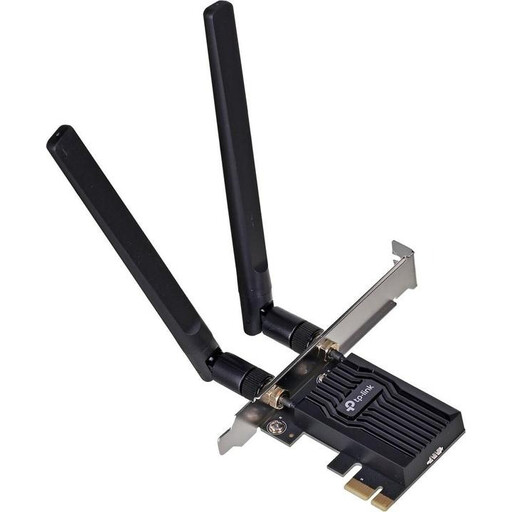
TP-Link Archer TX20E AX1800 Wi-Fi 6 PCIe Adapter
Why This Fits Their Persona: For desktop users seeking a high-performance, permanent upgrade. This internal PCIe card is designed for demanding applications like online gaming and 4K streaming, simultaneously upgrading the PC with both Wi-Fi 6 and Bluetooth 5.2.
As an internal card, it offers a more stable system connection than a USB dongle. The external antennas maximise range and signal stability, thus bypassing the problems of outdated standards. It is an all-in-one solution that doesn't block any USB ports.
Combines Wi-Fi 6 and Bluetooth 5.2 on a single card. High performance and low latency for demanding tasks.
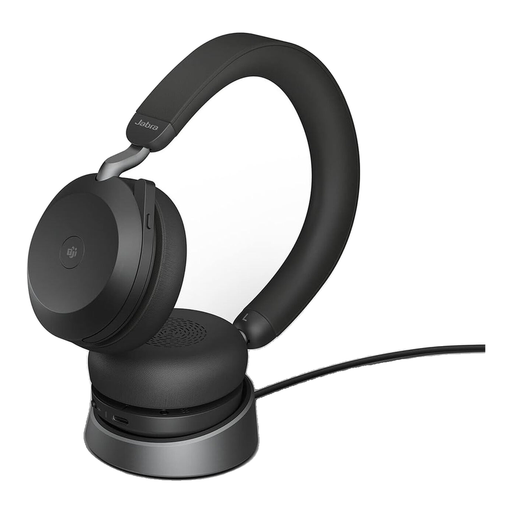
Jabra Evolve2 75 Wireless PC Headset with Charging Dock
Why This Fits Their Persona: This is an integrated solution for professional users who need a reliable audio connection for video conferences (e.g., MS Teams). The bundle includes a high-quality headset and a perfectly matched USB-C Bluetooth adapter (Jabra Link 380).
Completely bypasses compatibility and driver issues, as the headset and adapter are designed to work together as a certified system. The connection, optimised for voice applications, prevents audio dropouts and quality issues during important calls.
Certified for Microsoft Teams. Offers advanced noise cancellation (ANC) and a stable connection thanks to the dedicated adapter.
Looking for More Options?
We have compiled a complete, up-to-date list of products that fully meet these strict selection criteria and safety standards.
Frequently Asked Questions (FAQ)
How do I connect Bluetooth headphones to my PC after installing the adapter?
Once the adapter is recognised by the system, navigate to "Bluetooth & devices" (or a similar name) in your Windows settings. Enable Bluetooth and click "Add device". Put your headphones into pairing mode, and they should appear in the list of available devices on your PC. Select them to establish the connection.
Can a Bluetooth adapter completely eliminate latency in gaming?
No wireless standard is completely latency-free. However, a modern adapter with Bluetooth 5.0 or higher reduces the delay to a level that is barely perceptible for most games. For professional esports, where every millisecond counts, a wired connection often remains the gold standard. For all other users, a high-quality adapter provides more than sufficient performance.
Will a Bluetooth adapter for Windows 11 also work with older Windows versions?
That depends on the manufacturer. Many adapters advertised as plug-and-play for Windows 11 and 10 require a manually installed driver for Windows 7 or 8.1. Check the product description or the manufacturer's website for a list of supported operating systems to ensure compatibility.