
Multi-Device Mouse Recommendations for Productivity
Managing multiple devices—from a desktop PC in the office to a laptop at home and a tablet on the go—can quickly lead to a cluttered workspace. Different mice and cables for each system disrupt your workflow and create unnecessary complexity. Using a high-performance wireless multi-device mouse can solve this challenge by enabling seamless switching between different computers, thereby boosting efficiency.
This article presents a selection of wireless mice designed for professional use across multiple devices. We will highlight the key features you should look for when making your choice and showcase models that stand out for their technology, ergonomics, and functionality.
What to Look for in a Mouse for Multiple Computers?
Choosing the right model depends on your individual workflow needs. Three key criteria will help guide your decision.
1. Connectivity and Device Management
The ability to connect to multiple systems is the core feature. Most models use Bluetooth for laptops and tablets and a 2.4 GHz USB receiver for a stable connection to a PC. Pay attention to the number of devices that can be paired simultaneously and how easily you can switch between them with the press of a button. Newer technologies like NearLink claim to offer improved performance with lower latency and higher energy efficiency compared to traditional Bluetooth. Features for cross-computer file transfer are an added bonus for power users.
2. Ergonomics and Programmable Buttons
Comfort is crucial during long workdays. An ergonomic mouse for work is shaped to support the natural posture of your hand and reduce fatigue. Models with a thumb rest and contoured grips are often a great choice. A wireless mouse with programmable buttons further enhances productivity. It allows you to assign frequently used commands or macros to buttons, which is especially useful for accelerating workflows in applications for graphic design or software development.
3. Sensor Precision and Battery Life
A precise sensor is essential for detail-oriented tasks. The resolution is measured in DPI (Dots Per Inch)—higher values allow for faster and finer cursor movements. Adjustable DPI levels let you adapt to different screen sizes and tasks. A mouse with long battery life ensures you won't be interrupted in the middle of an important project. Modern mice often provide several weeks or months of use and can be quickly recharged via USB-C. For office environments, a quiet-click mouse can also be beneficial to minimise noise disturbances.
Our Recommended Multi-Device Mice
Based on the criteria mentioned, we have compiled a selection of models suitable for demanding work environments.
RAPOO MT760 PRO Wireless Mouse
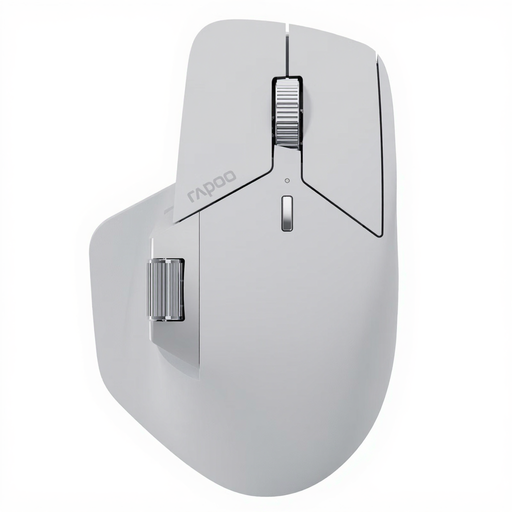
Why It Stands Out: The Rapoo MT760 PRO is a technologically advanced NearLink mouse designed for maximum connectivity. It can connect to up to seven devices simultaneously and supports seamless switching. Its M+ Cross-Computer technology allows you to move the cursor across multiple screens and transfer files via copy-and-paste.
Advantages:
- Comprehensive Connectivity: Connects via NearLink, Bluetooth 5.0, and cable to up to 7 devices.
- High Performance: A sensor with 12,000 DPI and a polling rate of 2000 Hz ensure precise control.
- Customisation: Features 11 programmable buttons and on-board memory to save configurations.
- Long Battery Life: Offers up to 120 days of use, according to the manufacturer, and charges via USB-C.
- Quiet Clicks: The buttons are optimised for silent operation.
Who Is It For? Professionals and tech enthusiasts who need a single mouse for a complex device ecosystem and value future-proof connectivity technology. Those planning on buying the Rapoo MT760 PRO will get a solution for demanding multi-tasking scenarios.
Logitech MX Master 4
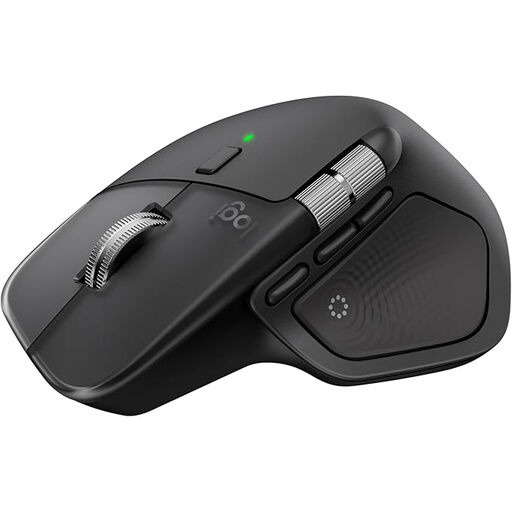
Why It Stands Out: The Logitech MX Master 4 builds on the success of its predecessors, focusing on ergonomics and productivity-enhancing features. The MagSpeed scroll wheel and haptic feedback provide tactile and precise control, while the ergonomic design ensures long-lasting comfort.
Advantages:
- Superb Ergonomics: The shape is optimised for a natural hand posture, reducing fatigue.
- Precise Scrolling: The MagSpeed scroll wheel intelligently switches between step-by-step and hyper-fast scrolling.
- High-Resolution Sensor: The 8K DPI sensor works even on glass surfaces, according to Logitech.
- Multi-Device Functionality: Pairs with up to three devices via Bluetooth or the Logi Bolt USB receiver.
- Quiet Clicks: The click noise is significantly reduced compared to previous models.
Who Is It For? Developers, designers, and content creators who need an extremely comfortable and feature-rich mouse for daily, intensive use across up to three computers.
Logitech G PRO X SUPERLIGHT 2
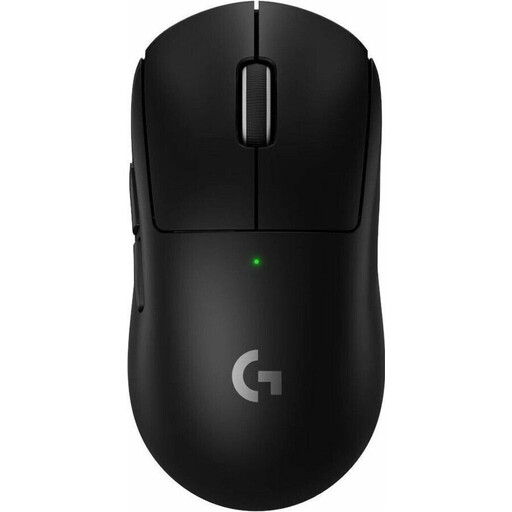
Why It Stands Out: Although positioned as a gaming mouse, the PRO X SUPERLIGHT 2 is also perfect for professionals who switch between work and occasional gaming, thanks to its extremely low weight of just 60 grams and outstanding responsiveness. The LIGHTSPEED wireless technology ensures a virtually latency-free connection.
Advantages:
- Extremely Lightweight: The 60-gram weight allows for fast and effortless movements.
- Professional-Grade Performance: The HERO 2 sensor offers up to 44,000 DPI and a polling rate of 8,000 Hz for maximum precision.
- Long Battery Life: Provides up to 95 hours of use per charge.
- Reliable Connection: LIGHTSPEED technology delivers stable and fast wireless performance.
- Hybrid Switches: LIGHTFORCE hybrid switches combine the speed of optical switches with the feel of mechanical ones.
Who Is It For? Users looking for a mouse for hybrid use—precise and fast enough for demanding work and powerful enough for competitive gaming. It is ideal for users who want a single high-performance mouse for their PC and Mac.
Looking for More Options?
If the featured models don't exactly meet your requirements or if you're looking for specific features like a different form factor, it's worth taking a look at our broader selection.
? Discover more USB-C mice in our category
Frequently Asked Questions (FAQ)
1. What is the main advantage of a multi-device mouse? The biggest advantage is efficiency and a clutter-free workspace. Instead of using a separate mouse for each device, you can seamlessly switch between your PC, laptop, and tablet with a single mouse. This not only saves desk space but also streamlines your workflow, especially if you frequently move between different systems.
2. How do I connect a wireless mouse to multiple devices? The process is typically straightforward. First, you pair the mouse with each device individually via Bluetooth. Most multi-device mice have a dedicated button that allows you to cycle through the paired devices. An LED indicator usually shows which device is currently active. Alternatively, a supplied USB dongle can be used for one of the devices.
3. Is a Bluetooth mouse suitable for demanding tasks like gaming or graphic design? While traditional Bluetooth can introduce a slight delay (latency) for some professional applications, the technology has evolved significantly. Modern wireless mice use advanced protocols like Logitech LIGHTSPEED or the new NearLink technology, which offer performance on par with wired mice. Therefore, these mice are very well-suited for most graphic design tasks and even for competitive gaming.