
How to Choose a Wireless Mouse for Your Needs
A wireless mouse promises a clutter-free desk and maximum flexibility. However, the selection process is fraught with pitfalls that often only become apparent after the purchase. From exaggerated marketing promises to technical flaws that disrupt your daily workflow, choosing the wrong cordless mouse can quickly lead to frustration.
As your Joybuy Product Recommendation Officer, I'm here to help you separate the wheat from the chaff. We'll focus on the facts and show you which features truly matter, so you can make an informed decision.
The 3 Most Common Pitfalls When Buying a Wireless Mouse
Many manufacturers advertise with impressive numbers and features. But not all that glitters is gold. Pay special attention to these three points to avoid falling into a marketing trap:
- The DPI Myth: Manufacturers often promote extremely high DPI (Dots Per Inch) values of 12,000 or more as a mark of quality. For most users in an office or at home, however, such a high value is irrelevant and practically unusable. You end up paying for a feature that is primarily important for professional gamers on high-resolution monitors.
- Unstable Connections: A cheap Bluetooth mouse or a model with a low-quality wireless dongle can lead to constant connection drops and noticeable delays (latency). This is a common annoyance, especially in environments with many other wireless devices, and it significantly impacts productivity.
- Unrealistic Battery Life: Claims like "up to 24 months of battery life" are often based on idealized usage scenarios with only a few hours of operation per day. With intensive daily use, the actual battery life can be significantly shorter, leading to frequent recharging or battery changes.
What Really Matters in a Wireless Mouse
To find a suitable PC mouse, you should focus on the technical fundamentals that meet your specific needs. The following three criteria are crucial.
Connection Type: Bluetooth vs. 2.4 GHz Wireless with Dongle
The type of connection significantly influences your mouse's compatibility and performance.
- Bluetooth: A Bluetooth mouse connects directly to your laptop, tablet, or PC without occupying a USB port. This is ideal for mobile devices with few ports. Some models can even pair with multiple devices simultaneously, allowing you to switch between them at the touch of a button.
- 2.4 GHz Wireless with USB Dongle: These mice use a small USB receiver (dongle) that establishes a dedicated and often more stable connection. Technologies like Logi Bolt offer an encrypted and reliable connection with low latency, making them a great choice for demanding office work or a gaming mouse. The downside is the permanently occupied USB port.
Sensor and DPI: Precision for Your Use Case
The sensor is the heart of every computer mouse. Its quality and sensitivity determine its precision.
- DPI (Dots Per Inch): This value indicates how sensitively the mouse reacts to movement. For standard office applications on Full HD or 4K monitors, values between 800 and 1,600 DPI are perfectly sufficient. Higher values are only useful if you use very large monitors or need a high-precision gaming mouse for fast-paced games.
- Sensor Type: Modern optical sensors work reliably on most surfaces. High-quality laser sensors, such as the Darkfield sensor in some Logitech mouse models, even allow for precise tracking on glass.
Ergonomics and Form Factor: Comfort for Long Workdays
A mouse that doesn't fit well in your hand can lead to strain over time.
- Shape and Size: Choose a mouse that fits your hand size and grip style (Palm, Claw, or Fingertip Grip). Ambidextrous models offer flexibility for both right- and left-handed users.
- Ergonomic Mouse: An ergonomic mouse is specially shaped to promote a more natural hand and arm posture. Vertical mice or highly contoured models can reduce the risk of repetitive strain injuries.
- Silent Mouse: For open-plan offices or quiet work environments, models with noise-reduced clicks are a worthwhile option.
Product Suggestions by Profile
Based on the criteria above, we have identified a few models that are a sensible choice for different user groups.
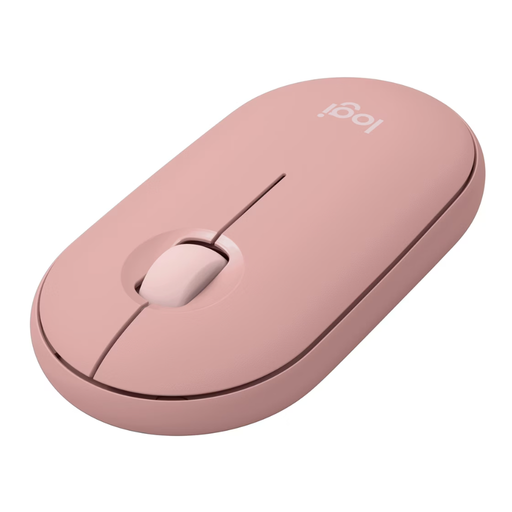
Logitech Pebble Mouse 2 M350s Tonal Rose
Why This Fits Their Persona: Its slim, lightweight design makes it the ideal companion for laptops and tablets. The ability to seamlessly switch between up to three devices via Bluetooth is perfect for users who flexibly move between a work PC, personal laptop, and tablet.
Instead of relying on an exaggerated DPI value, this model focuses on practical features. The Silent Touch technology reduces click noise by over 90% according to Logitech, and the battery life of up to 24 months with a single AA battery is realistic and suitable for everyday use.
Compact design for high mobility; Seamless switching between up to 3 devices; Extremely quiet click noise.
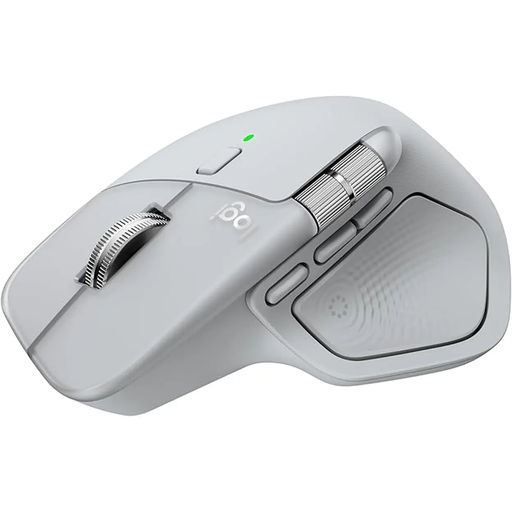
Logitech MX Master 4 Ergonomic Wireless Mouse
Why This Fits Their Persona: Engineered for maximum productivity. The ergonomic shape, MagSpeed scroll wheel for rapid or line-by-line scrolling, and the thumb wheel for horizontal navigation are ideal for developers, designers, and anyone who spends long hours at the PC.
This model bypasses the unstable connection trap with dual connectivity via Bluetooth and the secure Logi Bolt USB receiver. The 8K DPI sensor is not a marketing gimmick here; it enables precise work on high-resolution 4K/8K monitors and even on glass surfaces.
Advanced MagSpeed scroll wheel; Ergonomic design for long-term use; Precise 8K DPI sensor for any surface.
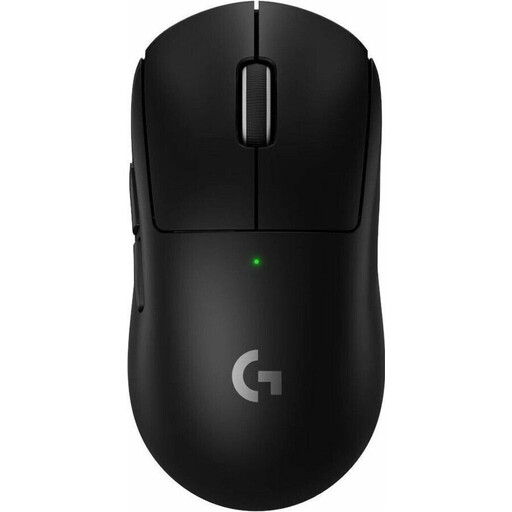
Logitech G PRO X SUPERLIGHT 2 LIGHTSPEED Wireless Gaming Mouse
Why This Fits Their Persona: For competitive gaming where every millisecond counts. The extremely low weight of just 60 grams allows for fast, fatigue-free movements. The high-precision HERO 2 sensor and LIGHTSPEED wireless technology are designed for maximum responsiveness and accuracy.
Here, high DPI values and a high polling rate are not empty promises but functional necessities for professional gaming. LIGHTSPEED technology was specifically developed to minimize latency and ensure a stable connection that can compete with wired mice.
Extremely lightweight design (60g); Professional-grade HERO 2 sensor for maximum precision; LIGHTSPEED wireless technology for minimal latency.
Looking for More Options?
If you prefer a wired alternative with guaranteed stability, we have compiled a selection of products that meet strict selection criteria.
Frequently Asked Questions (FAQ)
What is the difference between a Bluetooth mouse and a wireless mouse with a dongle?
A Bluetooth mouse connects directly to your computer's built-in Bluetooth module and does not require a USB port, which is convenient for on-the-go use. A wireless mouse with a dongle uses a dedicated USB receiver that often provides a more stable and responsive connection, which is particularly advantageous for gaming or in environments with a lot of signal interference.
How long does the battery of a wireless mouse last?
Battery life varies greatly depending on the model, frequency of use, and sensor technology. Models with replaceable AA or AAA batteries can often last for several months to over a year. Mice with built-in lithium-ion batteries, like the Logitech MX Master series, typically offer several weeks of use and are recharged via a USB-C cable. Use the manufacturer's specifications as a guideline and expect shorter battery life with intensive use.
Does every wireless mouse work with a Mac?
Most modern wireless mice are compatible with both Windows and macOS. Basic functionality (pointer movement, left/right click, scrolling) is almost always guaranteed. However, for advanced features like programming buttons or adjusting DPI settings, manufacturer-specific software (e.g., Logi Options+) is often required. Before buying a mouse, check if the software is also available for macOS to ensure you can use its full range of features. Some manufacturers also offer a special mouse for Mac, which is visually and functionally tailored to the Apple ecosystem.