
Wireless Keyboard and Mouse Sets for a Productive Workspace
A tidy, clutter-free desk is key to a focused and efficient work environment. A wireless keyboard and mouse set is an essential component for achieving this, whether in the office or at home. The right combination can not only enhance the aesthetics of your workspace but also improve comfort and boost productivity.
This article serves as a guide. It highlights the important criteria to consider when choosing a wireless keyboard and mouse combo and presents a selection of models for different needs. The goal is to provide you with an objective basis for your purchasing decision.
What to Look For When Making Your Selection
Choosing the right set depends on your individual work habits and preferences. The following points summarise the most important technical features.
Connectivity: 2.4 GHz Wireless vs. Bluetooth
Most wireless sets use one of two technologies:
- 2.4 GHz Wireless Connection: These sets come with a small USB receiver (dongle) that you plug into your computer. The connection is typically very stable and responsive, and setup is plug-and-play. This is a proven solution for a stationary workstation.
- Bluetooth: A Bluetooth connection doesn't require a separate USB receiver, which frees up a USB port on your device. Many models also allow you to easily switch between multiple devices (e.g., laptop, tablet, PC), increasing flexibility.
Typing Feel and Noise Level: Quiet and Precise
For a keyboard and mouse set in the office or a quiet work environment, the noise level is a critical factor. A quiet keyboard and mouse minimises distractions for you and your colleagues. Look for the following features:
- Key Technology: Keyboards with a scissor-switch mechanism offer a short, precise, and quiet keystroke. They are often found in high-quality laptop keyboards and slim desktop keyboards.
- Noise Reduction: Some manufacturers, like Logitech with its SilentTouch technology, offer specially designed keys and mouse clicks that, according to the manufacturer, reduce noise by over 90%.
Power Source: Rechargeable or Batteries
The question of power supply is a trade-off between convenience and runtime:
- A rechargeable keyboard and mouse with integrated batteries can be conveniently charged via a USB-C cable, often even while in use. This reduces waste and the long-term cost of batteries.
- Models with replaceable AA or AAA batteries often offer a very long runtime of up to several years before a change is needed.
All models presented here use the QWERTZ keyboard and mouse set layout common in Germany, so all keys are in their familiar positions.
Wireless Keyboard and Mouse Picks
Based on the criteria mentioned, we have compiled a selection of sets suitable for various applications.
CHERRY Stream Desktop Recharge
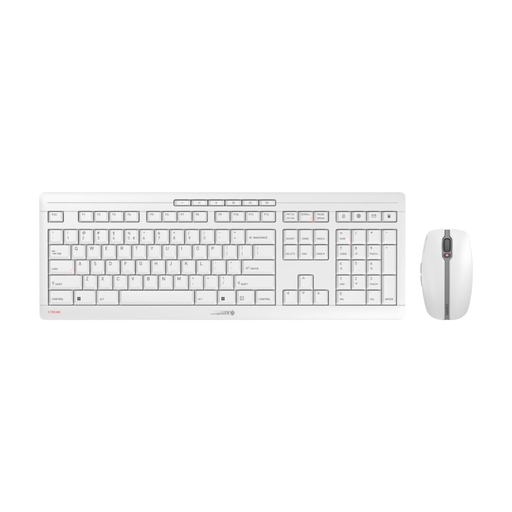
Why It Stands Out: The Cherry keyboard and mouse set combines sustainability with premium build quality. The integrated NiMH batteries can be charged via USB-C, making battery changes obsolete. The keyboard uses the proprietary CHERRY SX scissor technology, known for an extremely precise and quiet typing feel. An integrated metal plate ensures high stability and slip resistance.
Pros:
- Rechargeable NiMH batteries with USB-C charging function
- Quiet and precise keystrokes thanks to SX scissor technology
- High stability from an integrated metal plate and eight rubber feet
- Symmetrical 6-button mouse with quiet clicks and adjustable DPI (1000/1600/2400)
- Secure 2.4 GHz wireless connection with AES-128 encryption
Who Is It For? Users who value a high-quality typing experience, a quiet work environment, and a sustainable solution with rechargeable batteries. Ideal for daily, intensive use in the office.
View details for the CHERRY Stream Desktop Recharge
Logitech MK295 Silent Wireless Combo
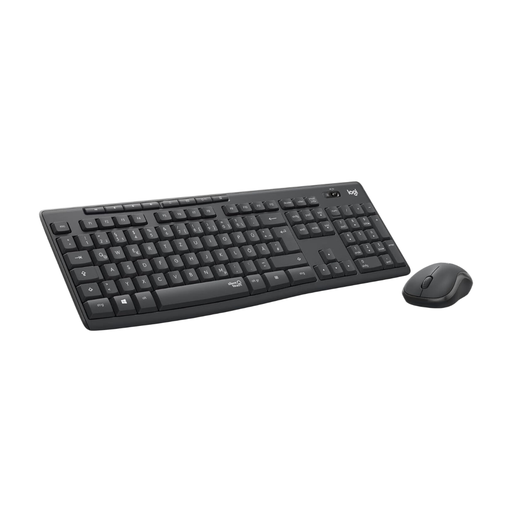
Why It Stands Out: This Logitech keyboard and mouse set is designed from the ground up for minimal noise. According to Logitech, its SilentTouch technology reduces clicking and typing noises by more than 90% compared to standard models. At the same time, the set offers an exceptionally long battery life of up to 36 months for the keyboard and 18 months for the mouse.
Pros:
- SilentTouch technology for extremely quiet operation
- Long battery life (up to 36 months for the keyboard)
- Stable 2.4 GHz wireless connection with a range of up to 10 metres
- Full-size keyboard with a number pad and eight hotkeys
- Made using certified post-consumer recycled plastic
Who Is It For? Users in open-plan offices, libraries, or home offices for whom near-silent operation is a top priority. Also suitable for users who prefer a long-lasting battery solution without frequent recharging.
View details for the Logitech MK295 Combo
Logitech MX Keys S Combo
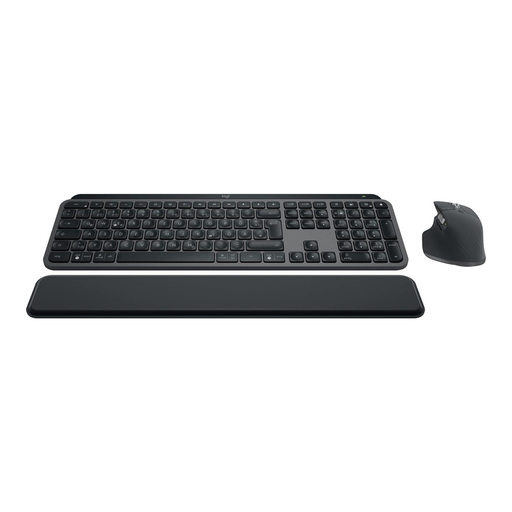
Why It Stands Out: The MX Keys S Combo is a premium solution for demanding users. The keyboard features spherically-dished keys that conform to your fingertips, providing a fluid typing experience. The smart backlighting automatically adjusts to ambient light conditions. The included MX Master 3S mouse, with its 8000 DPI sensor, offers precise tracking on almost any surface, including glass. You can connect via either Bluetooth or the Logi Bolt USB receiver, allowing you to switch between up to three devices.
Pros:
- Superb typing feel thanks to spherically-dished keys
- Smart, automatic backlighting
- MX Master 3S mouse with a high-precision 8000 DPI sensor and MagSpeed scroll wheel
- Multi-device capability for up to three devices (Bluetooth/Logi Bolt)
- Rechargeable batteries with long life and a USB-C charging port
Who Is It For? Professional users, creatives, and power users who switch between multiple computers or operating systems and demand the highest standards of precision, comfort, and customisation.
View details for the Logitech MX Keys S Combo
Looking for More Options?
The models presented here cover common user profiles. However, the market offers a much wider variety of specialised solutions, including ergonomic designs, compact layouts, or sets with advanced multimedia functions.
If you would like to compare more models, you can find a broader selection in our main category.
Discover our full range of Keyboards, Mice & Input Devices
Frequently Asked Questions (FAQ)
What is the difference between a 2.4 GHz and a Bluetooth connection in a wireless keyboard-mouse combo?
A 2.4 GHz connection uses a dedicated USB receiver and provides a very stable, ready-to-use (plug-and-play) connection, but it occupies a USB port. Bluetooth establishes a direct connection to the computer, saving the USB port and making it easier to switch between multiple devices. The setup may require one more step than with a 2.4 GHz connection.
How important is the QWERTZ layout?
For users in German-speaking regions, a QWERTZ keyboard and mouse set is the standard. The key arrangement corresponds to the familiar positions of letters like Y and Z, as well as the German umlauts (?, ?, ?) and the Eszett (?). Using a different layout, such as QWERTY (the US/UK standard), would require significant readjustment when typing.
Are rechargeable sets the better choice?
That depends on personal preference. A rechargeable keyboard and mouse is convenient because it can be charged with a cable when needed and produces no battery waste. On the other hand, sets with disposable batteries often offer a much longer autonomy of many months or even years, which minimises maintenance. The decision comes down to the convenience of recharging versus maximum independence from a power source.