
Wireless Gaming Mouse Buyer's Guide and Recommendations
Finding the right wireless gaming mouse can be a challenge. In competitive games, every millisecond counts, and many players worry about latency, connection drops, or a dead battery in the middle of a match. At the same time, technology has made enormous strides in recent years, and modern wireless mice are often on par with their wired counterparts in terms of performance.
This article serves as a guide. We'll explain the key technical features you should look for when making your choice and present a selection of models tailored to the specific needs of PC gamers.
What to Look for in a Wireless Gaming Mouse
To make an informed decision, it's helpful to understand the core technologies that define a mouse's performance.
1. Weight and Ergonomics
A lightweight gaming mouse is particularly advantageous in fast-paced FPS games. Lower weight allows for quicker reactions, more precise corrections, and reduces wrist fatigue during long gaming sessions. Models under 60 grams are now considered ultralight and are highly sought-after by esports athletes. The shape of the mouse should also match your grip style (Palm, Claw, or Fingertip Grip) to ensure comfortable and secure handling.
2. Sensor and Polling Rate
The optical sensor is the heart of any gaming mouse. It is responsible for accurately tracking your movements. For example, a gaming mouse with a PAW3395 sensor represents very high tracking accuracy and flawlessness, which is essential for competitive play.
Closely related is the polling rate, measured in Hertz (Hz). It indicates how often the mouse reports its position to the computer. While 1000 Hz was the standard for a long time, an 8K polling rate mouse (8000 Hz) enables even smoother cursor movement and reduces input lag to a minimum. Such a fast wireless mouse for gamers can provide the decisive edge in critical moments.
3. Connection Technology
Modern wireless mice often offer three connection modes: 2.4 GHz wireless, Bluetooth, and wired. For demanding gaming, the 2.4 GHz connection is the top choice, as it ensures a stable connection with extremely low latency. Bluetooth is well-suited for mobile use with a laptop, while wired operation allows you to continue playing while the mouse is charging.
Top Wireless Gaming Mouse Picks
Based on the criteria above, we have compiled a selection of models that stand out for their technical specifications and intended use.
ATTACK SHARK R5 ULTRA Carbon Fiber Wireless 8K PAW3950MAX Gaming Mouse
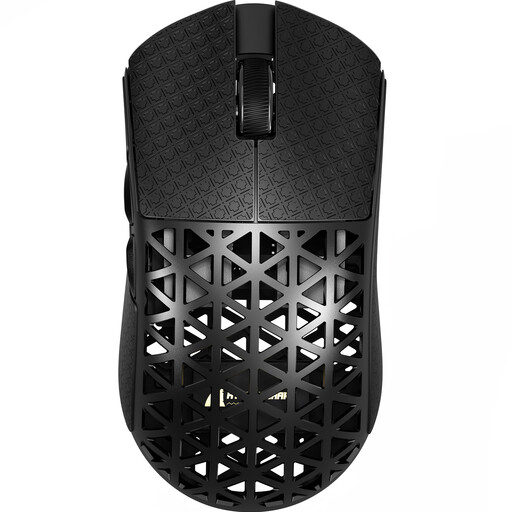
What makes it stand out The ATTACK SHARK R5 ULTRA is designed for maximum performance. Weighing only approx. 42 grams, achieved through an injection-molded carbon fiber construction, it is one of the lightest mice on the market. Paired with an 8000 Hz polling rate and the high-precision PAW3950MAX sensor, this model is aimed squarely at the esports sector.
Pros
- Extremely low weight: approx. 42 g for maximum agility
- 8K polling rate: Minimal latency with up to 8000 Hz in 2.4 GHz mode
- High-performance sensor: PixArt PAW3950 for precise tracking
- Nordic 52840 Chip: Ensures a stable and power-efficient wireless connection
- Durable switches: Omron micro switches, rated for up to 100 million clicks according to the manufacturer
Who is it for? For competitive players and esports athletes for whom every gram and every millisecond counts. Ideal for FPS titles that require fast and precise mouse movements.
ATTACK SHARK X11 Wireless Gaming Mouse with Charging Dock
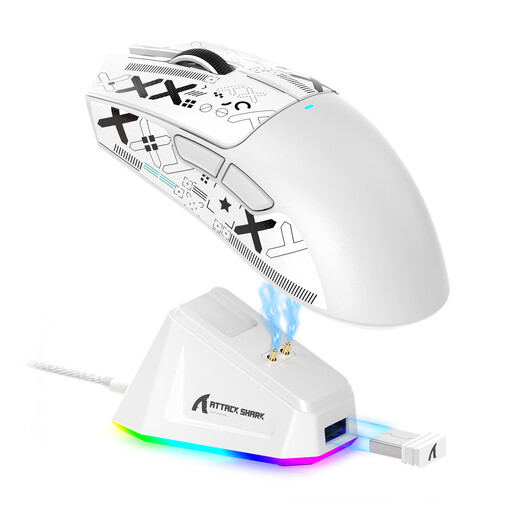
What makes it stand out The ATTACK SHARK X11 combines performance with convenience. Its standout feature is the included charging dock, which not only simplifies charging but also helps maintain a tidy desk setup. Weighing approx. 63 grams, it's light but not extreme, making it a great all-rounder.
Pros
- Includes charging dock: Convenient charging and stylish storage
- Low weight: approx. 63 g for a good balance of stability and speed
- Reliable sensor: PAW3311 offers solid performance for most gaming scenarios
- Tri-mode connectivity: Flexible use via 2.4 GHz, Bluetooth, or cable
- Long battery life: Up to 65 hours of use according to the manufacturer
Who is it for? For gamers who want a reliable wireless mouse with the added convenience of a charging dock. An excellent all-rounder for various game genres and daily use.
ATTACK SHARK X3 Wireless Gaming Mouse PAW3395 Superlight
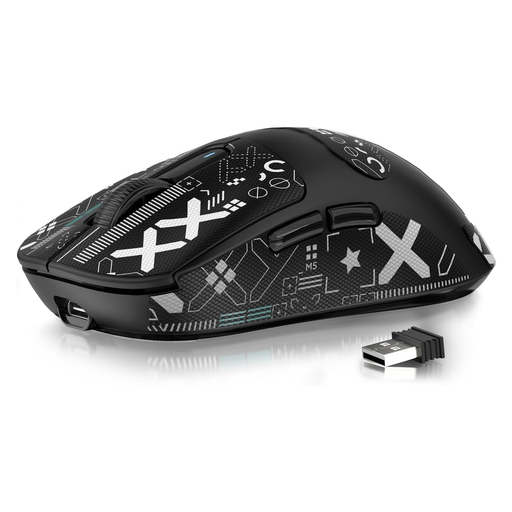
What makes it stand out The Attack Shark X3 is a prime example of an ultralight esports mouse that makes high-end tech accessible. Weighing just 49 grams and featuring the renowned PAW3395 sensor, it delivers performance typically found in significantly more expensive models. Particularly noteworthy is the manufacturer-stated battery life of up to 200 hours.
Pros
- Ultralight design: Only 49 g for effortless and rapid movements
- High-end sensor: The PAW3395 ensures top-tier precision with a max DPI of 26,000
- Outstanding battery life: Up to 200 hours of playtime according to the manufacturer
- Durable switches: Kaihua switches, rated for up to 80 million clicks
- Smart sleep mode: Helps to efficiently maximize battery life
Who is it for? For budget-conscious enthusiasts and ambitious gamers looking for an extremely lightweight gaming mouse with a top-tier sensor, without wanting to compromise on battery life.
Discover More Options
Haven't found the right model for you yet, or want to compare more alternatives? Discover our full selection of wireless optical gaming mouse and find the perfect mouse for your setup.
Frequently Asked Questions (FAQ)
1. Is a wireless gaming mouse really as fast as a wired one? Yes, modern wireless mice using 2.4 GHz technology offer latency that is indistinguishable from a wired connection to a human. Technologies like an 8000 Hz polling rate can even reduce input lag below that of many standard wired mice.
2. What does DPI mean on a gaming mouse? DPI stands for "Dots Per Inch" and describes the sensitivity of the mouse sensor. A higher DPI value means the cursor moves further across the screen with a small physical movement of the mouse. Most competitive players prefer lower DPI settings (e.g., 400 to 1600) for more precise aiming, but also adjust sensitivity within the game itself.
3. How important is the weight of a gaming mouse? Weight is largely a matter of personal preference, but in fast-paced games like FPS shooters, a lighter mouse (< 70 g) can improve reaction time and reduce hand fatigue. For slower games or productivity tasks, a heavier mouse can provide a greater sense of control.