
PC Wi-Fi Card Buyers Guide for Stable Connections
By: Joybuy Product Recommendation OfficerDate: 2026-07-09
A desktop PC often delivers high performance but is tethered to a fixed location by a LAN cable. For those seeking more flexibility, looking to reduce cable clutter, or simply wanting to modernise a slow connection, the question arises: What's the easiest way to connect a PC to a fast and stable wireless network? Installing an internal PC Wi-Fi card is a powerful and permanent solution.
This article explains the key criteria to consider when selecting a suitable card and presents a selection of models for various use cases—from the home office to demanding gaming.
Selection Criteria for Your New Wi-Fi Card
To find the right hardware for your system, several technical aspects should be considered. These will help you make an informed decision tailored to your individual requirements.
The Right Wi-Fi Standard: Wi-Fi 5, Wi-Fi 6, or Wi-Fi 6E?
The Wi-Fi standard determines the maximum speed and efficiency of the wireless connection.
- Wi-Fi 5 (802.11ac): An established standard that offers solid performance for everyday tasks like browsing, email, and HD video streaming. Cards with this standard are often a cost-effective option for retrofitting a PC with Wi-Fi.
- Wi-Fi 6 (802.11ax): Delivers higher data rates, improved efficiency in congested networks, and lower latency. A Wi-Fi 6 card for your PC is a worthwhile investment, especially for 4K streaming, online gaming, and households with many connected devices.
- Wi-Fi 6E (802.11ax): Extends Wi-Fi 6 by adding the 6 GHz frequency band. This exclusive band is less congested, enabling extremely low latency and high speeds, making it the preferred choice for demanding gamers and users seeking a future-proof solution.
Interface and Compatibility: PCIe and Operating System
Most internal Wi-Fi cards connect via a PCIe (PCI Express) slot on the computer's motherboard. Before purchasing, check if a free PCIe x1 slot is available in your desktop PC. Compatibility with your operating system is also crucial. Most current cards are optimised for Windows 10 and Windows 11, with Windows 11 typically required to use the 6 GHz band of Wi-Fi 6E.
Additional Features: Do You Need a Wi-Fi Card with Bluetooth?
Many modern PCIe Wi-Fi cards also integrate a Bluetooth module. A Wi-Fi card with Bluetooth allows you to connect wireless peripherals like mice, keyboards, headsets, or controllers directly to your PC without needing a separate USB Bluetooth adapter. This creates a clean and functional work or gaming setup.
Top PC Wi-Fi Card Picks
Based on the criteria mentioned, we have compiled a selection of Wi-Fi adapters for different needs.
TP-Link Archer TX20E AX1800 Wi-Fi 6 PCIe Adapter
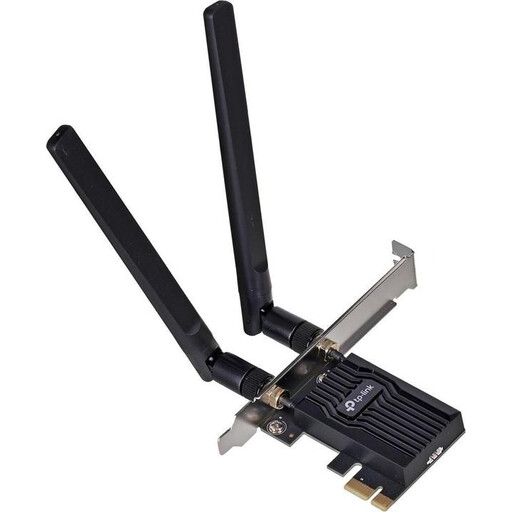
Why it stands out: The Archer TX20E is a well-balanced solution that combines the modern Wi-Fi 6 standard with integrated Bluetooth 5.2. It offers a significant performance boost over older Wi-Fi standards, making it a versatile all-rounder for most users.
Pros:
- Wi-Fi 6 AX1800: Speeds of up to 1201 Mbps on the 5 GHz band and 574 Mbps on the 2.4 GHz band.
- Bluetooth 5.2: Enables a fast and stable connection to wireless peripherals.
- Two External Antennas: Ensure improved signal strength and range.
- Low Latency: Suitable for smooth gaming and streaming.
- WPA3 Security: Supports the latest security standard to protect your network.
Who is it for?: Ideal for home office users and general consumers who want to upgrade their desktop PC to a current Wi-Fi standard while also benefiting from integrated Bluetooth.
TP-Link Archer T4E PCIe Network Card AC1200
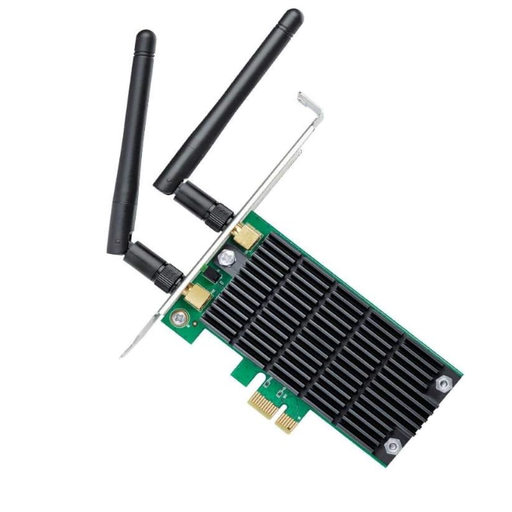
Why it stands out: The Archer T4E is a reliable and budget-friendly option for users who need a stable Wi-Fi 5 connection. Its broad compatibility with various Windows versions makes it a flexible choice for upgrading older systems.
Pros:
- AC1200 Dual-Band: Offers speeds up to 867 Mbps (5 GHz) and 300 Mbps (2.4 GHz).
- Beamforming Technology: Focuses the Wi-Fi signal directly towards connected devices for a more stable connection.
- Detachable Antennas: Allow for flexible positioning for optimal reception.
- Broad Compatibility: Supports Windows 11/10/8.1/8/7/XP.
- Low-Profile Bracket: Included in the box, also fitting compact PC cases.
Who is it for?: A great choice for users with basic needs like browsing and HD streaming who are looking for a cost-effective and reliable solution to upgrade their PC.
TP-Link Archer TXE75E WiFi 6E PCIe Network Card AXE5400
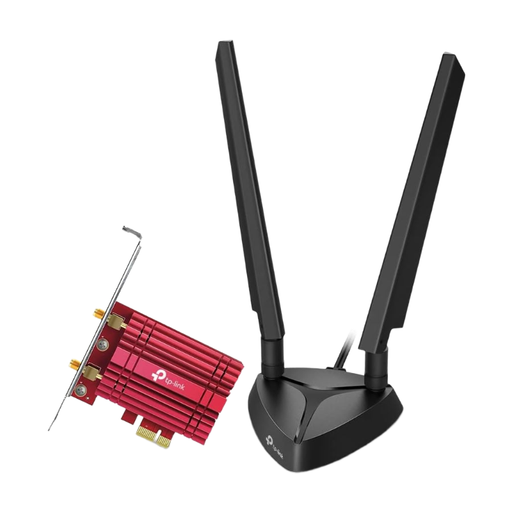
Why it stands out: As a high-end model, the Archer TXE75E utilises the Wi-Fi 6E standard and the exclusive 6 GHz band. This makes it a future-proof gaming Wi-Fi card for users who demand maximum performance and minimal latency.
Pros:
- AXE5400 Tri-Band: Uses the 2.4 GHz, 5 GHz, and the new 6 GHz band.
- Intel Wi-Fi 6E Chipset: Ensures stable and efficient performance with reduced latency.
- Magnetic Antenna Base: The external antennas can be flexibly positioned to optimise signal reception.
- Bluetooth 5.2: Integrated connectivity for modern wireless devices.
- Future-Proof: Ideal in combination with a Wi-Fi 6E router and Windows 11 for maximum performance.
Who is it for?: Perfect for demanding PC gamers, content creators, and tech enthusiasts who want to benefit from the advantages of the 6 GHz band and prepare their system for the next generation of wireless technology.
Looking for More Options?
If the models presented here don't exactly match your needs or if you're looking for specific features, a wide range of alternatives are available. A Wi-Fi adapter for a desktop PC can come in many different configurations.
Explore our full range of network cards and find the perfect solution for your system.
Frequently Asked Questions (FAQ)
How do I install a PCIe Wi-Fi card?
Installation is usually straightforward. Turn off your PC and disconnect it from the power source. Open the case, insert the card into a free PCIe x1 slot, and secure it. After closing the case and restarting the PC, you will need to install the necessary drivers, which are typically available for download from the manufacturer's website.
Is a gaming Wi-Fi card with Wi-Fi 6 worth it?
Yes, a Wi-Fi 6 card can be worthwhile for gamers. Technologies like OFDMA (Orthogonal Frequency-Division Multiple Access) significantly improve efficiency and reduce latency in networks with many devices. This leads to a more stable and responsive connection, which can be crucial for online gaming.
Can I also add Bluetooth with a Wi-Fi card?
Yes, many modern PCIe Wi-Fi cards are combo models that integrate both Wi-Fi and Bluetooth onto a single card. This is a very convenient solution for equipping your PC with both wireless technologies while keeping USB ports free for other devices.