
Multi-Port USB-C Charger Buyer's Guide
Finding the right charger for multiple devices can quickly become overwhelming. With a growing number of smartphones, tablets, laptops, and accessories all charging via USB-C, the result is often cable clutter and a shortage of available outlets. A multi-port USB-C charger promises a solution, but not every model delivers on that promise. Before you make a purchase, it's crucial to understand the most common pitfalls to avoid a bad investment.
The 3 Most Common Pitfalls When Buying Multi-Port Chargers
Many chargers advertise high wattage and numerous ports, but the devil is in the details. These three issues often lead to disappointment:
- Misleading Power Ratings: The advertised total output (e.g., 100 watts) is often only available when a single port is in use. As soon as multiple devices are connected, the power is split—often inefficiently. A 100W power adapter charging a laptop and a smartphone simultaneously might then only deliver 45W to the laptop, which isn't enough for a fast charge.
- Incompatible Fast-Charging Protocols: A charger may be marketed as a fast charger, but if it doesn't support your device's specific protocol (e.g., Power Delivery (PD) for laptops and iPhones or PPS for Samsung Super Fast Charging), you'll only get slow charging speeds. Compatibility is crucial for efficiency.
- Poor Thermal Management: High-performance chargers, in particular, generate heat. Models without adequate thermal management can overheat under full load. This not only leads to throttled charging performance but can also shorten the lifespan of the charger and connected devices, posing a safety hazard.
What Really Matters: The Core Specs Explained
To avoid these problems, you should check three technical aspects before buying. These will determine if a multi-port USB-C charger is right for your needs.
Total Output vs. Power Per Port
The most important specification isn't just the maximum total output, but how it's distributed across the individual ports. A good charger will clearly list its power-sharing scenarios.
- Example: A 140W charger can deliver the full 140W to a single device (like a MacBook). If two laptops are connected, the power might be split to 70W + 70W. If a smartphone is also connected, the distribution could be 65W + 45W + 30W. Check if the power offered per port is sufficient to still fast-charge your most demanding device (usually the laptop) even when other devices are plugged in.
GaN Technology for Greater Efficiency
GaN stands for Gallium Nitride, a semiconductor material that is increasingly replacing silicon in modern chargers. A GaN charger offers key advantages:
- More Compact Design: GaN components are smaller, enabling powerful chargers that have a much smaller footprint.
- Higher Efficiency and Less Heat: They convert power more efficiently and generate less waste heat. This ensures more stable charging performance and a longer lifespan.
Power Delivery (PD) as the Universal Standard
The PD charger is now the de facto standard for fast charging over USB-C. It is essential for charging high-power devices like laptops, tablets, and modern smartphones. Pay attention to the supported PD version (e.g., PD 3.0 or PD 3.1) to ensure compatibility with your devices. For some Samsung smartphones, support for PPS (Programmable Power Supply) is also required to achieve full charging speeds.
Top Recommendations Across Buyer Profiles
Based on these criteria, we have curated a selection of chargers suitable for different user profiles and their specific needs.
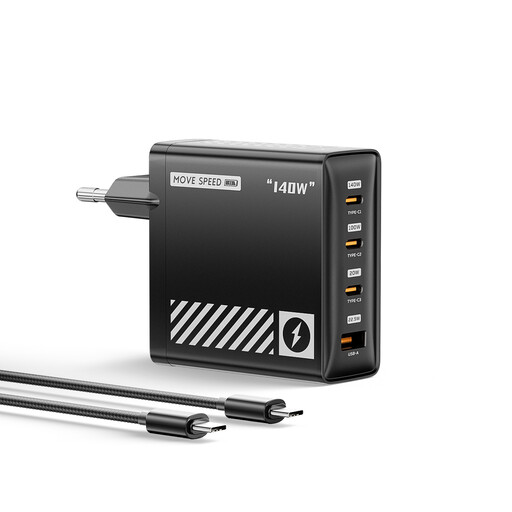
MOVESPEED 140W USB-C Charger, GaN Laptop Charger, PD 3.1
Why This Fits Their Persona: Ideal for users who need to charge a powerful laptop (e.g., MacBook Pro), a tablet, and a smartphone simultaneously. The high output and compact GaN design make it the perfect companion for the office, home office, and travel.
Support for the modern PD 3.1 protocol ensures future-proof compatibility. The GaN technology and 8-stage protection mechanisms address the issues of overheating and safety.
Very high single-port output of up to 140W, intelligent power distribution across 4 ports (3x USB-C, 1x USB-A), and a compact, travel-friendly size.
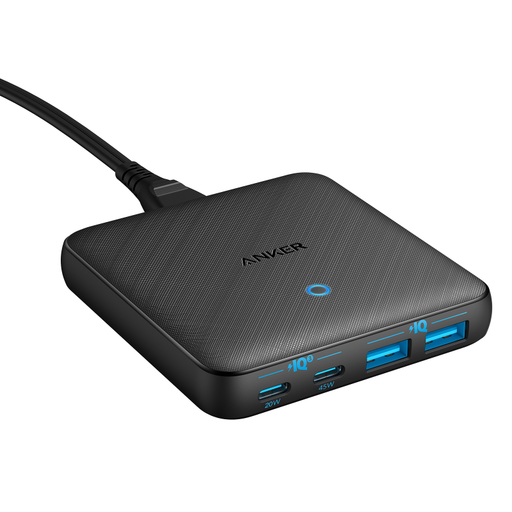
Anker PowerPort Atom III Desk Charger (65W, 2A/2C, Slim)
Why This Fits Their Persona: Perfect for anyone looking to reduce cable clutter on or under their desk. The slim design and long, detachable power cord allow for flexible and tidy placement.
As a dedicated desktop charger, it is designed for continuous operation. Anker's PowerIQ 3.0 technology ensures broad compatibility and avoids issues with incompatible charging protocols.
Extremely slim profile and a 1.5m power cord for maximum flexibility. The mix of 2 USB-C and 2 USB-A ports serves both modern and legacy devices.
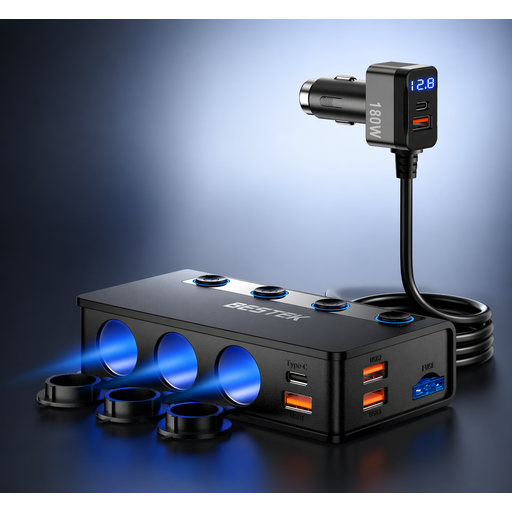
BESTEK 9-in-1 180W Cigarette Lighter Distributor
Why This Fits Their Persona: The solution for families or commuters who need to power a variety of devices in the car—from laptops and dashcams to portable coolers. It puts an end to the shortage of outlets in the vehicle.
This USB-C car charger bypasses the low-power pitfall by offering a massive 180W total output and a dedicated 65W PD port for laptops. Separate switches for the cigarette lighter sockets prevent unnecessary power drain.
Incredible versatility with 9 outlets (6x USB, 3x 12V socket). The high total output allows for simultaneous charging and operation of multiple demanding devices.
Looking for More Options?
We've compiled a complete, up-to-date list of products that fully meet these strict selection criteria and safety regulations.
Frequently Asked Questions (FAQ)
1. What is the difference between total output and power per port?
The total output (e.g., 100W) is the maximum power the charger can deliver in total. The power per port specifies how many watts a single port provides. This value changes depending on how many devices are connected simultaneously. A good charger intelligently distributes power so that important devices like laptops still charge sufficiently fast even when multiple ports are occupied.
2. Do I need a GaN charger?
A GaN charger is particularly useful if you are looking for a powerful yet compact charger. For travel or a tidy workspace, the smaller form factor with the same or higher power is a clear advantage. Additionally, they are often more durable and safer to operate due to lower heat generation.
3. Can I use a USB-C charger to charge older devices with USB-A?
Yes, many modern multi-port chargers offer a combination of USB-C and USB-A ports. This allows you to replace a MacBook charger for new devices while also charging older smartphones, power banks, or accessories with a USB-A cable. When choosing, look for a model with the right combination of ports for your needs.