
Wi-Fi Smart Plugs with Energy Monitoring Buyers Guide
Rising electricity prices and a desire for more everyday convenience are leading more and more households to seek out smart solutions. A Wi-Fi smart plug with energy monitoring is a simple and effective entry point for controlling energy consumption and intelligently managing home appliances. These devices allow you to switch power on and off via an app, create schedules, and, most importantly, identify the "energy hogs" in your household.
This article serves as a guide. We'll explain the key features to look for when making your choice and present a selection of models that cater to different needs.
What to Look for When Buying a Smart Plug
The market is flooded with a wide variety of smart plugs. To make an informed decision, a few technical features are crucial.
Maximum Load Capacity and Safety
The most important specification is the maximum electrical load a plug can handle, indicated in amperes (A) and watts (W).
- 10A / approx. 2300W: Sufficient for most small appliances like lamps, TVs, fans, or chargers.
- 16A / approx. 3680W: Necessary for devices with a high inrush current or continuous high power draw, such as portable air conditioners, oil-filled radiators, or high-performance coffee machines. Using an undersized plug for such appliances poses a safety hazard.
App Control and Compatibility
A smart plug with consumption monitoring is controlled via a smartphone app. Look for an intuitive user interface and stable operation. Most models are also compatible with common voice assistants. If you already use a smart home system, check for compatibility with Amazon Alexa or Google Assistant for convenient control as an Alexa smart plug with energy monitoring or via Google Home. Many devices are based on platforms like Tuya, which simplifies integration into existing systems.
Feature Set: Schedules and Energy Monitoring
The core benefit lies in the smart functions. A good Wi-Fi smart plug with a timer allows you to create detailed schedules to automatically turn devices on and off, helping to eliminate standby power consumption. The energy monitoring function should not only display real-time usage but also store historical data. This enables you to analyse consumption over days or months and take effective measures to save money. An Away Mode, which simulates your presence, can also enhance security.
Our Recommended Smart Plugs
Based on the criteria mentioned, we have compiled a selection of models that stand out for their functionality and specific use cases.
1. TP-Link Tapo P115
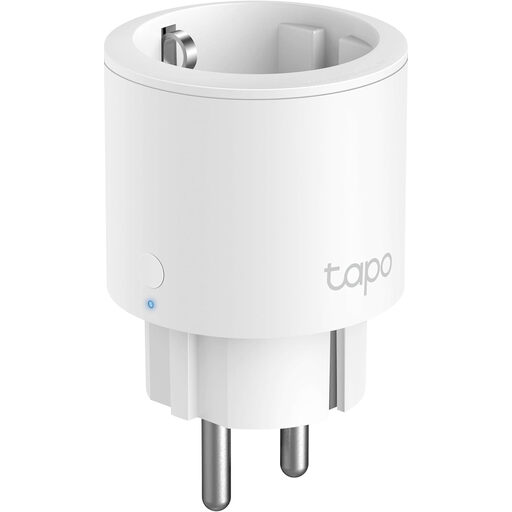
Why it stands out: The Tapo P115 combines a high load capacity with a very compact design. Despite its small size, it doesn't block adjacent outlets and is rated for high-power devices up to 3680 watts. The Tapo app is known for its user-friendly interface and detailed energy consumption analysis.
Advantages:
- High Load Capacity: Suitable for devices up to 16 A / 3680 W.
- Detailed Energy Monitoring: Analyse real-time and historical consumption directly in the app.
- Compact Nano Design: Does not obstruct adjacent sockets.
- Comprehensive Smart Features: Includes schedules, timers, and an Away Mode.
- No Hub Required: Connects directly to your 2.4 GHz Wi-Fi network.
- Voice Control: Compatible with Amazon Alexa and Google Assistant.
Who it's for: Users who want to intelligently control both small appliances and powerful consumers like space heaters or portable air conditioners, while precisely monitoring their energy usage.
2. WOOX R6113 Smart Wi-Fi Plug (4-Pack)
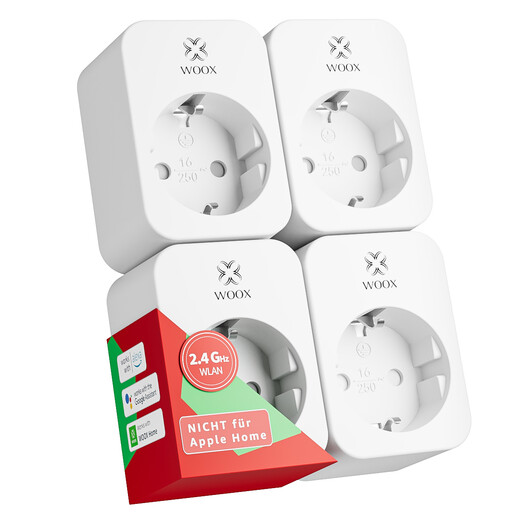
Why it stands out: This set offers excellent value for money for outfitting multiple rooms. The plugs are T?V-certified, signalling an extra layer of tested safety. With a load capacity of 16 A, they are also suitable for demanding appliances and can be controlled via the popular Tuya platform (through the Woox Home app).
Advantages:
- Convenient 4-Pack: Ideal for equipping a living room, office, and bedroom.
- T?V-Certified: Confirmed safety according to recognised standards.
- High Load Capacity: Supports devices up to 16 A / 3680 W.
- Broad Compatibility: Works with the Woox Home or Tuya Smart app, as well as Alexa and Google Home.
- Full Feature Set: Offers energy monitoring, schedules, timers, and an Away Mode.
Who it's for: Budget-conscious buyers who want to make multiple devices or rooms smart at once and value safety certification.
3. Tapo P110 Smart Plug
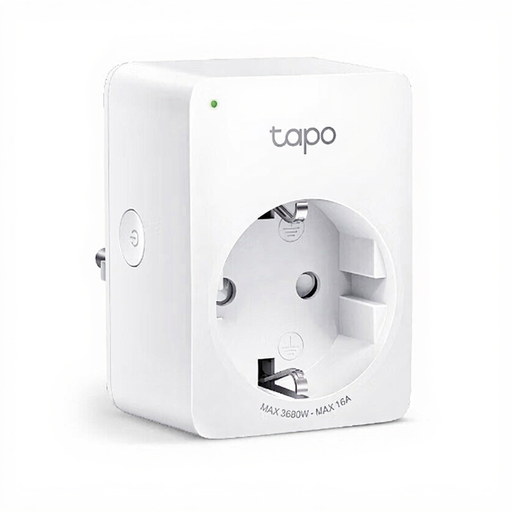
Why it stands out: The Tapo P110 is a very compact and cost-effective smart plug that provides all the essential functions for energy management. It's the ideal entry point for anyone looking to enjoy the benefits of an energy monitoring plug without a high initial investment.
Advantages:
- Very Compact Design: Fits unobtrusively into any outlet.
- Real-Time Energy Monitoring: Helps track power consumption directly in the Tapo app.
- Standard Smart Features: Remote control, schedules, and timers are built-in.
- Simple Setup: No hub needed; connects directly to Wi-Fi.
- Voice Control: Compatible with Amazon Alexa and Google Assistant.
Who it's for: Beginners and users who primarily want to control standard appliances like lamps, entertainment electronics, or fans (up to 10 A / 2300 W) and keep an eye on their consumption.
Discover More Options
This selection covers common use cases. However, the market offers a multitude of other models with specific features. If you are looking for different designs, brands, or special functions, you can find a wider selection in our comprehensive Wireless Sockets category.
Frequently Asked Questions
Does a Wi-Fi smart plug require a separate hub?
Most modern Wi-Fi smart plugs, including the models featured here, do not require a separate hub or bridge. They connect directly to the 2.4 GHz frequency band of your Wi-Fi router, which greatly simplifies installation.
How accurate is the energy monitoring on smart plugs?
The measurement function in a smart plug with consumption monitoring is primarily for guidance. It is generally accurate enough to identify high-consumption devices and recognise usage patterns. However, they are not designed for calibrated, billing-grade measurements.
Can I connect any device to a smart plug?
No. It is crucial to check the maximum load capacity of the plug (in watts and amperes) and compare it with the power consumption of the device you intend to connect. Plugging in a device that draws more power than the plug can supply can lead to overheating and damage.