
Smart Light Switches: Our Recommendations for Your Home in 2026
Controlling your home's lighting via an app or voice command is no longer a futuristic dream. A smart light switch is often the first and easiest step towards a connected home. It replaces your conventional switch, allowing you to automate lighting, create schedules, and adjust the atmosphere without having to replace the bulbs themselves.
However, the sheer number of options can be overwhelming: Which switch is compatible with your existing wiring? Which system works with Alexa, Google Assistant, or Apple HomeKit? This guide is here to help, introducing you to different models and their use cases so you can find the perfect solution for your needs.
What to Look for When Buying a Smart Light Switch
Before making a decision, there are a few technical aspects to consider. These three points will help you narrow down your choices.
1. Connectivity: Wi-Fi, Zigbee, or Another Protocol?
The way the switch communicates with your network is crucial for setup and daily use.
- Wi-Fi Light Switches: These models connect directly to your home's Wi-Fi router. The advantage is a simple installation without any additional devices (hub/bridge). They are ideal for beginners or if you only want to equip a few rooms. Control is handled directly through a manufacturer's app or linked voice assistants.
- Zigbee/Z-Wave Switches: These switches use a separate wireless protocol and require a central control unit, known as a hub (e.g., Aqara Hub, Philips Hue Bridge). This system is often more stable as it doesn't put extra strain on your Wi-Fi network and consumes less power. It's particularly suitable if you plan to build a larger smart home system with many devices.
2. Installation: Is a Neutral Wire Present?
This is the most critical technical question to answer before you buy. A light switch without a neutral wire is a specific requirement, especially relevant in older buildings (often built before 1970).
- With a Neutral Wire: Most modern electrical installations have a blue or grey neutral wire in the in-wall box. This provides the smart switch with a constant power supply, allowing it to always be ready to receive commands.
- Without a Neutral Wire: If this wire is missing, you need a special model designed to operate without a neutral wire. These switches draw their small amount of standby power indirectly through the connected light fixture. It is essential to check the wiring in your wall before purchasing. When in doubt, a qualified electrician should verify your setup.
3. Compatibility with Your Smart Home System
Ensure the switch works with your preferred ecosystem. Whether you're looking for a light switch for Alexa, Google Assistant, or an Apple HomeKit light switch, the product description will provide information on supported platforms. This ensures you can seamlessly control your lighting with voice commands or through a central app. The ability to control the light switch via an app is a feature of all models, but integration into an existing ecosystem provides maximum convenience.
Our Top Picks for Smart Light Switches in 2026
Here is a selection of models that cover different needs—from simple retrofits to integration into complex systems.
1. Aigostar WIFI Version, Smart Wall Switch
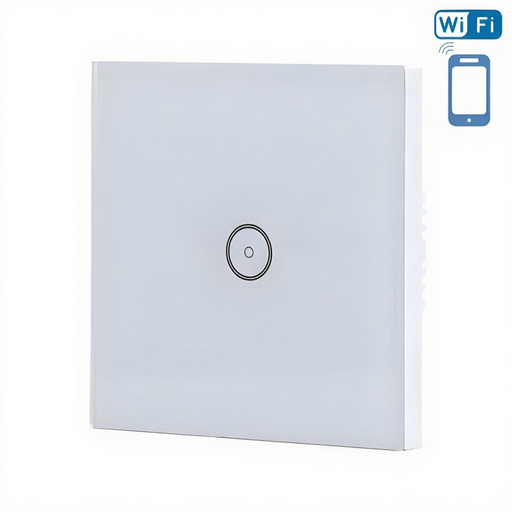
What makes it stand out The Aigostar Smart Wall Switch is a Wi-Fi light switch that works without an additional hub. It connects directly to your router and can be controlled via its companion app or by voice with Amazon Alexa and Google Assistant. Its design, featuring a white glass front and a subtle touch light switch, blends into many modern living environments.
Advantages
- Direct Wi-Fi Connection: No bridge or hub required.
- Voice Control: Compatible with Amazon Alexa and Google Assistant.
- Scheduling Function: Automate your lighting based on the time of day.
- Modern Design: Elegant glass surface and touch operation.
Who is it for? This model is an excellent choice for smart home beginners looking for a straightforward and visually appealing solution to intelligently control individual rooms. Installation requires a neutral wire.
2. AQARA Switch Single Wall, no Neutral
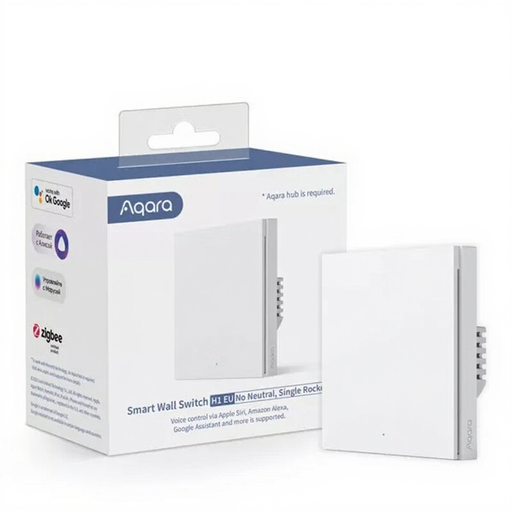
What makes it stand out The greatest strength of the Aqara H1 EU is its ability to function as a light switch without a neutral wire. This makes it the ideal solution for retrofitting in older buildings. It communicates via the stable Zigbee 3.0 protocol and requires a compatible Aqara Hub. In return, it offers broad compatibility, including Apple HomeKit, Alexa, and Google Assistant.
Advantages
- No Neutral Wire Required: Perfect for modernising older buildings.
- Broad System Compatibility: Supports Apple HomeKit, Alexa, Google Assistant, and IFTTT.
- Stable Zigbee 3.0: Reduces the load on your Wi-Fi and ensures reliable connections.
- Flexible Use: Can be combined with an additional wireless switch in two-way setups.
Who is it for? This switch is aimed at users who live in a property without a neutral wire or who already use a Zigbee-based smart home (especially with Aqara or HomeKit) and are looking for a reliable expansion.
3. AQARA Switch Single Module T1 (with Neutral)
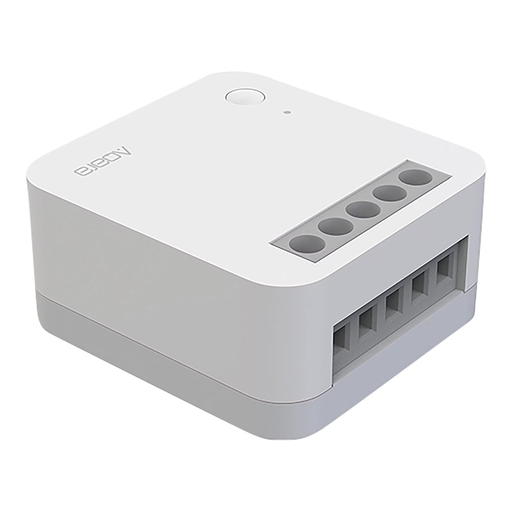
What makes it stand out The Aqara T1 Module is not a complete switch, but an in-wall smart switch relay. This small module is installed behind your existing, conventional light switch inside the wall box, making it smart. This allows you to keep the familiar design of your switch series while adding full smart home functionality. It requires a neutral wire and an Aqara Hub.
Advantages
- Invisible Integration: Makes existing light switches smart without changing their appearance.
- Compact Design: Fits into standard in-wall boxes.
- High Switching Power: Suitable for loads up to 2500 W.
- Comprehensive Compatibility: Works with Amazon Alexa, Apple Home, and Google Assistant.
Who is it for? Ideal for DIY enthusiasts and homeowners who want to maintain the design of their current switches but don't want to miss out on intelligent control options. This requires sufficient space in the wall box and a neutral wire.
Discover More Options
The products presented here already cover many use cases. But the market offers numerous other variations, such as multi-gang switches, dimmers, or shutter controls. If you are looking for a specific solution not listed here, you can find more models in our range.
️ Discover our full range of smart switches
Frequently Asked Questions (FAQ)
1. Can I install a smart light switch myself? Installing a light switch involves working with the 230-volt household electrical system. In many regions, including Germany, regulations stipulate that such work may only be carried out by a qualified electrician. Before starting any work, the corresponding circuit breaker in the fuse box must be switched off, and the circuit must be tested to ensure it is de-energised.
2. What is the difference between a Wi-Fi light switch and a Zigbee switch? A Wi-Fi light switch connects directly to your router and requires no additional hardware. A Zigbee switch communicates with a central hub over its own wireless network. Zigbee networks are often more stable and energy-efficient, especially with many devices, but they require the purchase of a hub.
3. Does a smart light switch work without the internet? Yes, manual operation directly at the switch will always work, even during an internet outage. However, controlling it via an app or voice from outside your home network depends on an active internet connection. Some systems, like those based on Zigbee, can continue to run local automations (e.g., schedules) through their hub even without an internet connection.