
The Right SD Card for 4K Video: Buyer’s Guide and Recommendations
A dropped 4K recording or a full buffer during a high-speed photo burst can jeopardise a project. Choosing the right memory card is therefore not an afterthought, but a foundational decision for the reliability of your workflow. As a Joybuy Product Recommendation Officer, my role is to provide you with clear, factual information so you can make an informed decision based on technical facts, not marketing hype.
This guide explains the crucial criteria for selecting an SD card for 4K video and presents a selection of models suitable for demanding applications in photography and videography.
What to Look for When Buying a Memory Card for 4K Video
The choice of the right card depends on three key technical parameters: speed, capacity, and compatibility.
1. Write Speed and Video Speed Class (V30)
For recording high-resolution video material, the write speed is the critical factor. It determines how quickly the camera can save data to the card. A card that is too slow will lead to buffer overflows and dropped recordings.
Pay attention to the Video Speed Class, indicated by a "V" followed by a number. For smooth 4K recording, a V30 SDXC card is the established minimum standard. This rating guarantees a sustained minimum write speed of 30 MB/s, which is sufficient for most 4K bitrates. A fast SD card with a high maximum write speed (e.g., 120 MB/s or more) provides extra headroom, especially when shooting at high frame rates (e.g., 4K at 60 fps) or when using the memory card for photography in RAW burst mode.
2. Capacity: SDXC for Large Data Volumes
4K video files are very large. One hour of 4K footage can easily take up 60 GB or more, depending on compression and bitrate. Memory cards are divided into different capacity classes:
- SDHC (High Capacity): Up to 32 GB
- SDXC (Extended Capacity): 64 GB to 2 TB
For serious 4K video projects, an SDXC card is practically essential. A 256GB SD card offers a good balance of capacity and price and is suitable for most single-day shoots. For longer projects or travel, a capacity of 512 GB or 1 TB can be a wise investment to minimise card swapping.
3. The UHS Interface: Performance and Compatibility
The UHS (Ultra High Speed) interface determines the maximum possible transfer speed between the card and the device.
- UHS-I: Theoretical maximum speed of 104 MB/s.
- UHS-II: Theoretical maximum speed of 312 MB/s (identifiable by a second row of contacts).
While UHS-II cards offer higher speeds, they also require a compatible camera and are often more expensive. Modern UHS-I cards, like some models in the Lexar SD Card series, use proprietary technology to push beyond the limits of the UHS-I interface, achieving read and write speeds far exceeding the standard. They often provide excellent value for money for cameras that do not support UHS-II.
Recommended SD Cards for 4K
Based on the criteria above, we have compiled a selection of memory cards that are ideal for professional and ambitious users.
Lexar 256GB SD Card SILVER, UHS-I, V30
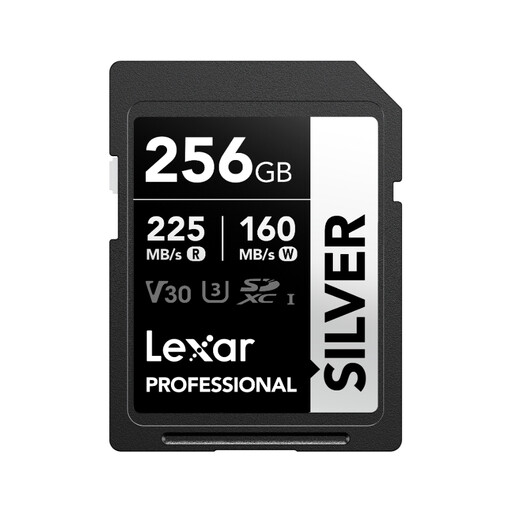
Why It Stands Out: This card combines high capacity with a write speed that significantly exceeds the V30 standard. It is designed as a high-performance all-rounder for mixed photo and video applications.
Advantages:
- Write Speed: Up to 140 MB/s for fast RAW bursts and demanding 4K recordings.
- Read Speed: Up to 205 MB/s (with a compatible Lexar reader), which accelerates your post-production workflow.
- V30 Certification: Guarantees reliable performance for 4K video recording at up to 60 fps.
- Capacity:256 GB provides ample space for extended shoots.
Who It's For: Photographers and videographers who need a well-rounded balance of speed and capacity for events, weddings, or content production.
Lexar 1TB Professional 1066x SD Card, UHS-I, V30
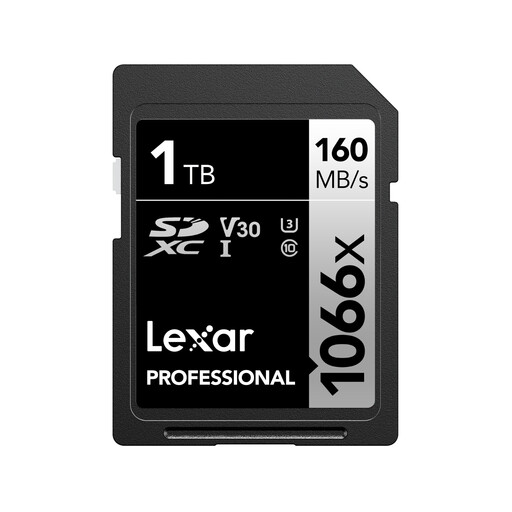
Why It Stands Out: With a massive capacity of 1 TB, this card is designed for projects where swapping cards isn't an option, such as long interviews, documentaries, or multi-day events.
Advantages:
- Maximum Capacity:1 TB of storage for hours of 4K footage or tens of thousands of RAW photos.
- High Speed: Up to 120 MB/s write speed and up to 160 MB/s read speed.
- V30 & U3 Rating: Certified performance for uninterrupted 4K UHD video recording.
- Durability: Engineered for use in demanding conditions.
Who It's For: Professional video producers, documentary filmmakers, and event photographers who require maximum storage capacity to focus entirely on their work.
Lexar 128GB SD Card SILVER, UHS-I, V30
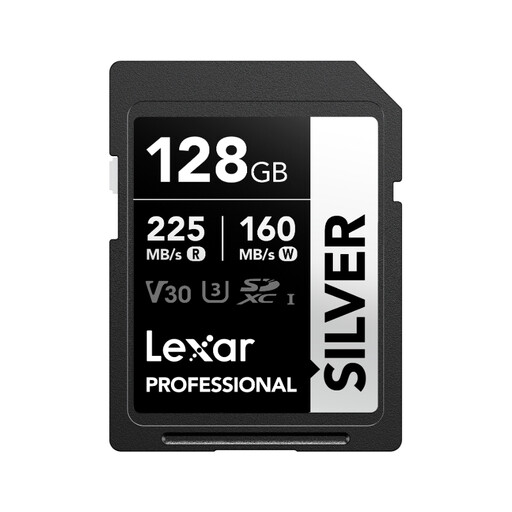
Why It Stands Out: This model offers the same high-speed performance as the 256 GB version but in a smaller capacity. It's a cost-effective solution for shorter projects or as a secondary card.
Advantages:
- Professional Speed: Up to 140 MB/s write and 205 MB/s read speed (with a compatible reader).
- V30 Standard: Reliable performance for 4K video recording at 60 fps.
- Efficient Capacity:128 GB is ideal for day trips, vlogging, or as a backup card.
- Broad Compatibility: Works with a wide range of cameras from manufacturers like Canon, Sony, and Nikon.
Who It's For: Content creators and hobbyist photographers who need a very fast SD card for specific projects without having to invest in maximum capacity.
Looking for Different Capacities or Speeds?
Every project has unique requirements for a camera memory card for photo and video. If the models presented here don't exactly match your needs, or if you're looking for other brands and specifications, you can find a broader selection in our main category.
Discover Our Full Range of SD Card Storage
Frequently Asked Questions (FAQ)
What does the V30 rating on an SD card mean?
The V30 rating stands for "Video Speed Class 30." It guarantees that the card can maintain a minimum sustained write speed of 30 megabytes per second (MB/s). This standard is essential for reliable 4K UHD video recording, as it prevents the recording from stopping due to speed fluctuations.
Is an SDXC card compatible with my older camera?
Not necessarily. SDXC cards (64 GB and larger) use a different file system (exFAT) than older SDHC cards (FAT32). Therefore, they only work in devices that explicitly support the SDXC standard. Most cameras manufactured after 2010 are compatible, but it is always wise to check your device's technical specifications in the manual or on the manufacturer's website.
Why should I format a new memory card in the camera?
Formatting a new memory card directly in the camera where it will be used is a crucial step. This process optimises the card's file structure for that specific camera model. This not only ensures maximum performance but also minimises the risk of file errors or data loss during operation. It is recommended to perform this process before first use and regularly after backing up all data.