
PS5 Controller Buyer's Guide: Essential Tips
Finding a new PS5 controller seems simple at first glance. But whether you need a replacement, a second controller for local multiplayer, or a high-end gamepad for your PC, the options are more varied and the potential pitfalls more numerous than you might think. Many models advertise features that disappoint in practice or show signs of defects after only a short time. This guide will help you identify the key features and make an informed decision.
Common Pitfalls When Buying a PlayStation 5 Controller
Before you buy a PS5 controller, you should be aware of two common problems that often lead to frustration and unnecessary expense.
- Incompatibility and Limited Features: A common annoyance is third-party controllers that are advertised as "PS5-compatible" but don't support the crucial features of the DualSense controller. They often lack the precise haptic feedback or adaptive triggers that define the PlayStation 5 gaming experience. When used as a PS5 controller for PC, you might also encounter issues with driver support or wireless connectivity.
- Short Lifespan Due to Wear and Tear: So-called "stick drift," where the analogue sticks register movement without any input, is a well-known problem with many controllers. It's caused by the wear and tear of internal potentiometers. Cheaper models are prone to developing this issue after just a few months of heavy use, rendering the controller useless.
Key Parameters for Making the Right Choice
To avoid these problems, you should pay attention to three core technical aspects. These determine your controller's performance, longevity, and overall gaming experience.
1. Compatibility and Connectivity
Check carefully which platforms the controller is optimised for. An official PS5 controller from Sony guarantees full functionality on the PlayStation 5. If you also want to use the controller on a PC, Mac, or mobile device, pay attention to the supported connection types. A wireless PS5 controller should ideally offer both Bluetooth for broad compatibility and a stable connection via a USB-C cable. For PC gamers, support for standards like DirectInput and XInput is important to ensure seamless functionality in most games.
2. Haptic Feedback and Adaptive Triggers
These two technologies are the heart of the DualSense controller.
- Haptic Feedback: Instead of traditional rumble motors, it uses more precise actuators that can simulate a wide range of vibrations—from the gentle patter of raindrops to powerful explosions.
- Adaptive Triggers: The L2 and R2 buttons can dynamically adjust their resistance. You'll feel this, for example, when drawing a bowstring or pressing the accelerator in a racing game.
Only controllers that explicitly support these features deliver the full PS5 experience. For PC games, support for these features is slowly expanding but is not yet widespread.
3. Analogue Stick Construction
To prevent the problem of stick drift, some newer controllers use Hall effect sensors. Instead of mechanical parts that wear down, these use magnetic fields to detect position. This technology is significantly more durable and maintains its precision over a longer period. A controller with Hall effect sticks is a worthwhile investment, especially for gamers who prioritise durable and reliable hardware.
Recommendations by User Profile
Here are a few recommendations tailored to different use cases that meet the quality criteria mentioned above.
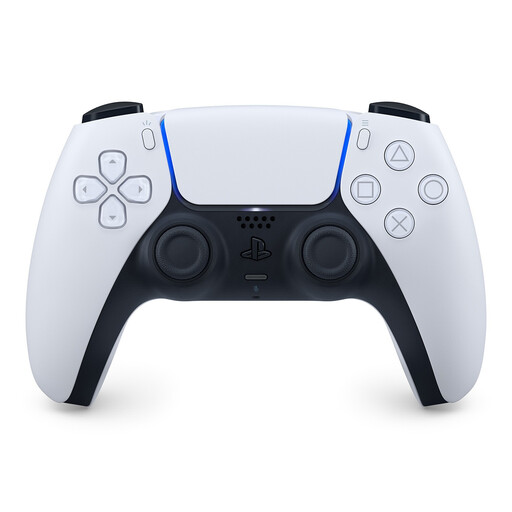
PlayStation DualSense Wireless Gaming Controller White
Why it's a good fit: For gamers seeking the uncompromising, native PS5 experience. This controller is the benchmark for all the features that define the console and offers guaranteed compatibility.
As an official Sony product, this controller bypasses all compatibility and feature issues on the PS5. Haptic feedback and adaptive triggers work exactly as the game developer intended.
Full support for haptic feedback and adaptive triggers for maximum immersion. Seamless integration with the PS5 system, including firmware updates.

GameSir G7 HE Wired Controller
Why it's a good fit: Ideal for gamers who primarily play on PC or Xbox and value durability and precision. The wired connection ensures minimal latency.
The Hall effect sticks prevent the dreaded stick drift, a common defect in conventional controllers. This ensures high durability even with intensive use.
Hall effect technology for precise, drift-free control. Officially licensed for Xbox and Windows, ensuring straightforward plug-and-play use on PC.
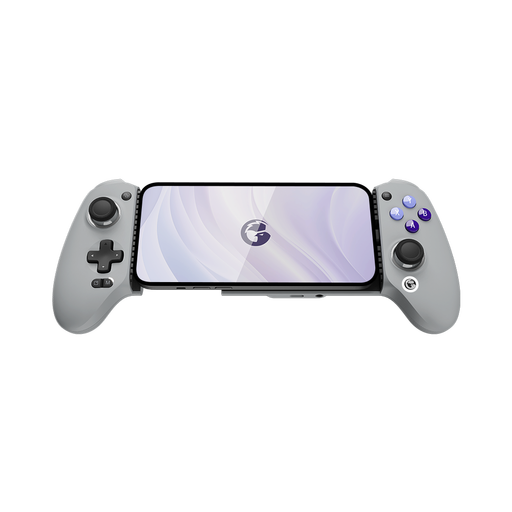
GameSir G8 Galileo Mobile Gaming Controller (USB-C)
Why it's a good fit: Transforms an Android smartphone or iPhone 15 into a powerful handheld console. Ideal for cloud gaming services like Xbox Cloud Gaming or PS Remote Play.
Offers a stable, latency-free USB-C connection instead of unreliable Bluetooth. Passthrough charging prevents the smartphone battery from dying during long gaming sessions.
Console-sized ergonomics and Hall effect sticks for precise mobile gaming. The flexible USB-C port accommodates various smartphone models.
Looking for more options?
We have compiled a complete, up-to-date list of products that fully meet these strict selection criteria and all relevant safety standards.
Frequently Asked Questions (FAQ)
How do I connect a PS5 controller to a PC?
You can connect a DualSense controller to a PC in two ways:
- Via USB-C Cable: This is the easiest method. Connect the controller to your PC with a USB-C cable. Windows will usually detect it automatically as a generic gamepad. For full functionality, including haptic feedback in supported games, you may need to install additional software like Steam or DS4Windows.
- Via Bluetooth: Press and hold the Create button and the PS button simultaneously until the light bar flashes rapidly. The controller will then appear in your PC's Bluetooth settings as "Wireless Controller" and can be paired.
What should I do about stick drift on a DualSense controller?
If your controller starts experiencing stick drift, you can try a few steps:
- Reset the controller: There is a small hole on the back of the controller. Insert a thin object (like a paperclip) and press the button inside for a few seconds to reset the controller.
- Clean it: Dust and debris can interfere with the mechanics. Carefully clean the area around the analogue sticks with compressed air.
- Update the firmware: Ensure your controller's firmware is up to date by connecting it to a PS5 console and following the on-screen instructions. If the problem persists, it may be a hardware defect.
How long does a PS5 controller's battery last?
The battery life of a DualSense controller varies greatly depending on usage and the games being played. Games that make heavy use of haptic feedback and adaptive triggers consume more power. On average, you can expect a battery life of 6 to 12 hours. To extend the battery life, you can reduce the intensity of the vibration and trigger effects in the PS5 settings.