
PCIe Wi-Fi Cards: Recommendations for Upgrading Your PC
By: Joybuy Product Recommendation OfficerDate: July 28, 2026
A desktop PC offers high performance for work and gaming, but it often lacks built-in, modern wireless connectivity. Running a LAN cable isn't always a practical solution. A PCIe Wi-Fi card is a reliable and high-performance method for equipping a desktop computer with fast Wi-Fi and Bluetooth.
This article is designed to guide your selection. We'll explain the relevant technical standards and present a selection of models for different use cases to help you find the right component for your needs.
Buyer's Guide: What to Look for in a PC Wi-Fi Card?
Choosing the right card depends on your existing system, your router, and your usage requirements. Here are three key points to consider.
1. The Right Wi-Fi Standard: Wi-Fi 6, 6E, or 7?
The Wi-Fi standard determines the maximum speed and efficiency of data transmission.
- Wi-Fi 6 (802.11ax): This is the established standard for most modern households. A Wi-Fi 6 PC card offers sufficient speeds for 4K streaming, online gaming, and home office work. It's a significant improvement over older standards like Wi-Fi 5 (802.11ac), especially in networks with many devices.
- Wi-Fi 6E (802.11ax): The extension of Wi-Fi 6. A Wi-Fi 6E PCIe card can also use the exclusive 6 GHz frequency band. This band is less congested than the 2.4 GHz and 5 GHz bands, resulting in lower latency and more stable connections. This is particularly advantageous for demanding gaming or in densely populated residential areas. A Wi-Fi 6E-compatible router is required.
- Wi-Fi 7 (802.11be): The latest standard, designed for maximum performance and future-proofing. A Wi-Fi 7 card theoretically offers even higher data rates and uses technologies like Multi-Link Operation (MLO) to bundle multiple frequency bands simultaneously. This is an option for users who aim for the cutting edge of technology and either have or are planning the appropriate network infrastructure.
2. Integrated Bluetooth Functionality
Many internal Wi-Fi adapters also offer Bluetooth functionality. A combined Bluetooth PCIe adapter is a convenient solution for connecting wireless peripherals like headsets, keyboards, mice, or game controllers to your PC without needing an extra USB dongle. Look for current Bluetooth versions like 5.2, 5.3, or 5.4, as they provide improved range, greater stability, and lower power consumption.
3. Compatibility and Installation
Before you upgrade your PC with Wi-Fi, check for physical and technical compatibility. An internal PC Wi-Fi adapter is installed into a free PCI Express slot (usually x1) on your computer's motherboard. Ensure that such a slot is available. Also, verify compatibility with your operating system (e.g., Windows 10 or 11), as newer standards like Wi-Fi 6E and Wi-Fi 7 often require Windows 11 to utilize all features.
Top PCIe Wi-Fi Card Picks
Here is a selection of three models from the TP-Link Archer brand that cover different needs and budgets.
TP-Link Archer TX20E AX1800 Wi-Fi 6 PCIe Adapter
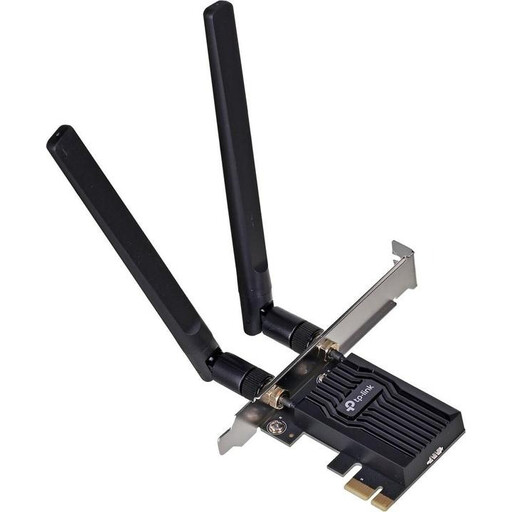
Why it stands out: The Archer TX20E is a solid and accessible solution for upgrading to the Wi-Fi 6 standard. It offers balanced performance for everyday applications, combining a stable wireless connection with modern Bluetooth connectivity.
Features:
- Wi-Fi 6 Standard: Delivers dual-band speeds of up to 1201 Mbps on the 5 GHz band and 574 Mbps on the 2.4 GHz band.
- Bluetooth 5.2: Enables connection to modern wireless peripherals.
- Two External Antennas: The high-gain antennas serve to improve signal strength and coverage.
- WPA3 Security: Supports the latest security standard to protect your network.
- Compatibility: Designed for Windows 11/10 (64-bit).
Who it's for: Users looking to upgrade their desktop PC from an older Wi-Fi standard or a wired connection to a reliable Wi-Fi 6 solution. Suitable for home office, streaming, and casual gaming.
View Details for the TP-Link Archer TX20E
TP-Link Archer TXE75E Wi-Fi 6E PCIe Network Card
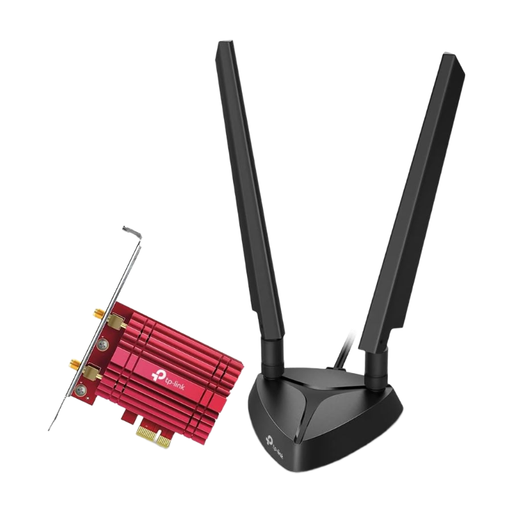
Why it stands out: This card provides access to the exclusive 6 GHz band, making it a high-performance option for demanding users. The external antenna base with a magnetic foot allows for flexible positioning for optimal reception, making it a great choice as a gaming Wi-Fi card.
Features:
- Wi-Fi 6E Standard: Tri-band speeds (AXE5400) across the 6 GHz, 5 GHz, and 2.4 GHz bands.
- 6 GHz Band: Offers an interference-free frequency band for lower latency, ideal for gaming and VR.
- Intel Wi-Fi 6E Chipset: Ensures stable and efficient performance.
- Bluetooth 5.2: Integrated connectivity for wireless accessories.
- Magnetic Antenna Base: Allows for flexible positioning of the two external antennas.
Who it's for: PC gamers, content creators, and power users who own a Wi-Fi 6E router and want to leverage the benefits of the 6 GHz band to minimize latency and interference. Requires Windows 11 for 6 GHz functionality.
View Details for the TP-Link Archer TXE75E
TP-LINK Archer TBE550E Wi-Fi 7 PCIe Adapter
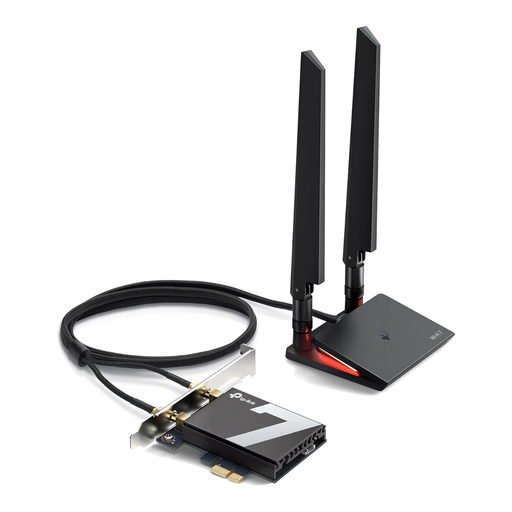
Why it stands out: The Archer TBE550E is built for the latest Wi-Fi 7 standard, offering extremely high speeds and the newest Bluetooth version. It's a future-proof investment for users who want the highest possible wireless performance.
Features:
- Wi-Fi 7 Standard: Offers tri-band speeds (BE9300) with up to 5760 Mbps on the 6 GHz band.
- Bluetooth 5.4: The latest version for enhanced security and reliability when connecting peripherals.
- Full 6 GHz Utilization: Designed to fully exploit the potential of the 6 GHz band.
- WPA3 Security: Provides advanced protection for your network.
- Exclusive to Windows 11: The card is specifically designed to operate with Windows 11 (64-bit).
Who it's for: Tech enthusiasts and early adopters who are building a future-proof PC system and already use or plan to purchase a Wi-Fi 7 router.
View Details for the TP-Link Archer TBE550E
Explore More Options
This selection covers common use cases. However, if you are looking for different specifications or want to compare more models, you can find a wider selection of products in our PC Wireless WiFi Adapter category.
Frequently Asked Questions (FAQ)
Is installing a PCIe Wi-Fi card complicated?
For individuals with a basic knowledge of PC hardware, the installation is generally straightforward. The process involves shutting down and opening the PC, inserting the card into a free PCIe x1 slot, securing the card, and connecting the antennas. After starting the system, the appropriate drivers must be installed.
Do I need a new router for a Wi-Fi 6E or Wi-Fi 7 card?
To utilize the full performance, and especially the 6 GHz band, a compatible Wi-Fi 6E or Wi-Fi 7 router is required. However, the cards are backward compatible, meaning they will also work with older routers (e.g., Wi-Fi 6 or 5), but only at the speed and with the features of the lower standard.
Does a gaming Wi-Fi card really improve latency?
Yes, a modern PCIe Wi-Fi card can reduce latency (ping) compared to older Wi-Fi standards or unstable USB adapters. Technologies like OFDMA in Wi-Fi 6 and access to the less congested 6 GHz band in Wi-Fi 6E and 7 help ensure a more stable and responsive connection for online gaming.