
Multi-Device Mouse: 2026 Recommendations for Enhanced Efficiency
Managing multiple digital devices—such as a laptop, desktop PC, and tablet—with separate input devices leads to a fragmented workflow and a cluttered desk. A multi-device mouse addresses this inefficiency by providing centralised control for multiple systems. By enabling seamless switching between devices, it streamlines your workflow and boosts productivity. This article analyses the technical criteria for selecting the right mouse and presents models designed for various user profiles.
Selection Criteria for a Multi-Device Mouse
The choice of a multi-device mouse should be based on an analysis of specific technical parameters that match the user's individual needs.
Connectivity: Bluetooth, 2.4 GHz Wireless, and Wired
The type of connection is a critical criterion. Modern mice often offer multiple modes (tri-mode or multi-mode) to ensure maximum flexibility.
- Bluetooth Mouse: Allows for a direct connection without an additional USB receiver. This is advantageous for devices with limited USB ports, such as laptops and tablets. Compared to older versions, Bluetooth 5.0 offers improved range, stability, and energy efficiency.
- 2.4 GHz Wireless Mouse: Uses a dedicated USB dongle for the connection. This technology is known for its low latency and high stability, making it a great choice for tasks that require precision. The range is often greater than that of Bluetooth.
- Wired Connection: Provides the lowest latency and an interference-free connection, but it restricts mobility. Some wireless models offer a wired usage option, often via USB-C, which also allows the battery to be charged simultaneously.
Ergonomics and Design
An ergonomic mouse is crucial for users who spend long hours at the computer. The design should support the natural posture of the hand to reduce fatigue and strain. Aspects such as shape, size, weight, and the placement of the thumb rest should be considered.
DPI and Sensor Precision
DPI (Dots Per Inch) describes the sensitivity of the mouse sensor. A higher DPI value means the cursor travels a greater distance on the screen with the same physical mouse movement. An adjustable DPI function is useful for adapting the sensitivity to different screen sizes and tasks—lower DPI for precise design work, higher DPI for fast navigation on large monitors.
Additional Features: Programmable Buttons and Silent Clicks
- Programmable Mouse: Buttons that can be assigned custom commands, macros, or shortcuts significantly increase efficiency. This is especially relevant for power users and content creators.
- Silent-Click Mouse: Mice with reduced click noise are ideal for office environments, libraries, or home offices to maintain a disturbance-free work atmosphere.
Our Top Picks for Multi-Device Mice in 2026
Based on the technical criteria mentioned above, we present three models designed for different user profiles and use cases.
1. Baseus F01B Tri-Mode Wireless Mouse
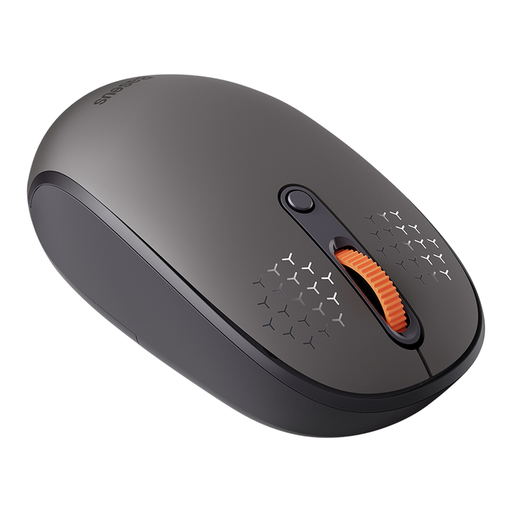
Analysis & Technical Specs
The Baseus F01B is designed as a functional input device for everyday use. It supports three connection modes: 2.4 GHz wireless, Bluetooth 5.0, and Bluetooth 3.0, allowing you to switch between up to three devices. The DPI sensitivity is adjustable across three levels (800/1200/1600). A key feature is its silent clicks, which, according to the manufacturer, reduce noise levels by 99%. The ergonomic design is tailored for right-handed users, and it operates on a single AA battery.
Why We're Featuring This Product
This model provides a solid foundation for users seeking a straightforward and reliable multi-device mouse for standard office applications. The combination of tri-mode connectivity and quiet operation makes it a practical tool for a peaceful and flexible work environment.
Pros:
- Tri-mode connectivity (2.4 GHz, BT 5.0, BT 3.0)
- Silent click mechanism for quiet operation
- Adjustable DPI levels (800/1200/1600)
- Broad compatibility with Windows, macOS, Linux, and other systems
Best for: Office or home office users who need a cost-effective wireless mouse for laptop and PC and value quiet operation.
View Product: Baseus F01B on Joybuy.de
2. RAPOO MT760Mini Bluetooth Wireless Mouse
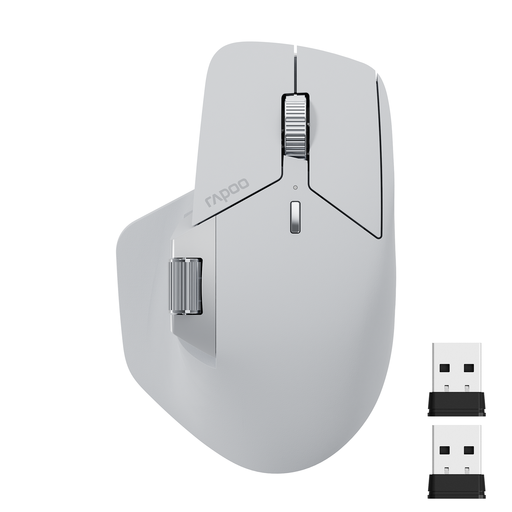
Analysis & Technical Specs
The RAPOO MT760Mini is aimed at more demanding users. It can be connected to up to four devices simultaneously (Bluetooth 5.0, 2.4 GHz, wired) and supports M+ Cross-Computer Technology. This feature allows the cursor to move seamlessly across the screens of multiple computers connected to the same network. With 11 programmable buttons and a side scroll wheel, it offers extensive customisation options. The sensor can be adjusted in seven levels up to 4000 DPI. The integrated lithium battery is charged via USB-C.
Why We're Featuring This Product
The MT760Mini is a productivity-enhancing tool. Its M+ Cross-Computer Technology and the high number of programmable buttons enable complex workflows that go beyond simple device control. The ergonomic design with a thumb rest supports comfortable use over extended periods.
Pros:
- Supports up to 4 devices
- M+ Cross-Computer Technology for a seamless workflow
- 11 programmable buttons for high customisability
- Rechargeable battery with USB-C port
- Side scroll wheel for horizontal navigation
Best for: Professionals, content creators, and power users looking for a sophisticated mouse for Mac and Windows to maximise their efficiency when working with multiple computers and demanding applications.
View Product: RAPOO MT760Mini on Joybuy.de
3. RAPOO MT760 PRO Wireless Mouse
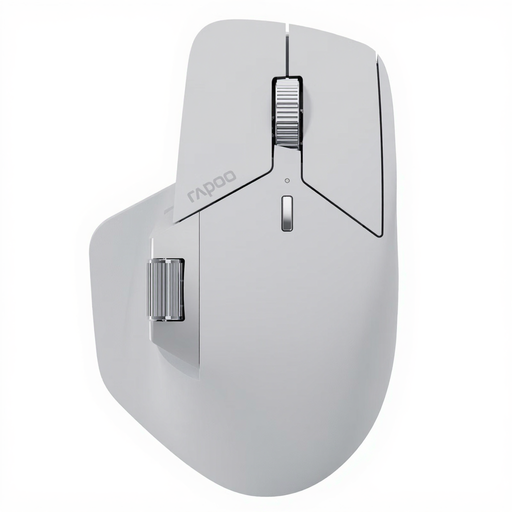
Analysis & Technical Specs
The RAPOO MT760 PRO represents the next step in evolution, integrating NearLink wireless technology. According to the manufacturer, NearLink offers extremely low latency, higher speed, and lower power consumption compared to conventional wireless standards. This model can be connected to up to seven devices. The sensor achieves a precision of up to 12,000 DPI with a 2000 Hz polling rate, enabling highly responsive and accurate control. Like the Mini model, it features 11 programmable buttons, M+ Cross-Computer Technology, and on-board memory for saving configurations. The battery life is stated to be up to 120 days.
Why We're Featuring This Product
The MT760 PRO is designed for users who refuse to compromise on performance and connectivity. The NearLink technology, combined with the high-resolution sensor, makes it attractive not only for highly productive work environments but also for demanding tasks like graphic design and casual gaming. The ability to pair up to seven devices is a unique selling point.
Pros:
- Supports up to 7 devices
- NearLink technology for very low latency and high efficiency
- High-precision sensor with 12,000 DPI and 2000 Hz polling rate
- Long battery life of up to 120 days
- On-board memory for personalised settings
Best for: IT specialists, designers, developers, and demanding home users who need a future-proof programmable mouse with maximum performance and connectivity options for a complex multi-device workstation.
View Product: RAPOO MT760 PRO on Joybuy.de
More Options for an Ergonomic Workstation
A multi-device mouse is a central component of an efficient workstation. To further improve ergonomics and productivity, supplementing it with other peripherals can be beneficial. You can find a selection of suitable products in our ergonomic accessories category.
Frequently Asked Questions (FAQ)
1. How do I connect a multi-device mouse to multiple devices? Typically, these mice have a dedicated button or switch to toggle between connection channels (e.g., Bluetooth 1, Bluetooth 2, 2.4 GHz). After the initial pairing with each device (via the device's Bluetooth settings or by plugging in the USB dongle), you can seamlessly switch between the connected systems by pressing this button.
2. Does a Bluetooth mouse work for both Mac and Windows? Yes, most modern Bluetooth mice are cross-platform compatible and work flawlessly with common operating systems like Windows, macOS, Linux, ChromeOS, and Android. It is advisable to check the manufacturer's compatibility list to ensure full functionality, especially for special buttons.