
Professional Workspace Monitor Buyers Guide
Selecting a monitor for the workplace is a decision that should be based on objective criteria. Parameters such as resolution, size, connectivity, and ergonomics have a direct impact on productivity and comfort. This guide analyses the technical specifications relevant for choosing a suitable Dell Monitor for office and home office environments.
Buyer's Guide: Technical Criteria for Monitor Selection
The choice of a PC Monitor depends on the specific requirements of the individual workspace. The following technical aspects are of central importance.
Resolution and Screen Size
Resolution determines the sharpness and level of detail in the display.
- Full HD Monitor (1920 x 1080 pixels): This resolution is the established standard for general office applications like word processing, email, and web browsing. On a 24-inch monitor, Full HD provides adequate pixel density for clear readability.
- 4K Monitor (3840 x 2160 pixels): With four times the number of pixels as Full HD, a 4K display allows for a significantly sharper rendering of text and a larger workspace for multitasking. This is particularly advantageous for screen sizes of 27 inches and above, such as a 32-inch monitor, and for tasks requiring a high level of detail (e.g., graphic design, CAD, analysis of large spreadsheets).
Panel Technology
Panel technology influences colour reproduction and viewing angle stability. IPS (In-Plane Switching) panels are the standard in office environments as they offer consistent colour representation and wide viewing angles (typically 178°/178°). This ensures that content remains colour-accurate and clear, even when viewed from the side.
Connectivity as a Productivity Factor
Modern workflows require flexible connectivity options.
- USB-C Monitor: A monitor with a USB-C port that supports Power Delivery (PD) can power a laptop, receive video signals, and transfer data through a single cable. This significantly reduces cable clutter and allows the monitor to function as a docking station.
- Other Ports: HDMI and DisplayPort are standard for video transmission. An integrated USB hub for peripherals (keyboard, mouse) and an RJ45 Ethernet port for a stable network connection are features that add significant value to an office monitor.
Workplace Ergonomics
An ergonomic screen is fundamental for maintaining health and well-being during long hours of screen time. Adjustment options such as height, tilt, swivel, and pivot (rotation to portrait mode) allow the user to precisely adapt the Dell screen to their seating position.
Featured Top Picks
Based on an analysis of technical specifications and practical benefits for professional users, we present two models.
DELL Pro Plus P3225QE 4K USB-C Hub Monitor
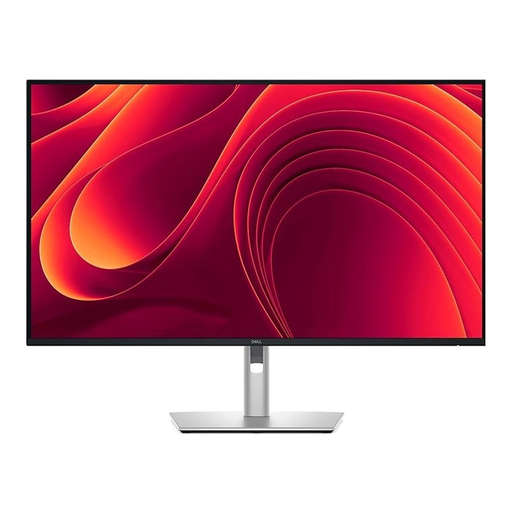
Why We Recommend This Product The P3225QE combines a high 4K resolution on a large 31.5-inch display with the functionality of a fully-featured docking station. According to the manufacturer, its IPS Black technology delivers a 2000:1 contrast ratio, resulting in deeper blacks and enhanced image depth. Its comprehensive connectivity makes it a central hub for any modern workspace.
Advantages
- High Image Quality: The 4K UHD resolution (3840 x 2160) on the 31.5-inch IPS Black panel ensures a detailed and sharp display.
- Comprehensive USB-C Hub: Delivers video, data, and up to 90W of power delivery over a single cable, simplifying setup for a home office monitor or in the workplace.
- Network Integration: An integrated RJ45 Gigabit Ethernet port provides a stable, wired network connection directly through the monitor.
- Eye Comfort: Equipped with ComfortView Plus, a hardware-based solution that reduces blue light emissions without compromising colour accuracy.
- Excellent Ergonomics: The stand is adjustable in height, tilt, and swivel, and also supports the pivot function.
Who It's For This model is aimed at power users, developers, analysts, and creative professionals who require a large, high-resolution display and a single-cable solution for their laptop.
→ See the DELL Pro Plus P3225QE on Joybuy.de (€10 off with code: M10)
DELL E Series E2425HM Full HD Monitor
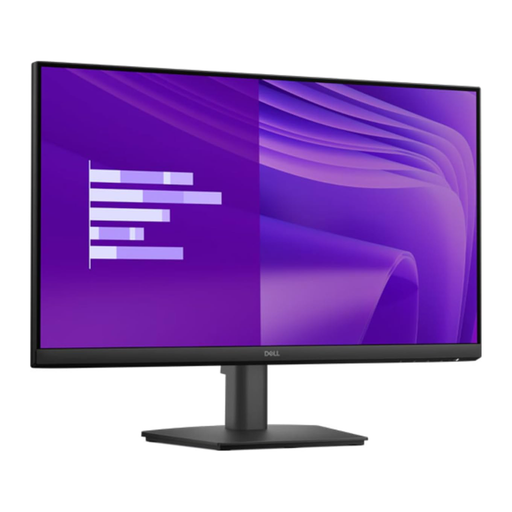
Why We Recommend This Product The E2425HM is a functional and efficient 24-inch monitor designed for standard office tasks. It provides a solid foundation with an IPS panel for good viewing angles, a Full HD resolution, and an increased 100 Hz refresh rate, which ensures smoother visuals when scrolling and in motion video.
Advantages
- Smoother Visuals: The 100 Hz refresh rate provides a noticeably smoother display compared to standard 60 Hz monitors.
- Reliable Image Quality: The IPS panel with a 1920 x 1080 pixel resolution offers precise colour reproduction and wide viewing angles.
- Certified Eye Comfort: The T?V Rheinland certified "Eye Comfort" technology, featuring a flicker-free screen and a blue light filter, reduces eye strain during extended use.
- Flexible Connectivity: With HDMI, DisplayPort, and VGA ports, the monitor is compatible with a wide range of new and legacy computer systems.
- Energy Efficiency: Certifications like ENERGY STAR and TCO confirm low energy consumption and an eco-conscious design.
Who It's For This model is a pragmatic choice for businesses equipping standard workstations, for educational institutions, and for budget-conscious users seeking a reliable Dell screen for everyday tasks in the home office.
→ See the DELL E Series E2425HM on Joybuy.de
Discover More Options
If the models presented do not exactly meet your requirements, the market offers a wide range of alternatives. You can find an overview of various sizes, resolutions, and features in our main category for LCD PC Monitors.
Frequently Asked Questions (FAQ)
1. Which Dell monitor is suitable for the office? Suitability depends on the task. For general office work (text, email), an E-Series or P-Series model with Full HD resolution and a 24-inch screen, like the E2425HM, is often sufficient. For more demanding tasks, multitasking, or creative work, a 4K monitor from the P-Series or UltraSharp series, such as the P3225QE, offers clear advantages due to its higher resolution and enhanced connectivity.
2. Do I need a 4K monitor for work? A 4K monitor is not strictly necessary for every job, but it does offer benefits. The higher pixel density results in sharper text, which improves readability. Additionally, the larger virtual workspace allows multiple windows to be displayed simultaneously without overlapping, which can boost productivity. For standard applications, however, a Full HD monitor remains a cost-effective and adequate solution.
3. What is the difference between the Dell P-Series and UltraSharp series? Both series are aimed at professional users. The P-Series (Professional), like the P3225QE featured here, focuses on productivity, connectivity (e.g., USB-C hubs, RJ45), and ergonomics for office use. The UltraSharp series (U-Series) is also often targeted at creative professionals and typically offers even higher colour accuracy, wider colour gamut coverage (e.g., DCI-P3, Adobe RGB), and sometimes advanced calibration options.
Written by: Joybuy Product Recommendation Officer