
Buyer's Guide to USB Card Readers
Whether you're a professional photographer, videographer, or just backing up personal data, transferring files from a memory card to a computer is an everyday task. But choosing the wrong adapter often leads to frustration: slow transfers, incompatible ports, or a short device lifespan. This guide will help you avoid the common pitfalls and find a memory card reader that performs reliably.
Where Budget Card Readers Fall Short: 3 Common Problems
When buying a card reader, crucial details that can later disrupt your workflow are often overlooked. Watch out for these three weak points to avoid making a poor investment.
- Incompatible Connectors: Many users buy a card reader with a classic USB-A plug, only to find that their new notebook or tablet exclusively features USB-C ports. Conversely, a USB-C-only reader can't be used with an older desktop PC. The result is a useless adapter and the need to buy another one.
- Hidden Speed Limits: A card reader can become a bottleneck, even if you're using a high-speed memory card. Many budget models use outdated USB 2.0 technology or don't support the fast UHS-II standard of modern SD cards. This makes transferring large video files or hundreds of RAW photos take unnecessarily long.
- Poor Build Quality and Lack of Versatility: A wobbly connector, a casing that overheats, or the absence of a slot for the common MicroSD standard (also called a TF card) are frequent flaws. A good memory card reader should be robustly built and support the most common card formats without needing an extra adapter.
Key Selection Criteria for Memory Card Readers
To avoid these issues, you should check three technical parameters before making a purchase. These will define your adapter's performance and longevity.
Connector Variety: USB-A, USB-C, or Both?
The technology landscape is divided. While desktop PCs and older laptops mostly rely on USB-A, USB-C is the standard for modern notebooks, tablets, and smartphones. A 2-in-1 card reader that combines both connectors offers maximum flexibility. With such a model, you're equipped for both your current and future devices and won't need to carry multiple adapters.
Transfer Speed: Understanding USB 3.0 and UHS Classes
The speed at which you can transfer data from an SD card to a laptop depends on three components: the memory card, the card reader, and your computer's USB port.
- USB Standard: A reader with USB 3.0 (also known as USB 3.2 Gen 1) offers a theoretical transfer rate of up to 5 Gbps, which is significantly faster than the 480 Mbps of USB 2.0.
- UHS Standard: For maximum performance, especially with 4K video recordings, the card reader should support your card's speed class. UHS-I is common, while UHS-II enables even higher speeds through additional contacts. A UHS-II-capable reader is a worthwhile investment for professional users.
Card Formats and Compatibility: SD, MicroSD (TF)
Most cameras use standard SD cards, while drones, action cams, and many smartphones rely on the smaller MicroSD format (also referred to as a TF Card Reader). A card reader with separate slots for both formats is the most practical solution, saving you the hassle of searching for small, easy-to-lose SD adapters. Also, check if the reader is compatible with common operating systems like Windows, macOS, and Linux, ideally without requiring any driver installation (Plug-and-Play).
Recommendations for Every Goal
Based on the criteria mentioned, we have identified a few models that offer a suitable solution for different user groups.
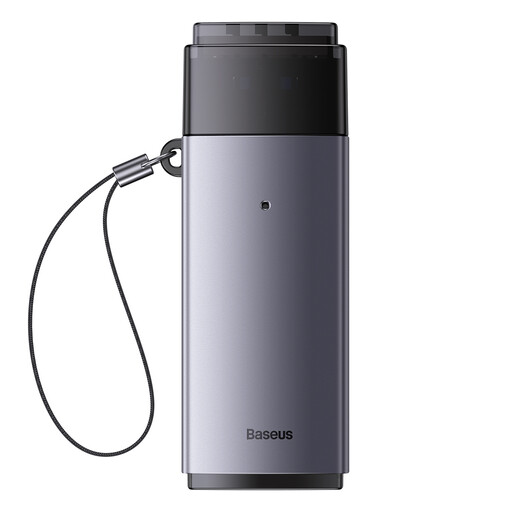
Baseus Lite Series USB-A to SD/TF Card Reader Grey
Why This Fits Their Persona: Ideal for users who primarily work with desktop PCs or older laptops that have standard USB-A ports. A straightforward and practical solution for basic data transfer from SD and TF cards.
This model focuses on core functionality for USB-A systems. It avoids the pitfall of paying for a USB-C port you don't need, while still providing reliable slots for SD and TF.
Compact design and broad plug-and-play compatibility with Windows, Apple OS, and Linux. According to the manufacturer, it achieves a transfer rate of up to 104 MB/s.
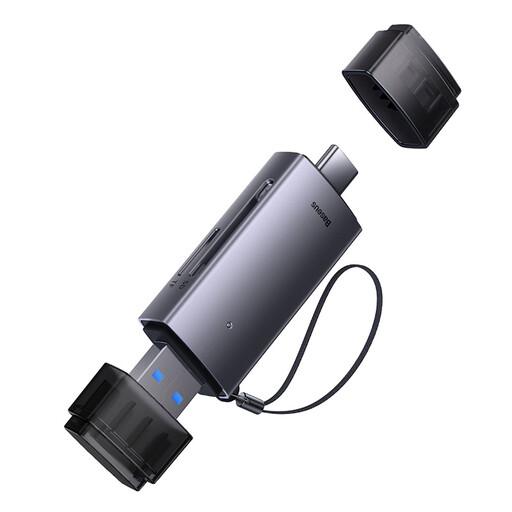
Baseus Lite Series USB-A & Type-C to SD/TF Card Reader Grey
Why This Fits Their Persona: The universal solution for anyone who switches between different devices—be it a desktop PC with USB-A or a modern MacBook and tablet with USB-C. This Baseus card reader is a true all-rounder.
This 2-in-1 card reader solves the core problem of port incompatibility. It equips you for virtually any common device, so you never have to worry about having the right connector.
Combines USB-A and USB-C ports in a single, portable device. Offers slots for SD and TF cards that can be used simultaneously.
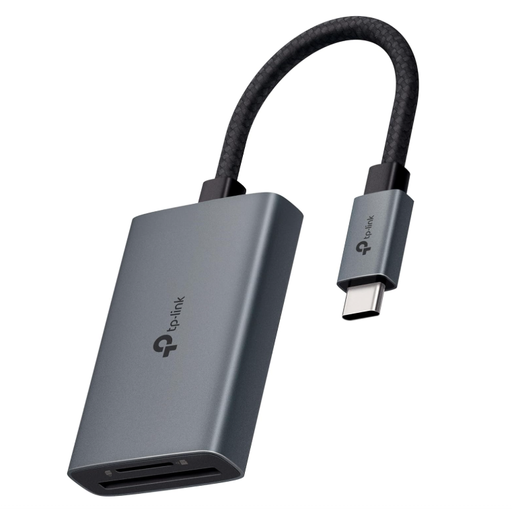
TP-Link UA440C USB Type-C to SD Card Reader
Why This Fits Their Persona: Designed for professional users who regularly transfer large amounts of data, such as 4K/8K videos or high-resolution photos, and require maximum speed. A high-performance USB-C Micro SD card reader for modern workflows.
This model specifically addresses the slow transfer speed pitfall. By supporting the UHS-II standard, it unlocks the full potential of modern memory cards and minimises waiting times.
Supports SD4.0 UHS-II for transfer rates of up to 312 MB/s (according to the manufacturer). Allows for simultaneous reading and writing on both SD and microSD cards.
Looking for More Options?
We have compiled a complete, up-to-date list of products that fully meet these strict selection criteria and safety regulations.
Frequently Asked Questions (FAQ)
Can I use both card slots (SD and MicroSD) at the same time?
This depends on the specific model. Many modern card readers, like the Baseus Lite Series 2-in-1 or the TP-Link UA440C, support simultaneous reading and writing on both cards. This means you can copy data from an SD card while accessing a MicroSD card. With more basic models, it's possible that only one card will be recognised at a time.
What impact does the USB version (e.g., USB 3.0) have on speed?
The USB version of both the card reader and the computer's port has a significant impact. A USB 3.0 port theoretically allows for data transfers up to ten times faster than a USB 2.0 port. To take full advantage of a high-speed memory card (e.g., UHS-I or UHS-II), both the card reader and the computer's port should support at least the USB 3.0 standard.
Do I need to install drivers to use a memory card reader?
Most modern SD card readers for PC and Mac are "Plug-and-Play" capable. This means they are automatically recognised by common operating systems like Windows 10/11, macOS, and most Linux distributions without any need for manual driver installation. You can simply plug the reader in and start using it immediately.