
Complete Computer Mouse Buyer's Guide for You
Choosing a new computer mouse can be overwhelming given the countless models and technical specifications. Manufacturers advertise ever-higher DPI figures and futuristic designs, but not every innovation is relevant for every user. Making the wrong choice not only wastes money but can also hinder productivity or lead to discomfort. This guide will help you understand the key features and find the right mouse for your needs.
Common Pitfalls in Mouse Buying: What to Watch Out For
Before we dive into the technical details, it's important to see through common marketing promises that often lead to a bad purchase.
- The Myth of Extremely High DPI: Many manufacturers promote mice with values over 20,000 DPI (Dots Per Inch). For most users, including many gamers, such values are irrelevant in practice. An extremely high DPI value makes the cursor uncontrollably fast. More important is a high-quality sensor that operates precisely at moderate DPI settings.
- One-Size-Fits-All Ergonomics: A mouse advertised as "ergonomic" is not automatically suitable for every hand. An ill-fitting shape can lead to strain in the wrist and forearm. The shape must match your hand size and grip style (Palm, Claw, or Fingertip Grip).
- Inappropriate Connectivity: The choice between a wired, a wireless mouse (2.4 GHz), and a Bluetooth mouse has a direct impact on performance and convenience. A Bluetooth connection is practical for laptops but can have higher latency, making it unsuitable for competitive gaming. A 2.4 GHz mouse requires a USB port for its dongle, which can be a disadvantage for devices with few ports.
Core Parameters for the Right Choice
To find the right computer mouse, you should focus on a few crucial technical features.
Sensor, DPI, and Polling Rate
- Sensor and DPI (Dots Per Inch): The sensor is the heart of every mouse. DPI indicates how sensitive the mouse is to movement. For a typical office mouse, values between 1,000 and 1,600 DPI are perfectly sufficient for precise work on standard monitors. Creative professionals and gamers benefit from higher, adjustable values (e.g., up to 4,000 DPI) to adapt the cursor speed to different tasks.
- Polling Rate: Measured in Hertz (Hz), the polling rate indicates how often the mouse reports its position to the computer. A standard office mouse often has 125 Hz. For smooth and responsive control, especially in gaming, 1,000 Hz is the established standard. Some specialized models, known as 8K mouse models, even offer rates up to 8,000 Hz for virtually lag-free input.
Connectivity and Form Factor
- Connection Type:
- Wired: Offers the most stable connection with no latency or battery issues. A great choice for stationary workstations and esports.
- Wireless Mouse (2.4 GHz RF): Provides a low-latency connection via a USB dongle. Ideal for a clutter-free setup and for demanding gaming without a cable.
- Bluetooth: Connects without a dongle and is ideal for mobile use with laptops and tablets. Many modern mice offer multi-mode connectivity, allowing you to switch between 2.4 GHz and Bluetooth.
- Ergonomics and Design:
- Standard Mice: Symmetrical or slightly asymmetrical shapes suitable for most users.
- Ergonomic Mouse: More contoured shapes that support the hand in a more natural position.
- Vertical Mouse: Holds the arm in a "handshake" position, which can reduce wrist strain.
- Lightweight Gaming Mouse: Models weighing under 70 grams, often under 50 grams, allow for faster and less fatiguing movements during long gaming sessions.
Our Recommended Product Picks
Here are some recommendations tailored to specific user profiles and their requirements.
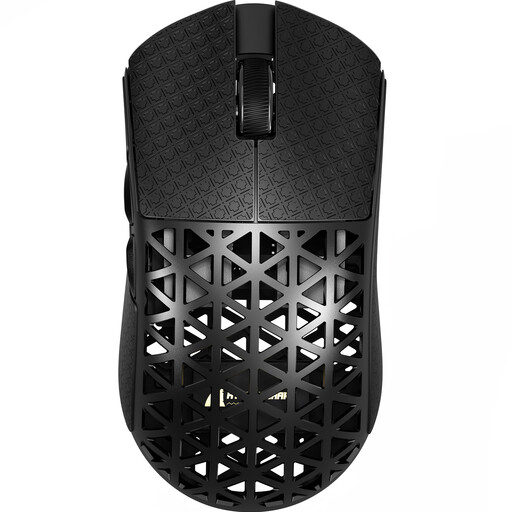
ATTACK SHARK R5 ULTRA Carbon Fiber Wireless 8K PAW3950MAX Gaming Mouse
Why This Fits Their Persona: For gamers where every millisecond counts, this model combines an extremely low weight with top-tier sensor and transmission technology. Ideal for fast-paced FPS titles.
Instead of just advertising high DPI, this 8K mouse delivers a measurably faster 8000Hz polling rate. The extremely low weight of approx. 42g is a functional advantage, not just a marketing spec.
The combination of the PAW3950MAX sensor, 8000Hz wireless polling rate, and its status as an extremely lightweight gaming mouse offers objective performance advantages for competitive play.
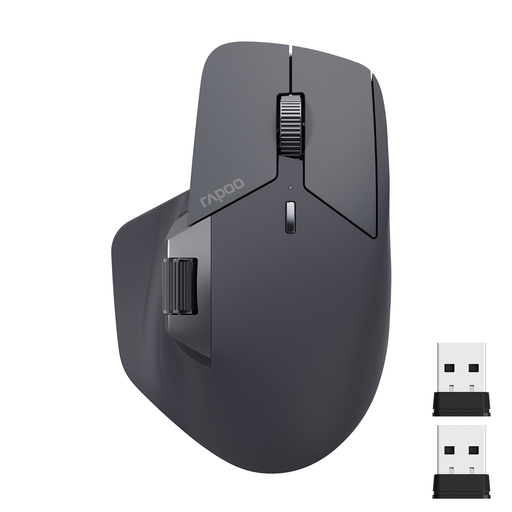
RAPOO MT760L Multi-Device Wireless Bluetooth Mouse
Why This Fits Their Persona: Perfect for users who need to seamlessly switch between multiple devices like a PC, laptop, and tablet. The long battery life and ergonomic shape support long workdays.
This mouse avoids the connectivity trap by offering both Bluetooth mouse and 2.4 GHz wireless connections. The M+ Cross-Computer technology solves the real-world problem of working across multiple machines.
Seamlessly switch between up to 4 devices. The battery life of up to 90 days (according to the manufacturer) and the side scroll wheel increase productivity in daily office work.
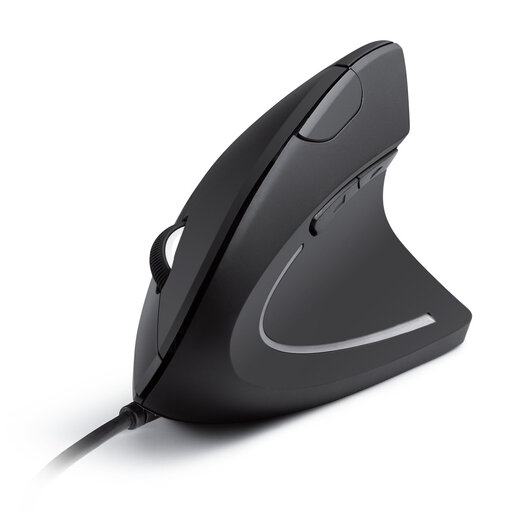
Anker CE100 USB Wired Vertical Mouse
Why This Fits Their Persona: For users who spend many hours at the computer and value healthy posture. The vertical design aims to reduce strain on the wrist and arm.
This model directly addresses the ergonomics trap by promoting a fundamentally different hand posture. Instead of just subtle contours, this vertical mouse offers a provably different joint position.
The "handshake" position can reduce muscle strain. As a wired mouse, it offers a reliable, battery-free, plug-and-play solution for the stationary workstation.
Looking for more options?
We have compiled a complete, up-to-date list of products that fully meet these strict selection criteria and German safety regulations.
Frequently Asked Questions (FAQ)
1. How long does the battery of a wireless mouse last? Battery life varies greatly depending on the model, usage, and connection type. Simple wireless mouse models for the office, powered by AA batteries, can last up to 12 or 18 months according to manufacturer specifications (e.g., Logitech M280). Rechargeable mice like the RAPOO MT760L often offer a runtime of up to 90 days. Gaming mice with high polling rates and lighting typically have a shorter battery life, ranging from a few days to several weeks.
2. Is a gaming mouse also suitable for office work? Yes, absolutely. A gaming mouse is often an excellent choice for office work. They usually feature very precise sensors, high-quality construction, and a well-designed ergonomic mouse shape. Programmable buttons can be used to speed up workflows with macros. Features like RGB lighting can usually be disabled to avoid being a distraction in an office environment. A silent mouse with quiet clicks can be particularly beneficial here.
3. What is the difference between a 2.4 GHz wireless mouse and a Bluetooth mouse? Both are types of wireless mice but use different technologies.
- Wireless Mouse (2.4 GHz): Connects to the computer via a small USB receiver (dongle). This connection has very low latency and is very stable, making it the preferred choice for gaming.
- Bluetooth Mouse: Connects directly to the computer's or laptop's built-in Bluetooth module without needing a dongle. This makes it very flexible and ideal for devices with few USB ports. The latency tends to be slightly higher than with 2.4 GHz connections, but this is not noticeable for office work and general use.