
Guide to White PC Components: Avoid Costly Mistakes
A PC build in brilliant white is more than just a trend—it's a statement of a clean, modern aesthetic. But the path to a flawless setup is paved with potential pitfalls. Many enthusiasts invest in white PC components, only to find the look is later marred by yellowed parts, incompatible lighting, or heat buildup. Before you commit your budget, it's crucial to understand the most common marketing traps and which technical features truly matter.
This guide will help you separate the wheat from the chaff. We focus on the objective criteria that define a durable and high-performance white PC build, and show you how to avoid buyer's remorse.
The 3 Most Common Mistakes When Buying White PC Components
The allure of a perfect white setup often leads to hasty decisions. Pay close attention to these three points to avoid disappointment:
- The Yellowing Effect: Inexpensive plastics, often used for shrouds or fan blades, can develop an unsightly yellow tint over time under the influence of UV light and the PC's operating heat. A once pure-white case can quickly look old and worn.
- The RGB Ecosystem Chaos: Buying ARGB components from different manufacturers without checking compatibility first often leads to a software nightmare. An ARGB fan 120mm from Brand A may not be controllable via Brand B's software, resulting in inconsistent colours and effects. Systems like MSI Mystic Light or NZXT CAM require compatible hardware.
- Showcase Cases with Heat Buildup: A panoramic PC case with large glass panels looks impressive but can severely restrict cooling performance. If the design blocks fresh air intake, internal temperatures rise, which throttles performance and shortens the lifespan of your components.
What Really Matters: The Crucial Parameters for Your White PC Build
To sidestep these mistakes, you should focus on verifiable technical specifications. The following three aspects are central to selecting the right components for a white PC build.
Material Quality and Colour Tone
The longevity of the white finish is directly dependent on the material. Look for powder-coated steel (often referred to as SPCC steel) for the chassis and UV-resistant ABS plastic for trim pieces. These materials are significantly more resistant to yellowing than simple, uncoated plastics. Another point is the consistency of the white shade. Different manufacturers often have slightly different shades of white. If possible, it is advisable to source major components like the white PC case and fans from the same manufacturer to ensure a uniform look.
Cooling Concept: Airflow and Noise Levels
An effective cooling concept is the foundation of any high-performance PC. With white cases, it's especially important to consider not just the aesthetics, but also the functionality.
- Airflow Design: Cases with mesh front panels or generous air intakes on the sides and bottom offer significantly better airflow than models with solid glass or plastic fronts.
- Fan Type: There are two main types of fans. Fans with high static pressure are optimised to push air through obstacles like radiators or dense dust filters. Fans with high airflow are designed to move large volumes of air in an open space. A good build strategically combines both types. A quiet PC fan is also characterised by a high-quality bearing (e.g., fluid dynamic bearing) and PWM control, which allows for speed adjustment based on temperature. A complete PC cooling kit can offer a coordinated solution here.
Compatibility: Form Factor and Dimensions
Nothing is more frustrating than components that don't fit together. Be sure to check the following dimensions before you buy:
- Motherboard Form Factor: Ensure the case supports your motherboard (e.g., ATX, Micro-ATX, Mini-ITX). A mid-tower ATX case generally offers a good balance of size and compatibility.
- GPU Length: Modern graphics cards are often very long. Measure the available space in the case and compare it with the length of your desired GPU.
- CPU Cooler Height: Large air coolers require a lot of vertical space. The maximum cooler height is specified in the case's specifications.
- Radiator Support: If you're planning a water-cooling setup, check which radiator sizes (e.g., 240mm, 280mm, 360mm) can be mounted in which positions (front, top, rear).
Our Selection: Matching Components for Different Needs
Based on the criteria above, we have identified some products that are suitable for different user profiles.
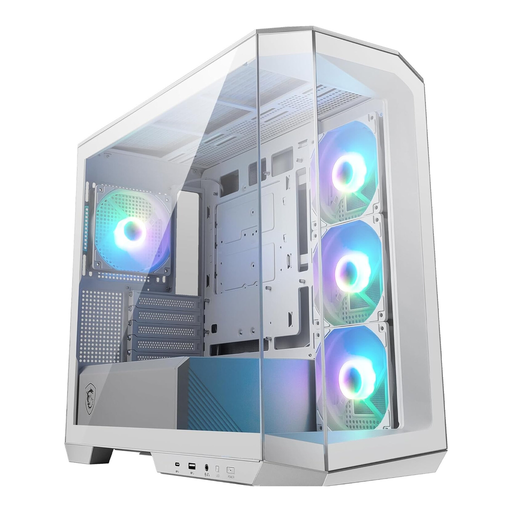
MSI MAG PANO M100R PZ White Micro-ATX PC Case
Why This Fits Their Persona: Ideal for users who want to build a visually stunning system with minimal effort. The panoramic design showcases the components, while the pre-installed fans make getting started easy.
Four pre-installed ARGB fans and a hub ensure uniform lighting (compatible with MSI Mystic Light) and bypass the RGB chaos. Despite the glass, the design allows for good airflow from the front.
Out-of-the-Box Solution: Four 120mm ARGB fans are already included. Modern Connectivity: Features a fast USB 3.2 Gen 2x2 Type-C port (20 Gbps).
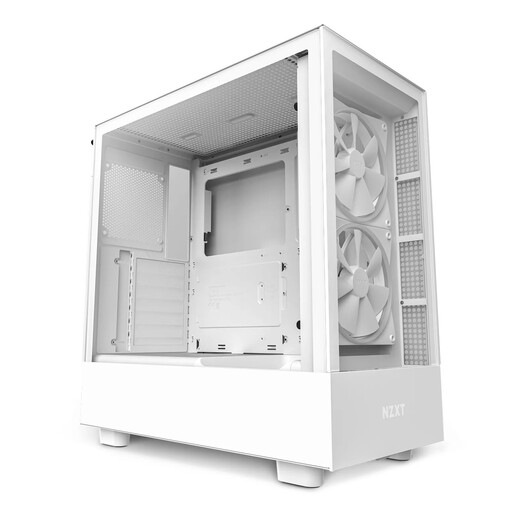
NZXT H5 Elite ATX Mid Tower PC Gaming Case
Why This Fits Their Persona: Perfect for users who need maximum cooling performance for high-end components. The well-thought-out cooling concept and generous space are ideal for demanding gaming and workstation builds.
Directly addresses the heat buildup pitfall with a dedicated, angled fan for GPU cooling. The NZXT components are tuned to the CAM ecosystem, which simplifies RGB control.
Targeted GPU Cooling: A unique 120mm fan in the floor directly cools the graphics card. High Compatibility: Offers space for most RTX 40-series graphics cards and up to 280mm radiators.
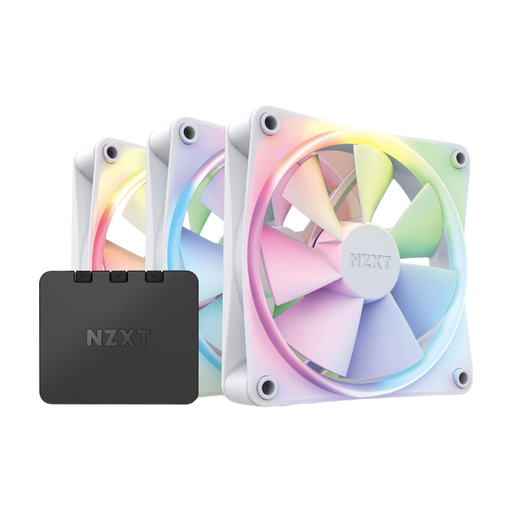
NZXT F120 RGB Fans 3-Pack with Controller
Why This Fits Their Persona: For users who want to specifically optimise their cooling system while valuing a quiet and aesthetically pleasing solution. This set provides a complete, coordinated solution.
The included controller solves the problem of incompatible RGB systems and allows for centralised control via the NZXT CAM software. The fans are optimised for quiet operation.
Complete PC Cooling Kit: Includes three fans and the necessary controller for immediate setup. Quiet Operation: The design is engineered for a balance of static pressure and airflow with low noise output.
Looking for More Options?
We have compiled a complete, up-to-date list of products that fully meet these strict selection criteria and UK/EU safety regulations.
Frequently Asked Questions (FAQ)
Do white PC components turn yellow over time?
High-quality white PC components are designed to remain colour-stable. Manufacturers achieve this by using powder-coated steel and UV-resistant plastics. However, cheaper products made from inferior plastic are prone to yellowing under heat and light exposure. To prevent this, you should not place the PC in direct sunlight and opt for products with clearly declared, high-quality materials.
How do I synchronise ARGB lighting from different manufacturers?
The easiest method is to choose components within a single ecosystem (e.g., NZXT case fans with an NZXT controller or MSI fans with an MSI motherboard and MSI Mystic Light). If you must mix components, check their compatibility with motherboard standards like ASUS Aura Sync, Gigabyte RGB Fusion, or MSI Mystic Light. Alternatively, universal ARGB controllers from third-party providers can help synchronise different products, but they often require additional configuration effort.
Static Pressure vs. Airflow: Which is more important for fans?
That depends on the application. Static pressure is crucial when air needs to be pushed through resistance, such as the radiators of a water-cooling system or dense dust filters. A high value (specified in mmH2O) is advantageous here. Airflow (specified in CFM or m?/h) is more important for case fans that are meant to move large volumes of air unimpeded, for example, as exhaust fans at the rear or top of the case. A well-balanced system uses both fan types in the right places.