
Buyer's Guide: CarPlay Displays with Integrated Dashcams
Drivers of vehicles built before around 2018 often face a challenge: the in-car technology feels outdated, while modern infotainment systems with navigation, music streaming, and hands-free calling have become standard. A complete car stereo replacement is often costly and complex. A practical alternative is a hybrid device that combines a CarPlay Display with a Dashcam.
This article serves as a guide. It explains the key features of these devices and presents a selection of models to provide you with an informed basis for upgrading your vehicle.
What to Look for When Buying?
The selection of external screens is vast. The following three criteria will help you find a device that suits your needs.
1. Connectivity and Compatibility
A key advantage of modern devices is wireless connectivity. Check whether the model supports Wireless CarPlay and Wireless Android Auto. This allows your smartphone to connect automatically as soon as you get in the car, with no cable required. Check the device's system requirements (e.g., iOS 10+ or Android 11+) to ensure compatibility with your smartphone. A portable CarPlay display offers maximum flexibility here.
2. Display and Camera Resolution
The quality of the screen and camera is crucial for the user experience and safety. An external car screen should offer a high resolution (e.g., 1600x600 pixels) for a clear display of maps and menus. For the dashcam function, a 4K dashcam front and rear is a smart choice to clearly record license plates and details, even in low-light conditions. A wide-angle lens (e.g., 140 degrees or more) captures a broader field of view of the road.
3. Installation and Power Supply
Most portable displays are designed for easy plug-and-play installation. They are powered via the 12V cigarette lighter socket and attached to the dashboard with a mount. This makes them the ideal solution for leased vehicles or for users who want to avoid a complicated installation. If you want to retrofit a reverse camera, check if it is included in the package and how the cable is routed to the main unit.
Our preferred products
Here is a selection of devices that cover different needs—from all-in-one solutions to specialised dashcams.
ESSGOO 10.26" Portable HD CarPlay Display with 4K Dashcam

What Makes This Model Stand Out The ESSGOO model is a comprehensive 2-in-1 solution that combines an infotainment upgrade with a full-featured dashcam. With a large 10.26-inch display, wireless smartphone connectivity, and a complete camera system including a 64GB memory card, it offers a cohesive package that's ready to use out of the box.
Pros
- Wireless Connectivity: Supports Wireless Apple CarPlay and Android Auto for a seamless connection.
- Integrated Dashcam: Records with a 4K front camera and a waterproof 1080p rear camera.
- Large Display: The 10.26-inch HD touchscreen with a resolution of 1600x600 pixels provides a clear and organised view.
- Split-Screen Function: Allows for simultaneous display of navigation and the camera feed.
- Flexible Audio Output: Sound can be played through the built-in speaker, Bluetooth, FM transmitter, or AUX cable.
Who Is It For? This device is ideal for drivers looking for a straightforward, all-in-one solution to equip their vehicle with navigation, media playback, and a complete recording system. It's a practical option for CarPlay for any car, as no vehicle-specific modifications are required.
REDTIGER F7NP 4K Dashcam Front and Rear
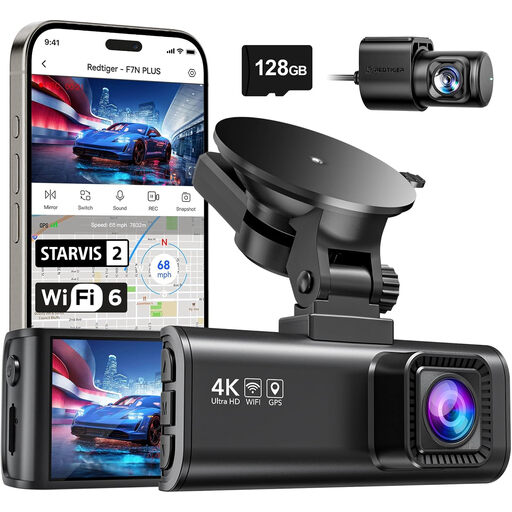
What Makes This Model Stand Out The REDTIGER F7NP is a specialised dashcam that focuses on the highest recording quality and reliability. It features a Sony STARVIS 2 sensor for enhanced night vision and uses a supercapacitor instead of a battery, which increases heat resistance and lifespan. This model does not offer a CarPlay function.
Pros
- High Video Resolution: Records in 4K (3840x2160p) at the front and 1080p at the rear.
- Advanced Night Vision: The Sony STARVIS 2 sensor, combined with WDR/HDR technology, ensures clear recordings in the dark.
- Fast 5.8GHz Wi-Fi: Enables rapid data transfer of up to 20 MB/s to the companion app.
- Integrated GPS Logger: Accurately records the driving route, speed, and location.
- Durable Design: The supercapacitor is designed to operate in extreme temperatures.
Who Is It For? This model is aimed at users for whom the primary safety function of a dashcam is the top priority. It is a great choice for anyone who already has a navigation solution and desires uncompromising recording quality for documenting trips.
WOLFBOX G850 PRO 4K Mirror Dashcam
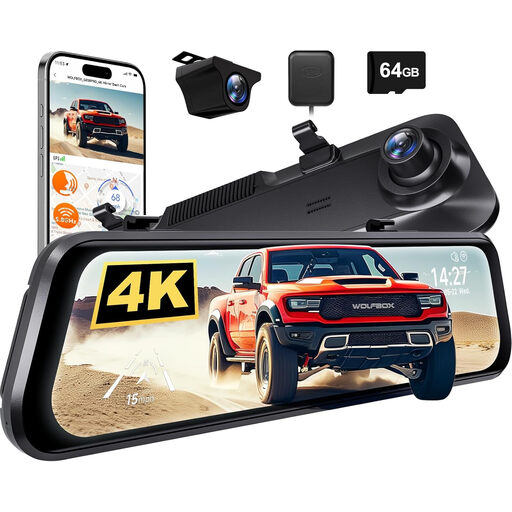
What Makes This Model Stand Out The WOLFBOX G850 PRO discreetly integrates a dashcam into a digital rearview mirror. It replaces the conventional interior mirror and functions as a 12-inch touchscreen that displays the feed from the rear camera. This ensures an unobstructed view to the rear, even when the boot is fully loaded. Additional Advanced Driver-Assistance Systems (ADAS/BSD) enhance safety.
Pros
- Discreet Design: Blends seamlessly into the vehicle's interior as a smart rearview mirror.
- Large Touchscreen: The 12-inch display offers a wide and clear view to the rear.
- 4K Recording: The front camera records in high 4K resolution.
- Smart Features: Includes voice control as well as driver-assistance systems like a Lane Departure Warning System (ADAS) and Blind Spot Detection (BSD).
- GPS and 64GB Card Included: The device is ready to use right away and records important driving data.
Who Is It For? The mirror dashcam is ideal for drivers who prefer a solution that looks factory-installed, without additional devices on the dashboard. It is particularly useful for vehicles with limited rear visibility and for users who value additional safety assistants.
Other Options and Accessories
For reliable recording, choosing the right memory card is crucial. Many dashcams require cards with high write speeds (e.g., U3 Class). Discover our selection of compatible dash cam memory card options to ensure your device's performance.
Frequently Asked Questions (FAQ)
1. Can I use a CarPlay display with a dashcam in any car? Yes, most portable models are universally compatible. They are powered by the 12V cigarette lighter socket, which is found in virtually every vehicle. They are attached to the dashboard or windscreen using suction cup or adhesive mounts, making them a flexible solution for CarPlay for any car.
2. How is the reverse camera installed with a portable display? Installing an external reverse camera typically requires a bit more effort. The camera is mounted on the exterior rear of the vehicle (often near the license plate). A long cable is routed from the camera through the vehicle's interior to the main display on the dashboard. Many cameras are waterproof (e.g., IP67 rated) for outdoor use. For power, the camera is often connected to the reverse light, so it activates automatically when you shift into reverse.
3. Do I need a cable connection for Wireless CarPlay? No, a cable is not required for ongoing operation. The initial pairing is usually done via Bluetooth. Afterwards, your smartphone will automatically connect to the display via Wi-Fi every time you start a trip. This allows you to leave your smartphone in your pocket while still using all the features of CarPlay or Android Auto. A cable connection is only necessary for charging the smartphone or for devices without a wireless function.