
Selecting Your Next Android Tablet
The search for the right Android tablet can quickly become overwhelming. The market is flooded with technical specs and marketing promises that often obscure more than they clarify. Anyone looking to buy an Android tablet faces the challenge of distinguishing genuine performance features from cleverly disguised drawbacks. This guide focuses on the crucial criteria and helps you identify common purchasing pitfalls to make an informed decision.
The 3 Most Common Pitfalls When Buying a Tablet
Before we dive into specifications, it's important to understand the most common traps that can lead to post-purchase disappointment.
- The "Virtual RAM" Myth: Many manufacturers advertise enormous amounts of memory, such as 20 GB of RAM. Upon closer inspection, this is often a combination of physical RAM (e.g., 8 GB) and "virtual RAM" (e.g., 12 GB). Virtual RAM is a swap file on the slower internal storage and is not a substitute for real, physical memory. In practice, a device with 8 GB of physical RAM is not comparable to one with 16 GB or 20 GB of physical RAM.
- Hidden Costs from Missing Accessories: An attractive price for a budget-friendly tablet can quickly skyrocket when accessories like a protective case, stylus, or keyboard must be purchased separately. These additional costs can significantly increase the total price and should be factored in from the start. Models offered as a bundle with a tablet with a stylus and keyboard often provide better value for money.
- Lack of Streaming Certification (Widevine L1): A high-resolution display is useless if streaming services like Netflix, Prime Video, or Disney+ only play content in standard definition (SD). This happens when the tablet lacks Widevine L1 certification. Many budget models only have Widevine L3, which limits playback quality to 480p and severely degrades the viewing experience.
What Really Matters: Core Features in Detail
To make a future-proof choice, you should focus on a few crucial technical parameters.
Display: Size, Resolution, and Refresh Rate
The display quality is critical to the user experience. A large display, such as a 13-inch tablet or larger, is excellent for media consumption and productive work. In addition to resolution (Full HD or higher is recommended), pay attention to the refresh rate. A 120 Hz display renders motion much more smoothly than the 60 Hz standard, which is noticeable when scrolling, gaming, and watching videos.
Processor and Connectivity
The processor is the heart of the tablet. An octa-core processor is now standard for smooth performance. For users who need a stable internet connection on the go, an LTE tablet with a SIM card slot is a necessary investment. This allows for mobile data access without relying on Wi-Fi networks. Models with dual-SIM functionality offer additional flexibility.
Accessories and Use Case
The intended use case determines the necessary accessories. For creative work or taking notes at university, a tablet with a stylus is essential. Those who want to use the tablet as a laptop replacement should choose a model where a keyboard is already included or that has the appropriate connection options (e.g., pogo pins). For families, a special tablet for kids with a rugged case and parental control software can be the right choice.
Considerations by User Type
Here are some recommendations tailored to specific user profiles that take the aforementioned criteria into account.

Teclast ArtPad Pro Tablet — 12.7-inch 2K Display
Why This Fits Their Persona: Ideal for taking notes in class or digital drawing. The included stylus supports 4096 levels of pressure sensitivity for precise work, according to the manufacturer, and the accompanying keyboard turns it into a versatile workstation.
It bypasses the hidden cost trap, as the stylus, keyboard, and protective case are already included. It is also Widevine L1 certified.
Pressure-sensitive stylus for creative applications and a large 10,000 mAh battery for extended use without constant recharging.
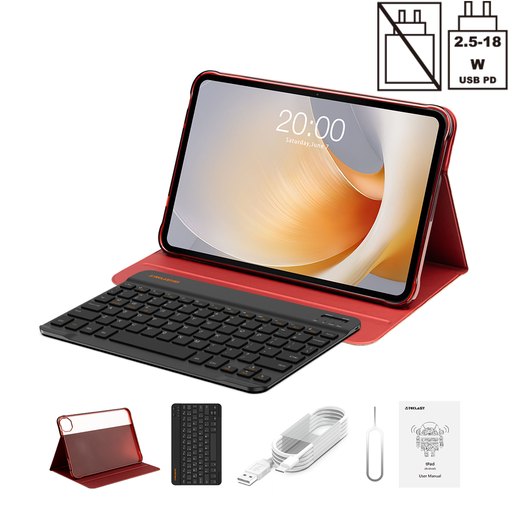
Teclast T65 Plus Tablet — 13.4-inch Display
Why This Fits Their Persona: The large 13.4-inch display with a fluid 120 Hz refresh rate makes it an excellent choice for movies and series. The Helio G99 processor and 8 GB of physical RAM provide enough power for multitasking and office applications.
This Teclast tablet has Widevine L1 certification, which ensures HD streaming and thus avoids the trap of poor playback quality.
Large, fast 120 Hz display for an immersive visual experience and LTE connectivity for internet access from anywhere.
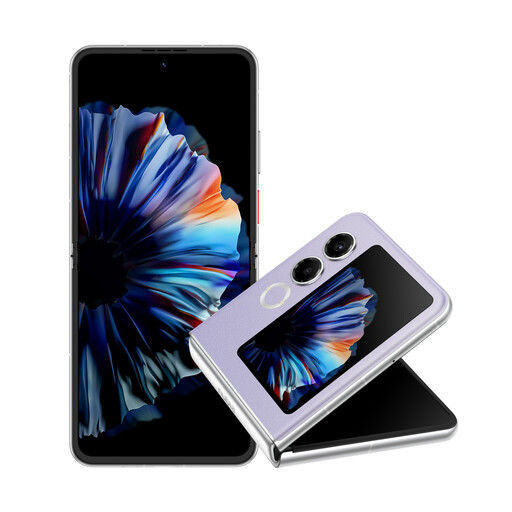
Nubia ZTE Flip 2 5G Foldable Smartphone
Why This Fits Their Persona: For users who want to combine the portability of a smartphone with the screen size of a small tablet. A foldable smartphone offers a large 6.9-inch display when unfolded and fits into any pocket when folded.
It eliminates the need to buy and carry two separate devices (a phone and a small tablet), saving costs and hassle in the long run.
Combination of a large 120 Hz AMOLED display and extreme compactness. Modern connectivity with 5G, Wi-Fi 6, and NFC.
Protect Your Other Devices, Too
After finding the right tablet, it's also important to protect your other mobile devices, like your smartphone. A high-quality case can prevent expensive repairs.
Frequently Asked Questions (FAQ)
How much RAM is reasonable for an Android tablet in 2026?
For a smooth experience and fluid multitasking, 8 GB of physical RAM is a solid baseline. More RAM is beneficial for demanding games or professional applications. Don't be swayed by high numbers for virtual RAM alone, as it uses the slower internal storage and doesn't boost performance to the same extent as physical RAM.
Do I need an LTE tablet, or is Wi-Fi enough?
The decision depends on your usage habits. If you primarily use your tablet at home, in the office, or in places with reliable Wi-Fi access, a Wi-Fi-only model is sufficient and more cost-effective. An LTE tablet makes sense if you are frequently on the go and need a constant, independent internet connection for work, navigation, or communication.
What does Widevine L1 certification mean?
Widevine is a Digital Rights Management (DRM) system developed by Google. L1 certification means that video processing and cryptography occur in a secure environment directly on the device's processor. Only with this certification do streaming providers like Netflix, Prime Video, and Disney+ allow content playback in high definition (HD, 1080p, or higher). Without L1, playback is restricted to standard definition (480p).