
Buying an Android Tablet: A Guide to Choosing the Right Device
With so many models and specifications on the market, finding a new Android tablet can quickly become overwhelming. The options range from budget-friendly devices for everyday tasks to high-performance models for demanding applications. This article serves as your guide. It highlights the key criteria you should consider when buying and presents a selection of devices for different user profiles to help you make an informed decision.
What to Look for When Buying an Android Tablet
To find the right device, it's helpful to match your personal needs with the technical specifications. Three core aspects are particularly important.
1. Processor and RAM: Defining the Performance Tier
The heart of any tablet is its processor (SoC). It is the primary factor determining the device's speed and responsiveness. For basic tasks like browsing the web, checking emails, or streaming videos, entry-level and mid-range processors are generally sufficient.
However, if you're looking for a gaming tablet or want to use demanding apps for photo and video editing, you should opt for a model with a high-performance processor. A top-tier Snapdragon tablet, for example, offers the necessary performance headroom for graphically intensive games and smooth multitasking. The RAM is also crucial: 4 GB of RAM is a solid foundation, while 8 GB or more is recommended for power users and to ensure the device is future-proof.
2. Display: Size, Resolution, and Refresh Rate
The display is your primary interface with the device. Size is measured in inches, with models like a 12-inch tablet offering a large workspace and viewing area that is well-suited for productivity and media consumption. Smaller formats around 10 inches are more compact and lightweight.
Besides size, resolution and refresh rate are critical for visual quality. A high resolution (e.g., 2K or higher) ensures a sharp and detailed image. A high refresh rate of 90 Hz or 120 Hz allows for smoother motion, which is especially noticeable when scrolling through websites and playing games.
3. Features and Accessories: Adapting the Tablet to Your Daily Life
Your intended use case will determine the necessary features. If you're looking for a tablet for university or work, you'll benefit from compatibility with external accessories. A tablet with a keyboard and stylus can replace a laptop in many situations, making it much easier to take notes or write longer texts. Check whether the accessories are included or need to be purchased separately. Battery capacity is also a key factor for mobile use. Large batteries with over 8,000 mAh allow for all-day use without constant recharging.
Recommended Android Tablets
Based on the criteria mentioned, we have compiled a selection of devices that cater to different user groups. This overview is intended to serve as a starting point for your 2026 tablet review.
nubia Pad Pro: For Performance and Demanding Applications
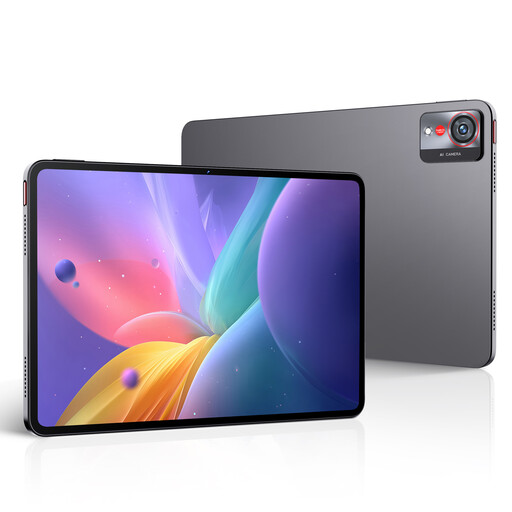
Why it stands out: The nubia Pad Pro is positioned in the high-performance segment. The combination of the Snapdragon 8 Gen 3 processor, LPDDR5X RAM, and UFS 4.0 storage is aimed at users who need maximum performance for professional applications and gaming.
Pros (based on specs):
- Processor: Equipped with the flagship Snapdragon 8 Gen 3 processor for demanding tasks.
- Display: A 10.9-inch display with 2.8K resolution and an ultra-smooth 144Hz refresh rate.
- Battery: A high battery capacity of 10,100 mAh is complemented by 66W fast charging.
- Design: The unibody metal chassis is slim at 7.3 mm and weighs approx. 523 g, according to the manufacturer.
Who is it for? This model is aimed at power users, creative professionals, and gamers who are looking for a no-compromise gaming tablet or a productive work device and are willing to invest in top-tier performance.
TECLAST P33: Affordable Starter Tablet Set
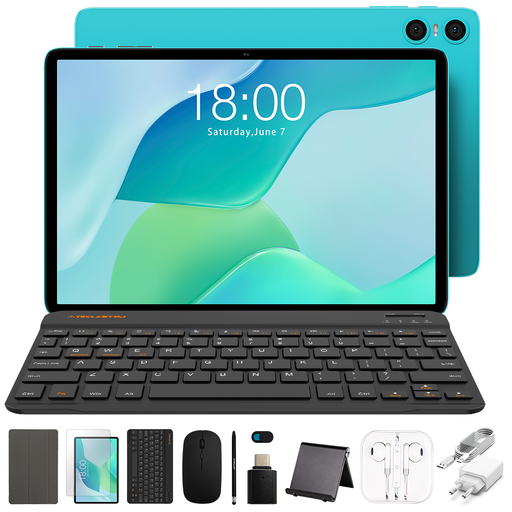
Why it stands out: The TECLAST P33 is offered as an all-in-one bundle. In addition to the tablet, it includes a Bluetooth keyboard, a mouse, and a stylus. This makes it an attractive option for users looking for a ready-to-go set for simple productivity tasks.
Pros (based on specs):
- Complete Package: Includes a keyboard case, mouse, and stylus for versatile use cases.
- Operating System: Equipped with an up-to-date version of Android 15.
- Storage: 64 GB of internal storage, which is sufficient for basic apps and data.
- Value for Money: As a budget-friendly tablet, it offers a comprehensive accessory package for beginners.
Who is it for? Ideal for budget-conscious buyers, students, or families who need a device for basic browsing, video streaming, and light office tasks. The included accessories make it a practical choice as a tablet for university for simple note-taking and research.
HONOR Pad 10: Large Display for Multimedia and Productivity
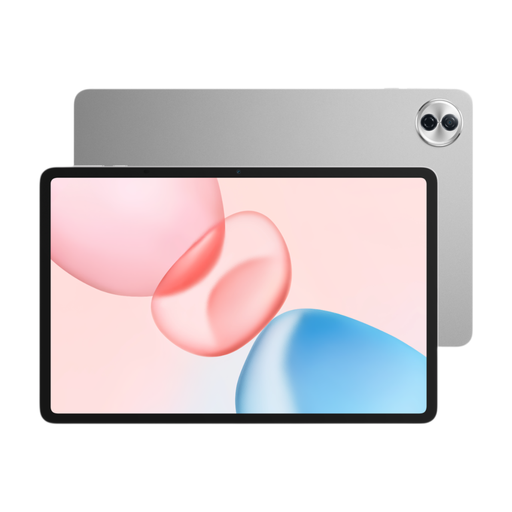
Why it stands out: The HONOR Pad 10 is distinguished by its large 12.1-inch display with 2.5K resolution and a 120 Hz refresh rate. Paired with the Snapdragon 7 Gen 3 processor, it offers a balanced mix of screen real estate and performance for everyday use.
Pros (based on specs):
- Large Display: The 12.1-inch display with a resolution of 2560x1600 pixels and 120 Hz is excellent for movies, multitasking, and reading.
- Processor: The Snapdragon 7 Gen 3 provides solid performance for most everyday apps and games.
- Battery: The 10,100 mAh battery capacity (typical value) promises long-lasting usage.
- Design: At 6.29 mm thick according to the manufacturer, the device is relatively slim despite its size.
Who is it for? This tablet is a great choice for users who prioritise a large, high-quality display for media consumption, browsing, and productivity. It represents a solid middle ground between entry-level devices and high-end models.
Haven't Found the Right Fit?
The selection presented here covers a range of use cases. If your ideal device isn't among them, you may find a suitable alternative in our broader product range.
? Discover more Android Tablets on Joybuy.de
Frequently Asked Questions (FAQ)
1. What should I consider when buying a tablet? Focus on the features that matter most to you: the processor's performance for your typical applications, the quality and size of the display for viewing comfort, and the battery life for mobile use. Also, check if accessories like keyboards or styluses are supported if you plan to use the tablet for productivity.
2. How much RAM should a good tablet have in 2026? For simple tasks like browsing and streaming, 4 GB of RAM is sufficient. For smooth multitasking, more demanding apps, or better future-proofing, 6 GB to 8 GB is a good choice. High-performance gaming and professional tablets are often equipped with 12 GB or more.
3. Which Android tablet is suitable for university? A tablet for university should have long battery life, a clear display for reading texts, and support for a stylus and keyboard. Models between 10 and 12 inches offer a good compromise between portability and usable screen space for notes and research. A device like the TECLAST P33 with included accessories can be a great starting point, while the HONOR Pad 10 offers more screen real estate for multitasking.