
How to Choose the Right All-in-One CPU Cooler
Choosing an All-in-One (AiO) liquid cooler can be complex. The market is filled with promises of ultra-quiet cooling performance and spectacular RGB lighting. However, not every PC liquid cooler delivers on its promises. Many users invest in a system that later turns out to be loud, incompatible, or less powerful than expected.
As your Joybuy Product Recommendation Officer, I'll help you identify the crucial features and navigate common pitfalls. This guide focuses on the objective criteria that truly matter for making an informed decision in 2026.
Common Pitfalls When Buying a CPU Liquid Cooler
Before we dive into the technical details, let's highlight three common issues that often lead to disappointment:
- The Compatibility Trap: Unclear socket compatibility is a frequent frustration. An AiO might be advertised as compatible with new sockets like Intel LGA 1851 or AMD AM5, but often requires a separate mounting kit that must be ordered in addition. Look for products that offer native support or an included kit for LGA 1700 liquid coolers and future standards.
- The "Quiet" Myth: Many manufacturers advertise low decibel ratings, which are often measured at idle or under unrealistic conditions. A truly quiet AiO liquid cooler proves its quality under load. The key factors here are a PWM-controlled pump and high-quality fans that adjust their speed based on CPU temperature, rather than running at high RPMs constantly.
- Overloaded Software Ecosystems: Pump heads with displays or complex ARGB effects look impressive but are often tied to proprietary software. These programs can consume system resources and unnecessarily complicate control. A good AiO should perform its core function—cooling—reliably even without additional software and allow control via the motherboard BIOS or standardized ARGB headers.
What Really Matters in an AiO Liquid Cooler
To avoid a bad purchase, you should focus on three core technical parameters. These determine the performance, noise level, and longevity of your CPU cooler.
1. Radiator Size: 240mm vs. 360mm
The size of the radiator is directly linked to the cooling surface area. The choice depends on your CPU, your use case, and the space in your case.
- 240mm AiO Cooler: This is the all-rounder. A high-quality 240mm AiO cooler is perfectly sufficient for most modern gaming CPUs from Intel and AMD. It offers a great balance of cooling performance, case compatibility, and price. Ideal for mid- to high-end systems in standard ATX cases.
- 360mm AiO Liquid Cooler: This size provides maximum cooling surface area and is the choice for enthusiasts who heavily overclock demanding high-end CPUs (e.g., Intel Core i9 or AMD Ryzen 9) or use them for compute-intensive tasks like video rendering. Make sure your case has enough space for a 394mm long radiator (plus fans).
2. Socket Compatibility and Mounting System
Proper installation is critical for cooling performance. Poor contact between the cold plate and the CPU can drastically increase temperatures.
- Native Support: Check the product page to see if your CPU socket (CPU cooler for AM5, LGA 1700 liquid cooler, AiO for Intel LGA 1851) is explicitly supported without requiring extra kits.
- Mounting Pressure: Some advanced models, like the Arctic Liquid Freezer III, use special contact frames for Intel sockets. These distribute the mounting pressure more evenly across the CPU heat spreader, which can optimize heat transfer.
3. Pump and Fan Control (PWM)
The ability to dynamically adjust the speed of the pump and fans is the hallmark of a modern and quiet AiO.
- PWM (Pulse Width Modulation): Ensure that both the fans and the pump have a 4-pin PWM connector. This allows the motherboard to regulate their speeds based on the CPU temperature. The result is quiet operation at idle and high cooling performance when it's needed.
- Fan Quality: High RPMs aren't everything. The quality of the fan bearings (e.g., fluid dynamic bearings) and the design of the fan blades are major factors in determining the noise level and the static pressure generated.
Our Product Recommendations
Here are some recommendations tailored to specific user profiles that meet the criteria mentioned above.
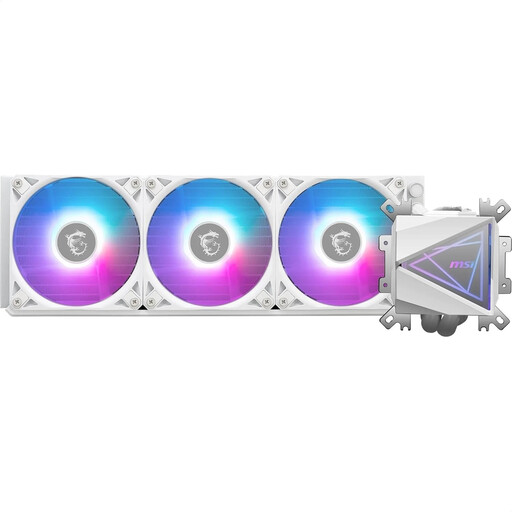
MSI MAG Coreliquid I360 WHITE
Why it's a match: Ideal for users aiming for a flawless, all-white aesthetic. The combination of a 360mm white radiator, ARGB fans, and the "Infinity Mirror" pump head creates a visual centerpiece for any showcase build.
Bypasses software dependency with ARGB GEN2, which is compatible with most motherboard standards. The "EZ Connection" cable system simplifies installation and ensures clean cable management.
Enlarged copper cold plate, optimized for modern multi-die CPUs. Pre-installed universal mounting system for Intel and AMD sockets.
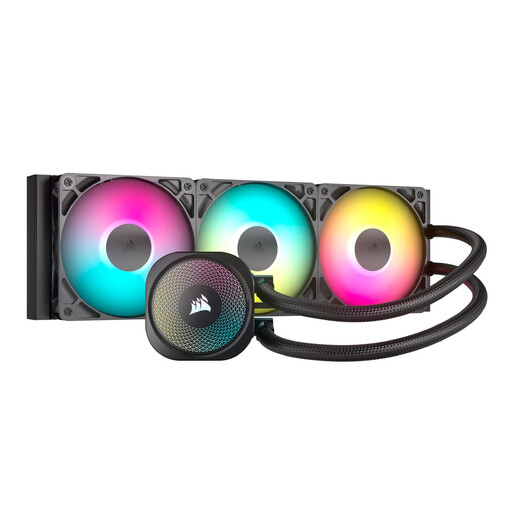
Corsair NAUTILUS 360 RS ARGB AIO
Why it's a match: Engineered for maximum cooling performance. The 360mm radiator combined with three RS120 fans provides the necessary thermal headroom for overclocking and demanding workloads on high-end CPUs.
Addresses the "quiet" myth with PWM-controlled fans that allow for custom fan curves in the BIOS. This lets you find a balance between noise and performance tailored to your specific needs.
High cooling performance from a 360mm radiator and direct connection to the motherboard without complex controllers. Comprehensive socket compatibility, including Intel LGA 1851 and AMD AM5.
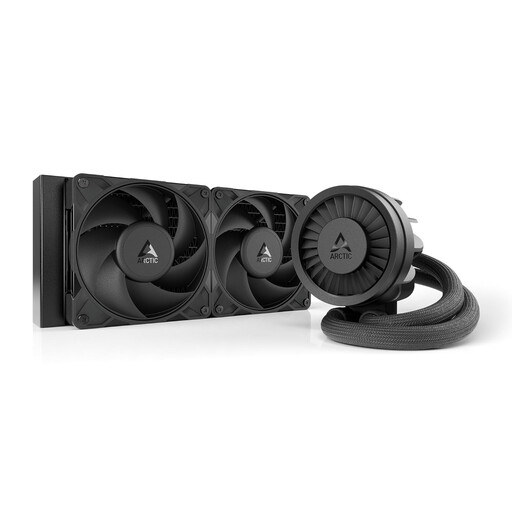
ARCTIC Liquid Freezer III Pro 240
Why it's a match: A pragmatic 240mm AiO cooler that focuses on the essentials: high cooling performance and reliability. The ARCTIC brand is known for its excellent price-to-performance ratio.
Solves the compatibility trap with the included Intel LGA1851/1700 contact frame for optimal mounting pressure. The integrated VRM fan is a practical feature that increases system stability—a detail that is often overlooked.
Integrated VRM cooling to stabilize the motherboard's voltage regulators. Simplified cable management with only one visible cable going to the motherboard.
Looking for more options?
We've compiled a complete, up-to-date list of products that fully meet these strict selection criteria and UK regulations.
Frequently Asked Questions (FAQ)
1. What is the average lifespan of an AiO liquid cooler? Most AiO cooling systems are designed for an operational life of 5 to 7 years. The pump is typically the first component to fail due to mechanical stress. A longer manufacturer warranty (e.g., 5 or 6 years) is often a good indicator of the longevity of the components used. Nevertheless, a regular visual inspection for leaks is advisable.
2. Is a 240mm AiO sufficient for current high-end CPUs (AM5, LGA 1700)? For most use cases, including demanding gaming, a high-quality 240mm AiO cooler is perfectly adequate for most processors. It provides enough cooling power to keep temperatures in a safe range even under high load. Only for extreme overclocking of top-tier models or for sustained all-core workloads (e.g., professional video rendering) does a 360mm AiO liquid cooler offer noticeably more thermal headroom.
3. What are the key steps for installing a PC liquid cooler? Careful installation is crucial. Pay attention to the following points:
- Check Compatibility: Before buying, measure to ensure the radiator and its fans will fit in your case (top or front).
- Remove the Protective Film: The most common mistake is forgetting to remove the protective film from the copper plate of the cooling block. This leads to immediate overheating.
- Thermal Paste: Apply an appropriate amount of thermal paste to the CPU.
- Mounting: Tighten the mounting screws of the cooling block in a cross pattern until they are snug to distribute pressure evenly.
- Connections: Connect the pump connector to the AIO_PUMP or CPU_FAN header on the motherboard and the fans to the corresponding PWM headers.